Wireless Mesh WiFi Systems That End Dead Zones for Good
The TP-Link Deco XE75 is the best wireless mesh WiFi system for most households, offering fast Wi-Fi 6E speeds, reliable coverage, and easy setup at a reasonable price. Its main advantage is the dedicated 6 GHz band for less congestion, but its limitation is that you need Wi-Fi 6E capable devices to fully benefit.
Dead spots and buffering are a thing of the past with a wireless mesh WiFi system. Unlike traditional routers, mesh systems use multiple nodes to blanket your home in strong signal.
We compared the top models on the market to find the best for different needs. From budget-friendly options to high-performance gaming systems, there’s a mesh WiFi system that fits your home and budget.
The shortlist, ranked

TP-Link Deco XE75
The TP-Link Deco XE75 is a tri-band Wi-Fi 6E mesh system that delivers fast speeds and broad coverage. It includes a dedicated 6 GHz band for less interference, making it ideal for homes with many devices. Setup is simple via the Deco app, and it supports up to 200 devices.
Pros
- Dedicated 6 GHz band for future-proofing
- Excellent app with parental controls
- Easy setup and management
Cons
- Requires Wi-Fi 6E devices for full speed
- No USB port

Amazon Eero Pro 6E
The Amazon Eero Pro 6E is a tri-band Wi-Fi 6E mesh system that integrates seamlessly with Alexa. It offers fast speeds and reliable coverage for smart home devices. The system automatically updates and includes built-in Zigbee and Thread radios for smart home compatibility.
Pros
- Works great with Alexa and Zigbee devices
- Automatic updates and security
- Simple setup
Cons
- Requires subscription for advanced security
- More expensive than some rivals

Asus ZenWiFi XT9
The Asus ZenWiFi XT9 is a dual-band Wi-Fi 6 mesh system that offers extensive coverage and high performance. It features a dedicated backhaul band to keep speeds fast even when nodes are far apart. With robust security features and easy management, it’s a strong choice for large homes.
Pros
- Dedicated backhaul band for stable performance
- Advanced security features
- Supports AiMesh for expandability
Cons
- No Wi-Fi 6E support
- Bulky design
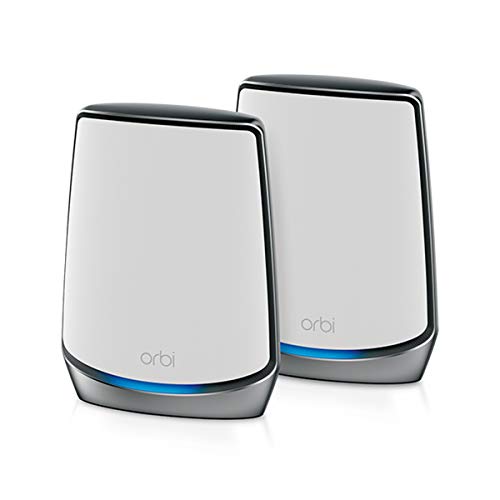
Netgear Orbi RBK852
The Netgear Orbi RBK852 is a tri-band Wi-Fi 6 mesh system known for its high-speed performance and coverage. It includes a dedicated backhaul channel and powerful hardware. Ideal for large homes with many devices, it supports up to 100 devices and offers advanced parental controls.
Pros
- Blazing fast speeds
- Excellent coverage for large homes
- Dedicated backhaul for reliability
Cons
- Expensive
- Large nodes take up space

Google Nest WiFi Pro
The Google Nest WiFi Pro is a tri-band Wi-Fi 6E mesh system that works seamlessly with Google services and devices. It offers reliable coverage and simple setup. The system uses the Google Home app for management and includes built-in Thread and Matter support for smart home integration.
Pros
- Integrates with Google Home and Nest
- Thread and Matter support for smart homes
- Easy setup and management
Cons
- No web interface for advanced settings
- Parental controls are basic

Amazon Eero 6+
The Amazon Eero 6+ is a dual-band Wi-Fi 6 mesh system that offers solid performance at an affordable price. It covers up to 4,500 square feet and supports up to 75 devices. Setup is easy with the Eero app, and it includes built-in Zigbee for smart home compatibility.
Pros
- Great value for money
- Works with Zigbee smart home devices
- Simple app-based management
Cons
- No Wi-Fi 6E support
- Advanced features require subscription
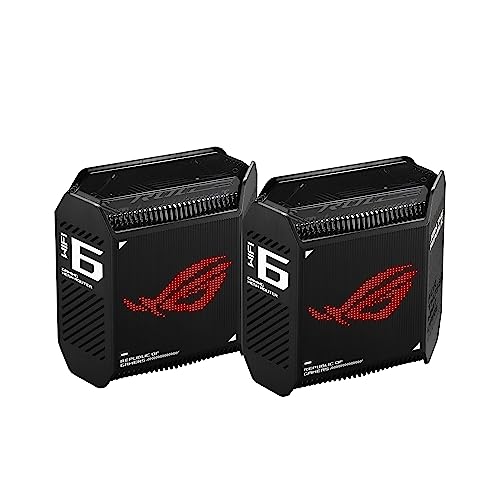
ASUS ROG Rapture GT6
The ASUS ROG Rapture GT6 is a tri-band Wi-Fi 6 mesh system designed for gamers. It features gaming-specific QoS, a dedicated gaming port, and RGB lighting. It provides excellent performance for both gaming and streaming, with a focus on low latency and high throughput.
Pros
- Gaming optimizations and QoS
- Dedicated gaming LAN port
- High-speed performance
Cons
- Pricey for non-gamers
- Large and flashy design
What to look for
What is a Wireless Mesh WiFi System? A wireless mesh WiFi system consists of multiple nodes or satellites that work together to create a single, seamless network. Unlike traditional routers that broadcast from one point, mesh systems place nodes throughout your home to eliminate dead zones and provide consistent coverage. They are especially useful in larger homes or spaces with thick walls.
Key Features to Consider When choosing a mesh WiFi system, look at coverage area, speed rating (like AX3000 or AX6000), and the number of devices it can support. Also consider the type of WiFi technology: Wi-Fi 6 is standard, while Wi-Fi 6E adds a 6 GHz band for even faster speeds and less congestion if you have compatible devices. Security features and parental controls are also important for families.
Wi-Fi 6 vs. Wi-Fi 6E Wi-Fi 6 operates on 2.4 GHz and 5 GHz bands, offering improved speeds and efficiency over older standards. Wi-Fi 6E adds a 6 GHz band, which is less crowded and allows for faster speeds, but only newer devices can access it. If you have many smart home devices, Wi-Fi 6 is sufficient; if you want to future-proof, consider Wi-Fi 6E.
Mesh vs. Traditional Routers A traditional router may be sufficient for small apartments, but in larger spaces, a mesh system is more effective. Mesh systems allow you to add nodes to extend coverage, and they manage the network more intelligently, so your devices automatically connect to the strongest node. This results in a more stable connection as you move around.
The lineup, side by side
| # | Model | Coverage | Best for | Score | Price |
|---|---|---|---|---|---|
| 1 | TP-Link Deco XE75 | Up to 5,500 sq ft | most households | 9.4 | Check price |
| 2 | Amazon Eero Pro 6E | Up to 5,000 sq ft | smart homes | 9.1 | Check price |
| 3 | Asus ZenWiFi XT9 | Up to 5,500 sq ft | whole-home coverage | 9.0 | Check price |
| 4 | Netgear Orbi RBK852 | Up to 5,000 sq ft | maximum performance | 8.9 | Check price |
| 5 | Google Nest WiFi Pro | Up to 5,400 sq ft | Google ecosystem | 8.6 | Check price |
| 6 | Amazon Eero 6+ | Up to 4,500 sq ft | budget buyers | 8.4 | Check price |
| 7 | ASUS ROG Rapture GT6 | Up to 5,200 sq ft | gamers | 8.2 | Check price |
Questions worth asking
How many mesh nodes do I need?
Typically, two nodes cover up to 3,000 square feet, while three nodes cover up to 5,500 square feet. The size of your home and layout will determine the number. If you have multiple floors, you may need a node on each floor.
Can I mix different mesh brands?
No, mesh systems are proprietary. All nodes must be from the same brand and series to work together. However, some brands like Asus support AiMesh, allowing you to mix compatible Asus routers.
What is a dedicated backhaul band?
A dedicated backhaul band is a separate wireless channel used for communication between nodes. This keeps data traffic between nodes from interfering with device traffic, resulting in better performance.
Do mesh systems support wired backhaul?
Yes, many mesh systems have Ethernet ports that allow you to connect nodes via Ethernet cable for even faster backhaul. This is ideal if you have Ethernet wiring in your walls.
Are mesh systems secure?
Most mesh systems come with built-in security features like WPA3 encryption and automatic updates. Some brands offer additional security through subscriptions, such as Eero Secure or Netgear Armor.
Can I use a mesh system with my current modem?
Yes, a mesh system replaces your router, but you still need a modem from your internet service provider. You can connect the mesh system directly to your modem.
How do I set up a mesh WiFi system?
Setup is typically done via a mobile app. You connect the main node to your modem, then follow the app instructions to add additional nodes. Most systems take less than 15 minutes to set up.
What is the difference between a mesh system and a WiFi extender?
A mesh system creates a single network with multiple nodes that communicate to provide seamless coverage. A WiFi extender repeats the existing signal but often creates separate networks and can reduce speed. Mesh is generally more reliable.
Do mesh systems support parental controls?
Yes, most mesh systems include parental controls that let you pause internet access, filter content, and set time limits. Some require a subscription for advanced features.
Can I use mesh WiFi for gaming?
Yes, many mesh systems offer gaming-specific features like QoS to prioritize gaming traffic. Look for systems with low latency and high throughput, such as the ASUS ROG Rapture GT6.
Our take
For most users, the TP-Link Deco XE75 is the best wireless mesh WiFi system because it balances performance, coverage, and price. If you have a massive home and need maximum speed, choose the Netgear Orbi RBK852. Gamers should consider the ASUS ROG Rapture GT6, and budget shoppers will appreciate the Amazon Eero 6+.


