Top Wireless PlayStation Consoles for Untethered Gaming
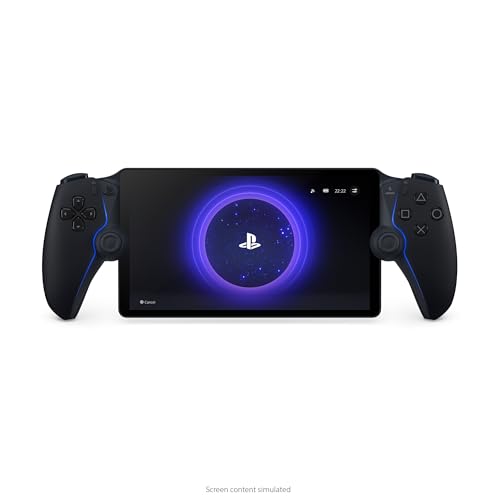
The PlayStation Portal Remote Player leads our list for PS5 owners who want to play their entire library anywhere in the house, offering crisp 1080p visuals and dual sense haptics, but it requires a strong Wi-Fi connection and does not support Bluetooth audio.
Wireless gaming has transformed how you enjoy PlayStation titles. Whether you stream from your PS5 or play via cloud, a dedicated wireless console can free you from the TV.
We compared seven current models, from Sony’s official Remote Player to third-party handhelds. Owners report clear differences in latency, comfort, and features.
How to pick the right one
The top picks, ranked
PlayStation Portal Remote Player
Sony’s handheld streams games directly from your PS5 over Wi-Fi. It features an 8-inch LCD screen, dual sense haptics, and adaptive triggers. Owners praise its seamless integration and crisp display. It requires a stable network and does not support Bluetooth audio.
Pros
- Perfect integration with PS5
- Full dual sense features
- Excellent screen quality
Cons
- Requires strong Wi-Fi
- No Bluetooth audio

Backbone One PlayStation Edition
This controller attaches to your smartphone, turning it into a portable console. It uses the PS Remote Play app to stream games. Owners report low latency and comfortable grips. It works with Android and iPhone models. No internal battery; it draws power from the phone.
Pros
- Universal phone fit
- No battery to charge
- Feel of DualSense
Cons
- Requires a compatible phone
- Phone size limitations

Logitech G Cloud Gaming Handheld
This Android-based handheld focuses on cloud gaming, including PlayStation Plus Premium. It has a 7-inch 1080p screen and weighs less than many competitors. Owners appreciate its battery life of over 12 hours. It lacks native PS5 remote play integration, but works via the PS app.
Pros
- Exceptional battery life
- Bright and sharp display
- Comfortable for long sessions
Cons
- Cloud latency may vary
- No native PS5 integration

Sony DualSense Wireless Controller
While not a console, this controller offers wireless play on PS5, PC, and mobile via Bluetooth. Owners love the haptic feedback and adaptive triggers. It has a built-in mic and speaker. Battery lasts about 10-12 hours. It is essential for any wireless PlayStation setup.
Pros
- Immersive haptics
- Broad device support
- Built-in mic
Cons
- Not a standalone console
- Battery life average

Razer Kishi V2 for Android
This telescopic controller connects directly via USB-C, reducing latency. It works with the PS Remote Play app. Owners report a comfortable grip and responsive buttons. It has a low profile design. No battery needed, which keeps weight down.
Pros
- Direct connection reduces lag
- Comfortable analog sticks
- Compact for travel
Cons
- No headphone jack
- Limited to Android

Nintendo Switch OLED (with PlayStation Remote Play via Chiaki)
The Switch OLED is a versatile console that can stream PS5 using the open-source Chiaki app, but it requires a modded system. Owners use it for its excellent screen and portability. It is not officially supported. Setup is complex and not for everyone.
Pros
- Beautiful OLED display
- Huge game library
- Portable and dockable
Cons
- Complex setup for remote play
- Not officially supported
Anbernic RG505
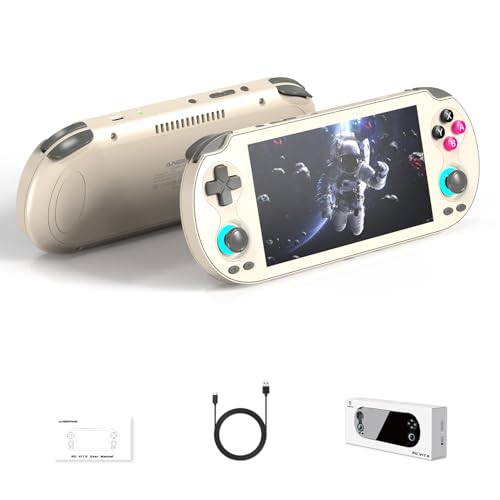
This Android handheld is popular for emulation but can also run PS Remote Play. It features a 4.95-inch OLED screen and a powerful processor. Owners report good performance for retro games. The controls are comfortable, but the screen is smaller than others.
Pros
- Great for emulators
- Bright OLED screen
- Expandable storage
Cons
- Smaller display
- Setup for remote play is manual
How they stack up
| # | Model | Display | Best for | Score | Price |
|---|---|---|---|---|---|
| 1 | PlayStation Portal Remote Player | 8-inch LCD, 1080p | PS5 owners seeking a dedicated remote play device | 9.4 | Check price |
| 2 | Backbone One PlayStation Edition | iOS and Android | Mobile gamers who want to turn their phone into a PS5 streamer | 9.1 | Check price |
| 3 | Logitech G Cloud Gaming Handheld | 7-inch 1080p | Cloud gamers who want a large display and long battery life | 8.8 | Check price |
| 4 | Sony DualSense Wireless Controller | Bluetooth 5.1 | PS5 gamers who want a wireless controller for mobile or PC | 8.7 | Check price |
| 5 | Razer Kishi V2 for Android | Android USB-C | Android users seeking a compact controller for PS Remote Play | 8.5 | Check price |
| 6 | Nintendo Switch OLED (with PlayStation Remote Play via Chiaki) | 7-inch OLED | Tech-savvy gamers who want a hybrid console for multiple platforms | 8.2 | Check price |
| 7 | Anbernic RG505 | 4.95-inch OLED | Emulation fans who also want PS remote play capability | 8.0 | Check price |
Common questions
Can I use any wireless console with my PS5?
Only devices that support the PS Remote Play app or cloud streaming can access your PS5 library. Sony’s Portal is designed for this. Third-party Android devices can also use the app, but they require a stable Wi-Fi connection.
What is the best wireless option for PS5?
For most PS5 owners, the PlayStation Portal Remote Player is the best because it offers official integration, a large screen, and dual sense haptics, but it requires a strong network.
Do these devices work without a PS5?
Some work with cloud gaming services like PlayStation Plus Premium, which streams games without a console. The Logitech G Cloud and Backbone One can use cloud streaming if you have a subscription.
How important is a strong Wi-Fi connection?
It is critical. Streaming games requires high bandwidth and low latency. A weak signal causes lag and visual artifacts. A router with Wi-Fi 6 can help.
Can I use Bluetooth headphones with the PlayStation Portal?
No. The Portal does not support Bluetooth audio. You must use the 3.5mm headphone jack or wired headphones.
Is the Backbone One compatible with iPhone?
Yes. There is a Lightning version for iPhone and a USB-C version for Android. Both support the PS Remote Play app.
What is the battery life of the Logitech G Cloud?
Owners report over 12 hours of gameplay on a full charge, making it one of the longest-lasting handhelds available.
Do I need to mod my Nintendo Switch to use PS Remote Play?
Yes. The official Switch does not support PS Remote Play. To use Chiaki, you must have a modded Switch, which voids your warranty and is not recommended for everyone.
The bottom line
If you own a PS5 and want a dedicated handheld, the PlayStation Portal Remote Player is the clear winner. It offers seamless integration and a premium experience. For budget-conscious gamers, the Backbone One turns your phone into a capable streaming device. Avoid the Switch unless you are comfortable with modding.