Top Streaming Players for Cord Cutters in 2025
The Amazon Fire TV Cube stands out as the top pick for most households, offering blazing fast performance, hands-free Alexa, and a full 4K HDR experience. Its main drawback is the ads on the home screen, which some users find annoying. For Apple users, the Apple TV 4K is a premium alternative with seamless integration into the Apple ecosystem.
Streaming media players have become the heart of modern home entertainment. They turn any TV into a smart TV, giving you access to thousands of apps, games, and services. With so many options, picking the right one can be overwhelming.
This guide cuts through the noise. We focus on wireless players that stream over Wi-Fi. We highlight their strengths and weaknesses so you can make an informed choice. Whether you prioritize voice control, picture quality, or price, there is a device here for you.
What we recommend

Amazon Fire TV Cube
The Fire TV Cube is a powerful streaming device that combines a 4K streamer with an Echo speaker. It supports Dolby Vision, HDR10+, and Dolby Atmos for an immersive experience. With hands-free Alexa, you can control your TV, soundbar, and more without touching a remote. It also has an HDMI input for cable boxes or game consoles, making it a true hub for your entertainment.
Pros
- Fast processor with quick app loading
- Built-in speaker for voice responses
- Can control other devices via IR and HDMI CEC
Cons
- Home screen has ads
- Requires an Amazon account for full features

Apple TV 4K (3rd Generation)
Apple TV 4K offers a polished experience with a clean interface and deep integration with Apple services. It supports 4K HDR with Dolby Vision and HDR10+, and features a powerful A15 Bionic chip for smooth navigation. Siri voice control works well, and the remote is a touchpad that is intuitive. It also supports Thread for smart home connectivity, making it a hub for HomeKit devices.
Pros
- No ads on home screen
- Excellent integration with iPhone and iPad
- Supports Thread and Matter for smart home
Cons
- Expensive compared to rivals
- Limited gaming capabilities compared to consoles

Roku Ultra
Roku Ultra is known for its user-friendly interface and unbiased search results across channels. It supports 4K HDR with Dolby Vision and HDR10+, and includes a remote with a headphone jack for private listening. The Roku voice remote lets you search across many apps. It also has a USB port and Ethernet for stable connectivity, and it works with Alexa and Google Assistant.
Pros
- Simple and clean home screen
- Voice search across top channels
- Headphone jack on remote for private listening
Cons
- Interface is not as flashy as others
- No hands-free voice control

Google TV Streamer (4K)
Google TV Streamer (4K) is Google’s latest streaming device. It runs on Google TV, which aggregates content from your apps and services into a personalized home screen. It supports 4K HDR with Dolby Vision and HDR10+, and includes Google Assistant for voice control. The device also acts as a Matter hub and Thread border router for smart home devices. It has a sleek design and comes with a voice remote.
Pros
- Personalized recommendations
- Google Assistant can control smart devices
- Acts as a smart home hub
Cons
- Interface can be cluttered with ads
- Newer product with fewer user reviews
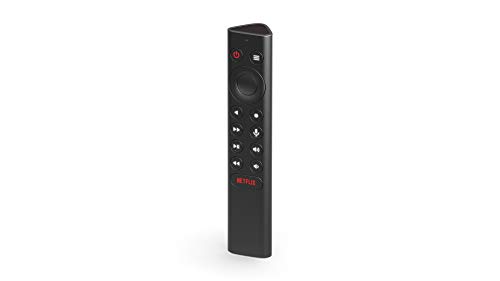
NVIDIA Shield TV Pro
NVIDIA Shield TV Pro is a streaming player built for performance. It supports 4K HDR with Dolby Vision and HDR10+, and it upscales lower resolution content using AI. It runs on Android TV, giving access to Google Play Store and GeForce NOW for cloud gaming. It also supports Plex server, making it a favorite for media enthusiasts. The remote is simple, and it works with Google Assistant.
Pros
- AI upscaling improves non-4K content
- Great for gaming with GeForce NOW
- Can act as a Plex media server
Cons
- More expensive than other Android TV boxes
- Interface not as polished as others

Roku Streaming Stick 4K
Roku Streaming Stick 4K is a compact and affordable way to stream in 4K. It plugs directly into your TV’s HDMI port and is powered by USB. It supports Dolby Vision and HDR10+, and it includes a voice remote with TV controls. The Roku interface is simple and easy to navigate. It also offers a mobile app for private listening and voice search.
Pros
- Very affordable
- Compact design
- Same Roku interface as higher-end models
Cons
- No Ethernet port
- No hands-free voice control

Chromecast with Google TV (HD)
Chromecast with Google TV (HD) is the budget version of Google TV Streamer. It offers the same Google TV interface but only streams in 1080p HD, not 4K. It supports HDR10 and includes Google Assistant voice control. This device is ideal for older TVs or secondary rooms. It is a simple and affordable way to get Google TV on any screen.
Pros
- Very low price
- Full Google TV experience
- Compact size
Cons
- Only 1080p, not 4K
- Older hardware may feel slow at times
The lineup, side by side
| # | Model | Resolution | Best for | Score | Price |
|---|---|---|---|---|---|
| 1 | Amazon Fire TV Cube | 4K Ultra HD with Dolby Vision and HDR10+ | Best Overall for Hands-Free Control | 9.4 | Check price |
| 2 | Apple TV 4K (3rd Generation) | 4K HDR with Dolby Vision and HDR10+ | Best for Apple Ecosystem Users | 9.3 | Check price |
| 3 | Roku Ultra | 4K HDR with Dolby Vision and HDR10+ | Best for Simple Interface and Search | 9.1 | Check price |
| 4 | Google TV Streamer (4K) | 4K HDR with Dolby Vision and HDR10+ | Best for Google Assistant Integration | 8.9 | Check price |
| 5 | NVIDIA Shield TV Pro | 4K HDR with Dolby Vision and HDR10+ | Best for Gamers and Power Users | 8.8 | Check price |
| 6 | Roku Streaming Stick 4K | 4K HDR with Dolby Vision and HDR10+ | Best Budget 4K Stick | 8.6 | Check price |
| 7 | Chromecast with Google TV (HD) | 1080p HD with HDR10 | Best for Budget Buyers with Full Google TV | 8.0 | Check price |
How to pick the right one
Common questions
What is the difference between a streaming stick and a streaming box?
A streaming stick is a compact device that plugs directly into an HDMI port. A streaming box is a larger unit that connects via an HDMI cable. Boxes often have better processors, more ports, and better cooling, but sticks are more portable and discreet.
Do I need a 4K streaming player if I have a 1080p TV?
No, a 1080p player is sufficient for a 1080p TV. However, if you plan to upgrade your TV soon, investing in a 4K player now can be future-proof. Many 4K players also downscale content to fit your current TV.
Can I use any streaming player with any TV?
Yes, as long as your TV has an HDMI port, you can use any streaming player. Most modern TVs have HDMI, but older models may not. In that case, you might need an adapter or a different device.
Which streaming player has the best voice assistant?
It depends on your ecosystem. Alexa is great for Amazon services and smart home. Google Assistant excels at general knowledge and Android integration. Siri is best if you use Apple devices. Choose the one that aligns with your existing devices.
Do streaming players require a monthly subscription?
No, the device itself is a one-time purchase. However, you need subscriptions to services like Netflix, Hulu, or Disney+. Some devices, like Roku, have free channels with ads, but no fee for the device itself.
Can I stream from my phone to a streaming player?
Many players support casting. Chromecast with Google TV allows casting from Android and iOS. Apple TV supports AirPlay. Roku and Fire TV have apps that allow mirroring. Check the specific device’s features for casting support.
What is the advantage of a streaming player over a smart TV?
Streaming players often have faster processors, more apps, and receive updates longer than smart TVs. They also provide a consistent interface if you have multiple TVs. You can also upgrade the player without replacing the TV.
Which streaming player supports the most apps?
Roku and Android TV (Google TV) have the largest app libraries. Fire TV also has many apps, but some services may not be available. Apple TV has a good selection but may lack some niche apps.
How important is Ethernet connectivity?
Ethernet is important if you have a poor Wi-Fi connection or want the most stable streaming. Only a few players, like the Fire TV Cube and Roku Ultra, have Ethernet ports. Most sticks rely on Wi-Fi, which is usually sufficient for streaming.
Can I use a streaming player with a projector?
Yes, if the projector has an HDMI input. Some projectors may not support HDCP, which can cause issues with protected content. Most modern projectors work fine with streaming players.
Our take
For most households, the Amazon Fire TV Cube is the best overall choice due to its speed, hands-free control, and broad feature set. If you are deeply invested in the Apple ecosystem, the Apple TV 4K is worth the extra cost for its seamless integration and clean interface. Budget-conscious buyers should consider the Roku Streaming Stick 4K, which delivers excellent performance at a lower price point. Gamers will appreciate the NVIDIA Shield TV Pro for its AI upscaling and cloud gaming capabilities. Ultimately, your decision should be guided by your existing devices and personal preferences, but any of these players will significantly enhance your streaming experience.


