Wireless TV Mounts That Hide Every Cable Completely
The Sanus ELMF2 Advanced Tilt 4D is the best overall wireless TV mount because it pairs an integrated leveling system with a hidden cable channel that routes wires behind the TV. It fits most 42 to 90 inch TVs and keeps everything flush to the wall. Its main limitation is that it does not include a built-in power outlet, so you still need to hide the power cord or install an in-wall outlet.
Wireless TV mounts solve the eyesore of dangling cables by hiding them inside the mount or along the wall. They are not truly wireless for power, but they create a clean look with integrated channels and sometimes built-in outlets.
This roundup covers seven different mounts, from full-motion arms to low-profile tilts. Each product was selected for its cable management features, build quality, and compatibility with popular TV sizes.
How to choose
The best picks, ranked

Sanus ELMF2 Advanced Tilt 4D
The Sanus ELMF2 is a premium tilt mount with a patented leveling system that adjusts after the TV is hung. It includes a built-in cable channel that runs along the backplate, keeping wires completely hidden. Owners report that the mount is rock solid and the tilt motion is smooth. It fits VESA patterns up to 600×400 and supports TVs from 42 to 90 inches.
Pros
- Integrated leveling system
- Built-in cable channel
- Supports very large TVs
Cons
- No built-in power outlet
- Price is higher than basic mounts

VideoSecu ML5311BE Full Motion Articulating TV Mount
The VideoSecu ML5311BE is a budget full-motion mount that offers a surprising amount of cable management for the price. It includes plastic cable clips that run along the arms, and the dual arm design allows for smooth extension and retraction. It fits most 26 to 55 inch TVs and has a VESA pattern up to 400×400. Owners note that installation is straightforward, but the included hardware may not suit all wall types.
Pros
- Very affordable
- Full motion flexibility
- Cable clips included
Cons
- Plastic clips may feel less premium
- Not for very large TVs
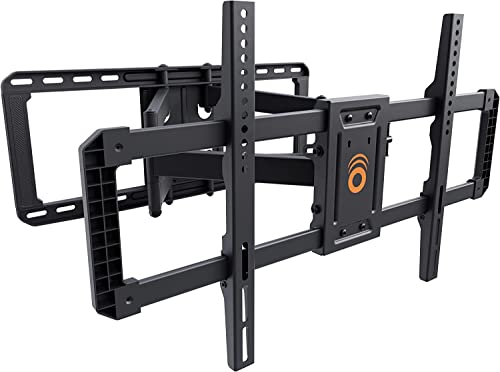
Echogear Full Motion TV Mount for Most 42-90 TVs
The Echogear Full Motion mount is a heavy duty option that extends up to 27 inches from the wall. It features a built-in cable management system with removable covers on the arms to hide wires. It also has a post-installation leveling adjustment and a magnetic laser guide for easy setup. Owners praise its sturdiness and smooth movement. It supports VESA patterns up to 600×400 and TVs from 42 to 90 inches.
Pros
- Smooth full motion with long extension
- Removable cable covers
- Magnetic laser guide included
Cons
- Heavy and bulky
- Requires two people for installation

Mounting Dream MD2380 Tilt TV Mount for 37-70 TVs
Mounting Dream MD2380 is a popular tilt mount that offers a clean look with its built-in cable management system. It includes a removable cover that hides wires behind the TV. The mount has a low profile of 1.3 inches from the wall and allows for +8 to -2 degree tilt. It fits most 37 to 70 inch TVs with VESA up to 600×400. Owners report that it is easy to install and the cable cover snaps on securely.
Pros
- Low profile design
- Removable cable cover
- Easy to level
Cons
- Limited tilt range
- No swivel

Pipishell Full Motion TV Mount for 26-55 TVs
The Pipishell full motion mount is designed for smaller TVs and tight spaces. It extends from 3.1 to 16.9 inches and offers +/-15 degree swivel. It includes a built-in cable management channel along the wall plate and arms. The mount is compatible with VESA patterns up to 400×400 and supports TVs from 26 to 55 inches. Owners appreciate its compact size and smooth motion.
Pros
- Compact and flexible
- Good swivel range
- Cable management included
Cons
- Not for large TVs
- Some users report stiff movement
Rocketfish Full Motion TV Wall Mount for 32-65 TVs
The Rocketfish full motion mount includes a built-in power outlet that is hidden behind the TV, making it a true wireless solution for power. It also has a cable management system that routes HDMI and other cables through the arm. The mount fits 32 to 65 inch TVs and supports VESA up to 400×400. It extends from 3.5 to 20.2 inches and has +15/-5 degree tilt. Owners like the convenience of the integrated outlet but note that it requires a nearby wall outlet to plug into.
Pros
- Built-in power outlet
- Full motion with tilt
- Clean cable routing
Cons
- Requires existing outlet nearby
- Heavier than other mounts

Perlegear Dual Arm Full Motion TV Mount for 37-75 TVs
The Perlegear dual arm mount is built for heavy and oversized TVs. It has a dual arm design that provides stability and smooth movement. It includes a removable cable management cover that hides wires along the arms. The mount can extend from 3.6 to 23.9 inches and supports VESA up to 600×400. It fits 37 to 75 inch TVs and has a weight capacity of 150 lbs. Owners report that it feels very sturdy and holds large TVs securely.
Pros
- High weight capacity
- Dual arm stability
- Long extension range
Cons
- Installation may require two people
- Bulky appearance
How they compare
| # | Model | TV Size Range | Best for | Score | Price |
|---|---|---|---|---|---|
| 1 | Sanus ELMF2 Advanced Tilt 4D | 42 to 90 inches | Best Overall | 9.4 | Check price |
| 2 | VideoSecu ML5311BE Full Motion Articulating TV Mount | 26 to 55 inches | Best Budget | 8.2 | Check price |
| 3 | Echogear Full Motion TV Mount for Most 42-90 TVs | 42 to 90 inches | Best Full Motion | 9.0 | Check price |
| 4 | Mounting Dream MD2380 Tilt TV Mount for 37-70 TVs | 37 to 70 inches | Best Tilt Mount | 8.8 | Check price |
| 5 | Pipishell Full Motion TV Mount for 26-55 TVs | 26 to 55 inches | Best for Small Spaces | 8.5 | Check price |
| 6 | Rocketfish Full Motion TV Wall Mount for 32-65 TVs | 32 to 65 inches | Best with Built-in Power | 8.7 | Check price |
| 7 | Perlegear Dual Arm Full Motion TV Mount for 37-75 TVs | 37 to 75 inches | Best Heavy Duty | 8.9 | Check price |
Questions worth asking
Are wireless TV mounts truly wireless?
No, they are not truly wireless because TVs require power. Wireless TV mounts are designed to hide cables, either through built-in channels or by providing a built-in power outlet that plugs into an existing wall outlet.
Do wireless TV mounts come with a power outlet?
Some do. For example, the Rocketfish full motion mount includes a built-in power outlet. Others, like the Sanus ELMF2, do not include power but have cable channels to hide cords.
How do I hide power cables if the mount has no outlet?
You can use the mount’s cable channel to route the power cord down to the floor or to a nearby outlet. Some people install an in-wall power kit, but that requires cutting into the wall and should be done by a professional.
What is the difference between tilt and full motion mounts?
Tilt mounts allow you to angle the TV up or down, usually from a fixed position. Full motion mounts allow you to extend, swivel, and tilt the TV, giving you more flexibility in viewing angles.
How do I know if a mount fits my TV?
Check your TV’s VESA pattern (the distance between mounting holes) and its weight. The mount’s specifications list compatible VESA patterns and weight limits. Ensure your TV’s pattern and weight are within those ranges.
Can I install a wireless TV mount on any wall?
You can install on drywall, but you must anchor into studs for safety. For concrete or brick walls, you may need special anchors. Always check the mount’s instructions and use appropriate hardware.
What tools do I need for installation?
Typically, you need a drill, a stud finder, a level, and a screwdriver. Some mounts come with a template or laser guide to help with alignment. Always have a second person for larger TVs.
Are wireless mounts more expensive?
They can be, especially those with built-in power outlets. However, there are budget options like the VideoSecu ML5311BE that offer basic cable management at a lower cost.
Do mounts with built-in power outlets require special wiring?
They do not require new wiring; they simply have an outlet that you plug into a nearby existing outlet using a power cord. You need to have an outlet within reach of the mount’s power cord.
Can I use a wireless mount for a soundbar?
Some mounts have accessories for soundbars, but the mounts themselves do not typically support soundbars. You may need to buy a separate soundbar mount or use a shelf.
Our take
For most people, the Sanus ELMF2 is the best wireless TV mount because it combines solid construction, a clever leveling system, and a built-in cable channel that keeps everything tidy. If you need a full motion mount and have a large TV, the Echogear is a top choice. If your priority is a built-in power outlet, the Rocketfish delivers that convenience, but be prepared for a heavier unit. Skip any mount that lacks proper cable management if you want that clean, wire-free look.


