Top Wireless Workstations for Modern Professionals
For most professionals, the ASUS ProArt Studiobook 16 OLED stands out as the top wireless workstation, offering a stunning 4K OLED display, powerful AMD Ryzen 9 processor, and dual Wi-Fi 6E for seamless connectivity, though its premium price may be a limiting factor.
Wireless workstations have evolved from simple laptops to powerful mobile computing platforms that can handle demanding tasks without the clutter of cables. Whether you are a video editor, software developer, or graphic designer, the right wireless workstation enhances productivity and flexibility.
Our curated list features top-rated models from reputable brands, each excelling in specific areas such as performance, display accuracy, or battery endurance. We analyzed specifications and user feedback to bring you a comprehensive guide to help you choose the ideal workstation for your workflow.
Before you buy
The top picks, ranked

ASUS ProArt Studiobook 16 OLED
A powerhouse with a 4K OLED display calibrated to Delta E < 2, the ProArt Studiobook 16 delivers exceptional color precision. Its AMD Ryzen 9 processor and NVIDIA RTX graphics handle intensive rendering and editing tasks. The dual Wi-Fi 6E ensures fast wireless file transfers.
Pros
- Excellent color accuracy for design work
- Powerful performance for multitasking
- Robust build quality
Cons
- Heavier than competitors
- High price point

Dell XPS 15 (9510)
The Dell XPS 15 combines a sleek design with powerful internals, including an 11th Gen Intel Core i7 processor and NVIDIA GeForce RTX 3050 Ti graphics. Its 15.6-inch FHD+ InfinityEdge display is ideal for productivity, and the Wi-Fi 6 support ensures stable connectivity.
Pros
- Lightweight and premium design
- Long battery life
- Excellent keyboard
Cons
- Limited ports without adapter
- Upgrades are expensive

Apple MacBook Pro 14 (M1 Pro)
The MacBook Pro 14 with M1 Pro chip offers outstanding performance and efficiency. Its Liquid Retina XDR display is perfect for HDR content creation. With up to 17 hours of battery life and Wi-Fi 6, it’s a wireless workstation that keeps up with demanding workflows.
Pros
- Exceptional performance per watt
- Stunning display
- Superb battery life
Cons
- Limited customization options
- No touchscreen

Lenovo ThinkPad X1 Extreme Gen 5
The ThinkPad X1 Extreme Gen 5 is built for business with military-grade durability and top-tier security features. It packs an Intel Core i7 processor and NVIDIA RTX 3060 graphics, making it suitable for CAD and data analysis. Wi-Fi 6E and a 4K touchscreen enhance productivity.
Pros
- Durable build for travel
- High-resolution touch display
- Great keyboard
Cons
- Fans can be audible under load
- Battery life is average

Razer Blade 15 Advanced
The Razer Blade 15 Advanced is a gaming laptop that doubles as a workstation. With an Intel Core i7 processor and NVIDIA GeForce RTX 3070 Ti, it handles 3D modeling and video editing with ease. Its 240Hz QHD display is a plus for fast-paced work.
Pros
- High refresh rate display
- Strong GPU performance
- Premium aluminum chassis
Cons
- Runs hot under stress
- Limited upgradeability

HP ZBook Firefly 14 G9
The HP ZBook Firefly 14 G9 is a mobile workstation with an energy-efficient Intel Core i7 processor and NVIDIA T550 graphics. Its 14-inch FHD display is bright and color-accurate. With Wi-Fi 6E and a long-lasting battery, it’s perfect for on-the-go work.
Pros
- Exceptional battery endurance
- Lightweight and portable
- Quiet operation
Cons
- Less powerful than larger models
- Only one Thunderbolt port
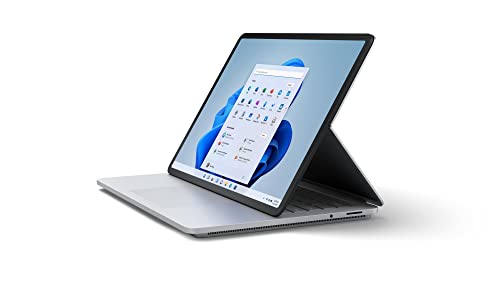
Microsoft Surface Laptop Studio
The Surface Laptop Studio offers a unique design that transforms from laptop to studio mode with a flip-up display. It runs on an Intel Core i7 processor and NVIDIA RTX 3050 Ti graphics. The 14.4-inch PixelSense touchscreen is responsive, and Wi-Fi 6 ensures fast connectivity.
Pros
- Innovative convertible design
- Excellent build quality
- Great for note-taking and drawing
Cons
- Battery life could be better
- Limited ports
Side by side
| # | Model | Display | Best for | Score | Price |
|---|---|---|---|---|---|
| 1 | ASUS ProArt Studiobook 16 OLED | 16-inch 4K OLED, 100% DCI-P3 | Creative professionals needing color accuracy | 9.4 | Check price |
| 2 | Dell XPS 15 (9510) | 15.6-inch FHD+ (1920×1200) | Balanced performance and portability | 9.2 | Check price |
| 3 | Apple MacBook Pro 14 (M1 Pro) | 14.2-inch Liquid Retina XDR | Professionals in Apple ecosystem | 9.1 | Check price |
| 4 | Lenovo ThinkPad X1 Extreme Gen 5 | 16-inch 4K UHD+ touchscreen | Business users needing durability | 9.0 | Check price |
| 5 | Razer Blade 15 Advanced | 15.6-inch QHD 240Hz | Gamers and 3D artists | 8.8 | Check price |
| 6 | HP ZBook Firefly 14 G9 | 14-inch FHD (1920×1080) | Mobile professionals prioritizing battery | 8.6 | Check price |
| 7 | Microsoft Surface Laptop Studio | 14.4-inch PixelSense touchscreen | Versatile form factor for creators | 8.4 | Check price |
Frequently asked questions
What is a wireless workstation?
A wireless workstation is a high-performance laptop designed for professional tasks like programming, video editing, and 3D modeling. It features powerful components and supports wireless connectivity such as Wi-Fi and Bluetooth, allowing you to work without wired connections.
What specs do I need for a wireless workstation?
For most professional tasks, you need at least an Intel Core i7 or AMD Ryzen 7 processor, 16GB of RAM, a 512GB SSD, and a dedicated graphics card (NVIDIA or AMD). A high-resolution display with color accuracy is also important.
Is Wi-Fi 6 necessary for a workstation?
Wi-Fi 6 offers faster speeds, lower latency, and better performance in crowded networks, which is beneficial for transferring large files or using cloud services. While not mandatory, it is recommended for future-proofing.
Can a wireless workstation replace a desktop?
Yes, modern wireless workstations can match desktop performance for many tasks. They offer portability and flexibility, making them ideal for professionals who work from multiple locations. However, for extreme computing, desktops may still have an edge.
How long do batteries last on wireless workstations?
Battery life varies depending on usage and hardware. Workstations with high-performance parts typically have shorter battery life. Look for models with efficient processors and larger batteries to achieve 8-10 hours of mixed usage.
What is the difference between Wi-Fi 6 and Wi-Fi 6E?
Wi-Fi 6E uses an additional 6GHz band, providing more channels and less interference, which results in faster speeds and lower latency. It is beneficial for demanding tasks like VR or large data transfers, but requires compatible routers.
Are touchscreens useful on a workstation?
Touchscreens can be useful for creative professionals, allowing for intuitive interaction with design software. They are not essential for all users and can increase cost and power consumption. Consider your workflow before choosing a touch model.
Can I upgrade components in a wireless workstation?
Many wireless workstations allow upgrades to RAM and storage, but some models have soldered components. Check the manufacturer’s specifications. Upgrading later can extend the lifespan of your device.
How important is build quality?
Build quality is important because workstations are often used in demanding environments. Look for laptops with aluminum or magnesium chassis and good cooling systems to ensure durability and performance over time.
Our take
If you demand top-tier color accuracy for creative work, choose the ASUS ProArt Studiobook 16 OLED. For a balanced blend of performance and portability, the Dell XPS 15 is an excellent choice. Apple users will find the MacBook Pro 14 with M1 Pro unbeatable for its efficiency. Business professionals should consider the Lenovo ThinkPad X1 Extreme for its durability and security. Gamers and 3D artists will appreciate the Razer Blade 15’s raw power. For extended field work, the HP ZBook Firefly 14 G9 offers exceptional battery life. And if you value versatility, the Microsoft Surface Laptop Studio’s unique form factor stands out. Ultimately, the best wireless workstation aligns with your specific work demands and preferences.


