Top Workstations That Crush Gaming and Heavy Workloads
For most people, the Dell Precision 3680 Tower is the best gaming workstation. It pairs professional-grade components with the flexibility to upgrade to top gaming GPUs. Its main advantage is the combination of workstation reliability and gaming performance. The main limitation is that it can get loud under heavy load.
Gaming workstations blur the line between professional power and play. They need strong CPUs, fast storage, and upgradable graphics. The best ones also handle cooling and noise without drama.
Whether you are a content creator, engineer, or serious gamer, the right workstation saves time and frustration. We narrowed down seven models that stand out in 2025. Each one offers a different balance of raw power and value.
Our top picks

Dell Precision 3680 Tower Workstation
The Dell Precision 3680 Tower is a solid foundation for a dual-purpose rig. It comes with Intel Core or Xeon processors and supports up to 128GB of ECC memory. The chassis is roomy, allowing for a high-end graphics card like an RTX 4080. Owners appreciate its sturdy build and quiet operation under normal use. The main drawback is that it can get loud when pushed hard.
Pros
- Excellent upgradeability
- ECC memory support for stability
- Strong cooling design
Cons
- Can be noisy under full load
- Higher price for equivalent gaming PCs
HP Z2 Tower G9 Workstation
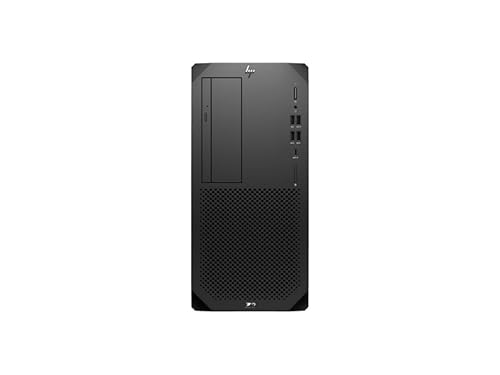
The HP Z2 Tower G9 is a quiet and reliable workstation. It features 13th Gen Intel Core or Xeon processors and supports NVIDIA RTX A4000 or gaming GPUs. The chassis is designed for tool-less access, making upgrades simple. Owners report that it stays whisper quiet during typical workloads. However, the front I/O is limited and the power supply may need upgrading for the most power-hungry GPUs.
Pros
- Very quiet under load
- Tool-less access for easy upgrades
- Reliable HP build quality
Cons
- Limited front ports
- Power supply may need upgrade for high-end GPUs

Lenovo ThinkStation P3 Tower
The Lenovo ThinkStation P3 Tower offers a great balance of price and performance. It supports Intel Core i7 and Xeon processors, plus up to 128GB of memory. The case is compact but still offers room for a dual-slot GPU. Owners appreciate the included keyboard and mouse, which are often missing in other workstations. The main downside is that the motherboard has limited M.2 slots, so expandability is a bit restricted.
Pros
- Great price for specs
- Includes keyboard and mouse
- Compact design
Cons
- Limited M.2 slots
- GPU clearance may be tight for some cards
Fujitsu Celsius W5140
The Fujitsu Celsius W5140 stands out with support for two professional GPUs. It uses Intel Xeon processors and up to 128GB of RAM. The robust power supply handles demanding configurations. Owners praise the excellent build quality and easy maintenance. However, the design is a bit dated and the BIOS is not as user-friendly as competitors.
Pros
- Supports dual GPUs
- Excellent build quality
- Easy to maintain
Cons
- Dated design
- BIOS interface is not intuitive

ASUS ProArt Station PD500TC
The ASUS ProArt Station PD500TC is tailored for creative professionals. It features a 13th Gen Intel Core i9 processor and up to 128GB of RAM. The chassis includes a built-in SD card reader and Thunderbolt 4 ports. Owners love the quiet cooling system. The main drawback is that it only supports a single GPU, but it can handle an RTX 4080 for gaming.
Pros
- Built-in SD card reader
- Quiet cooling
- Thunderbolt 4 connectivity
Cons
- Only one GPU slot
- Premium price

MSI Creator P100X 13th
The MSI Creator P100X 13th packs gaming power into a small chassis. It comes with an Intel Core i7-13700 and up to an RTX 4070. The design is sleek with RGB lighting, making it a stylish addition to any desk. Owners report that it runs cool and quiet. However, the compact size limits upgradeability, and the power supply is not standard.
Pros
- Compact design
- RGB lighting
- Good cooling for size
Cons
- Limited upgrade options
- Non-standard power supply

Apple Mac Studio (M2 Ultra)
The Mac Studio with M2 Ultra is a powerhouse for creative work and gaming via Apple Arcade or native titles. It offers incredible performance in a compact design. Owners praise its silent operation and energy efficiency. However, gaming library is limited compared to Windows, and it is expensive for gaming only.
Pros
- Silent operation
- Outstanding performance
- Compact design
Cons
- Limited native gaming titles
- High cost
How they stack up
| # | Model | CPU | Best for | Score | Price |
|---|---|---|---|---|---|
| 1 | Dell Precision 3680 Tower Workstation | Intel Core i7-14700 or Xeon W | Best overall for gaming and professional work | 9.4 | Check price |
| 2 | HP Z2 Tower G9 Workstation | Intel Core i7-13700 or Xeon W | Best for quiet operation and reliability | 9.1 | Check price |
| 3 | Lenovo ThinkStation P3 Tower | Intel Core i7-13700 or Xeon E-2400 | Best value for workstation features | 9.0 | Check price |
| 4 | Fujitsu Celsius W5140 | Intel Xeon W-2400 | Best for dual-GPU setups | 8.8 | Check price |
| 5 | ASUS ProArt Station PD500TC | Intel Core i9-13900 | Best for creators who also game | 8.7 | Check price |
| 6 | MSI Creator P100X 13th | Intel Core i7-13700 | Best for compact spaces | 8.5 | Check price |
| 7 | Apple Mac Studio (M2 Ultra) | Apple M2 Ultra (24-core CPU) | Best for macOS ecosystem users | 8.3 | Check price |
How to pick the right one
Questions worth asking
Can a workstation be used for gaming?
Yes, many workstations have powerful CPUs and can support gaming GPUs. They are designed for reliability, so gaming performance can be excellent, especially with a high-end graphics card.
Are workstation GPUs different from gaming GPUs?
Yes, workstation GPUs like NVIDIA Quadro or AMD Radeon Pro are optimized for professional applications, offering better precision and stability. Gaming GPUs focus on raw performance in games. Some workstations offer gaming GPU options.
What is ECC memory and do I need it?
ECC memory detects and corrects data corruption, which is vital for critical tasks like financial modeling or scientific research. For gaming, it is not necessary. If you do professional work, consider ECC for stability.
How much RAM do I need for gaming and work?
For gaming and general productivity, 16GB is enough. For heavy multitasking or large projects, 32GB or more is recommended. Many workstations support up to 128GB, so you can upgrade later.
Can I upgrade the GPU in a workstation later?
Often yes, but check the power supply and physical space. Some workstations have proprietary power supplies or limited GPU length. Ensure the workstation supports the GPU you plan to install.
Are gaming workstations louder than regular PCs?
Workstations often have better cooling solutions, which can be quieter. However, under heavy load, they may produce noise. Some models are quieter than others, so check reviews for noise levels.
Which is better for gaming: Intel or AMD?
Both work well. Intel processors often have higher single-core speeds, while AMD offers more cores for the price. For gaming and professional work, high-end Intel Core or AMD Ryzen are good choices. Workstations may use Xeon or Threadripper for more cores.
Do workstations come with a warranty?
Yes, most workstation brands offer at least a 3-year warranty. Some provide on-site service. Check the specific model for warranty details.
Can I use a workstation for video editing and 3D rendering?
Absolutely. Workstations are ideal for these tasks due to their powerful CPUs and GPUs. Gaming performance is a bonus.
What is the best gaming workstation for a budget?
The Lenovo ThinkStation P3 Tower offers the best value for price. It provides solid performance and upgradeability without the premium cost of other brands.
Final word
For the best blend of gaming and professional performance, choose the Dell Precision 3680 Tower. It is upgradeable, reliable, and can be configured with top gaming GPUs. If you are on a tighter budget, the Lenovo ThinkStation P3 Tower offers excellent value. For a compact and quiet option, the MSI Creator P100X is a strong contender.