Workstations with USB C: 7 Smart Picks
For most professionals, the Dell Precision 3680 Tower is the top pick. It offers robust performance with Intel Core processors and extensive USB C ports. Its main advantage is a balanced mix of power and expandability, though it may be overkill for light tasks.
USB C has become the standard for modern connectivity, offering high-speed data transfer and power delivery in one port. Choosing a workstation with USB C ensures future-proofing for peripherals and docking stations.
The market has many options, from compact towers to expandable full towers. Each model has specific strengths, so we have compared them to help you find the right fit.
What we recommend

Dell Precision 3680 Tower Workstation
A reliable tower workstation with Intel Core i9 and up to 128GB RAM. It features multiple USB C ports including Thunderbolt 4 for fast connectivity.
Pros
- Excellent performance for demanding tasks
- Ample storage and memory options
- Thunderbolt 4 support
Cons
- Large footprint
- High price for maxed configuration
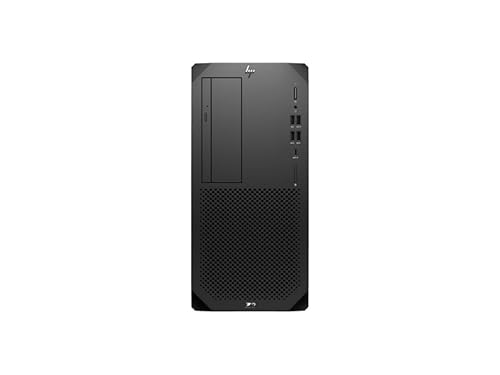
HP Z2 Tower G9 Workstation
A powerful workstation with Intel Xeon or Core processors and professional graphics. It has multiple USB C ports with optional Thunderbolt.
Pros
- ISV certified for design software
- Quiet operation
- Tool-less access for upgrades
Cons
- Only optional Thunderbolt on some models
- Storage capacity lower than some peers

Lenovo ThinkStation P360 Tower
Engineered for CAD and simulation, this workstation delivers reliable performance. It includes USB C ports and supports ECC memory.
Pros
- ECC memory for data integrity
- Robust build quality
- Excellent thermal design
Cons
- DDR4 memory not as fast as DDR5
- Limited front USB C ports

Apple Mac Studio with M2 Ultra
A compact powerhouse with Apple silicon, offering exceptional performance for video editing and 3D rendering. It has six Thunderbolt 4 ports.
Pros
- Incredible performance per watt
- Ultra quiet operation
- Seamless ecosystem integration
Cons
- Limited internal expansion
- Higher cost for Apple ecosystem
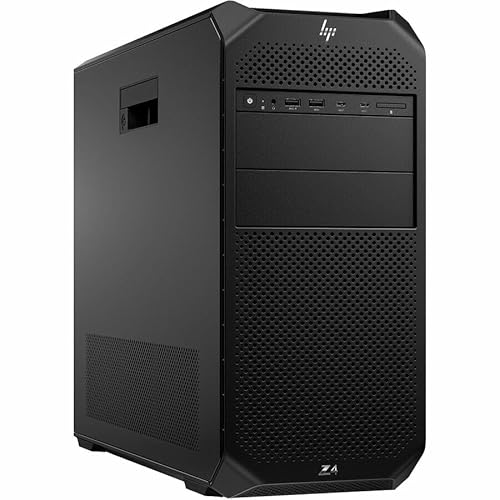
HP Z4 G5 Workstation
A scalable tower with Intel Xeon W processors and support for multiple GPUs. It offers USB C ports and flexible configuration.
Pros
- Massive memory capacity
- Support for up to 3 GPUs
- Tool-less chassis
Cons
- Very large size
- Power hungry

Dell Precision 3460 Small Form Factor
A space saving workstation with Intel Core or Xeon processors. It includes USB C ports with optional Thunderbolt for fast transfers.
Pros
- Compact fits small spaces
- Quiet cooling
- Good performance
Cons
- Limited expansion slots
- Thunderbolt only optional

Apple Mac Pro (2019) with Radeon Pro
A modular workstation with PCIe expansion and Afterburner card. It has two Thunderbolt 3 ports and high end performance.
Pros
- Unmatched expandability
- Powerful GPU options
- Premium design
Cons
- Very expensive
- Older Thunderbolt 3
How to pick the right one
Compared at a glance
| # | Model | Processor | Best for | Score | Price |
|---|---|---|---|---|---|
| 1 | Dell Precision 3680 Tower Workstation | Intel Core i9-14900K | Best Overall | 9.4 | Check price |
| 2 | HP Z2 Tower G9 Workstation | Intel Xeon W or Core i9 | Best for Graphic Design | 9.2 | Check price |
| 3 | Lenovo ThinkStation P360 Tower | Intel Xeon W-1300 | Best for Engineering | 9.0 | Check price |
| 4 | Apple Mac Studio with M2 Ultra | Apple M2 Ultra | Best for Creative Professionals | 9.3 | Check price |
| 5 | HP Z4 G5 Workstation | Intel Xeon W-3400 | Best for Heavy Compute | 8.9 | Check price |
| 6 | Dell Precision 3460 Small Form Factor | Intel Core i9 or Xeon | Best Compact Design | 8.7 | Check price |
| 7 | Apple Mac Pro (2019) with Radeon Pro | Intel Xeon W | Best for Expandability | 8.5 | Check price |
Questions worth asking
Can I connect multiple monitors to a USB C workstation?
Yes, many workstations with Thunderbolt 4 support daisy chaining or multiple displays via a single port. Check the specifications for supported display outputs.
Is it worth getting a workstation with Thunderbolt 4?
If you transfer large files frequently or use high resolution external displays, Thunderbolt 4 is beneficial. It offers faster speeds and more bandwidth than standard USB C.
Can I upgrade the RAM and storage later?
Most tower workstations allow upgrades. Some compact models have limited slots. Always check the number of memory slots and available drive bays.
Do these workstations come with a keyboard and mouse?
Usually not. Professional workstations are often sold without peripherals. You will need to purchase them separately.
What is the difference between a workstation and a regular desktop?
Workstations are designed for professional tasks with higher reliability, ECC memory support, and certified components. They often have more powerful processors and graphics.
Are these workstations noisy?
Noise levels vary. Many modern workstations have efficient cooling. Owners report that some models are quiet under normal load, but heavy compute may increase fan noise.
Can I use a USB C docking station with these workstations?
Yes, most support USB C docking for connecting multiple peripherals. Ensure the docking station is compatible with your operating system and port type.
How long do these workstations last?
With proper care, a workstation can last 5 to 7 years. Upgradeable components extend its life. Regular cleaning and software updates help.
Which operating system is best for these workstations?
Windows is common for most workstations. Apple models use macOS. Linux is also supported on many systems. Choose based on your software needs.
Our take
For most professionals, the Dell Precision 3680 Tower offers the best balance of performance, connectivity, and upgradeability. It is a solid choice for demanding tasks and future proofing. If you prefer a compact design, consider the Dell Precision 3460, but check its expansion limitations.


