Top Xbox Consoles for Every Gamer
The Xbox Series X stands out as the top pick for most gamers, offering unmatched power and performance for 4K gaming. Its main advantage is the ability to play the most demanding titles at high frame rates, but its larger size and higher cost might be a limitation for some.
Choosing the right Xbox console can be overwhelming with the variety of options available. Whether you are a casual player or a hardcore enthusiast, there is an Xbox tailored to your needs. This guide breaks down the strengths of each model to simplify your decision.
From the all-digital Series S to the powerhouse Series X, Microsoft’s lineup covers a range of budgets and performance levels. We compared specifications, user reviews, and gaming performance to bring you a clear picture of what each console offers.
How to choose
The top picks, ranked

Xbox Series X
The Xbox Series X is the most powerful console Microsoft has ever made. It delivers true 4K gaming at 60 frames per second, with support for up to 120 FPS. Its custom SSD ensures lightning-fast load times and Quick Resume lets you switch between multiple games seamlessly. Owners report that it runs quietly and stays cool even during intense sessions.
Pros
- Best performance in the Xbox lineup
- Large storage capacity
- Backward compatible with thousands of games
Cons
- Expensive compared to other models
- Large and heavy design
Xbox Series S
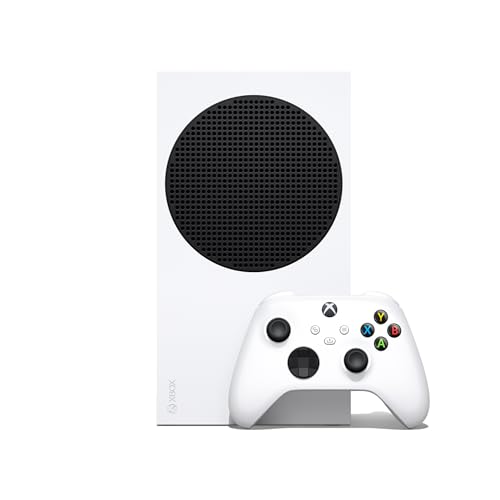
The Xbox Series S is a compact, all-digital console that brings next-gen speed and performance at a lower price. It targets 1440p resolution and supports up to 120 FPS. With a smaller SSD, it still benefits from fast load times and Quick Resume. Owners appreciate its small footprint and whisper-quiet operation, making it perfect for smaller spaces.
Pros
- Affordable entry into next-gen gaming
- Compact and lightweight design
- Digital-only library saves shelf space
Cons
- Less storage space
- No disc drive for physical media

Xbox Series X (2 TB Galaxy Black Special Edition)
This special edition of the Xbox Series X comes with a massive 2 TB SSD and a striking Galaxy Black design with a starry pattern. It offers all the power of the standard Series X but doubles the storage, which is ideal for large game libraries. Owners love the extra space and the aesthetic appeal, though it comes at a premium price.
Pros
- Double the storage of standard Series X
- Unique special edition design
- Same powerful performance
Cons
- Higher price point
- Limited availability

Xbox Series S (Carbon Black, 1 TB)
The Carbon Black edition of the Xbox Series S offers double the storage of the original, with a 1 TB SSD. It still maintains the same compact design and digital-only approach. This version is perfect for those who want to store more games without stepping up to the larger Series X. Owners report that the extra space makes a significant difference.
Pros
- More storage than standard Series S
- Same compact design
- Good value for digital gamers
Cons
- No disc drive
- Slightly heavier than original Series S
Xbox One X
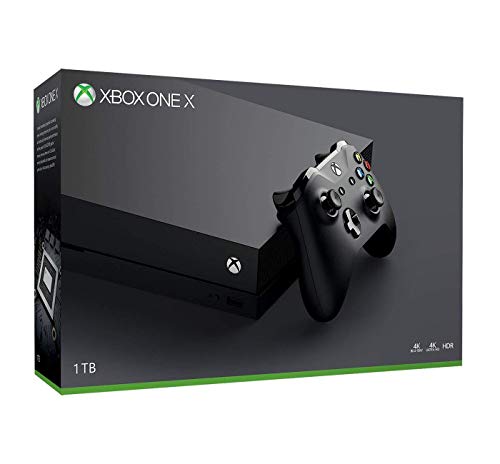
The Xbox One X was the most powerful console of the previous generation, offering true 4K gaming for many titles. It remains a solid choice for those who want to play a vast library of Xbox One and backward-compatible games without investing in the newest hardware. Owners note that it struggles with some newer releases, but it handles older games beautifully.
Pros
- Affordable way to play 4K games
- Extensive backward compatibility
- Large game library available
Cons
- Older hardware, slower load times
- Not all games run at 4K
Xbox One S
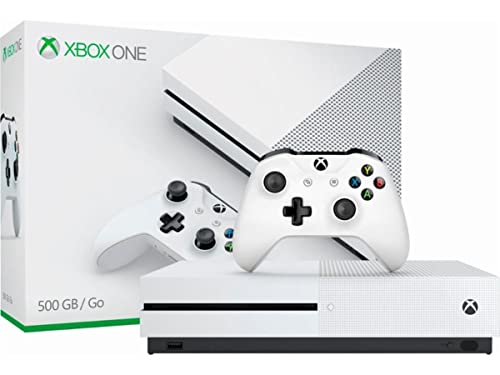
The Xbox One S is a budget-friendly console that still supports 4K video streaming and HDR. It has a built-in 4K Blu-ray player, making it a great media center. While it cannot run games in native 4K, it upscales them for better visuals. Owners appreciate its low price and quiet operation, making it a good entry point for new gamers.
Pros
- Very affordable
- 4K Blu-ray player included
- Quiet and energy efficient
Cons
- Lower performance for modern games
- Load times are slower

Xbox Series X (Refurbished)
A refurbished Xbox Series X offers the same powerful performance as a new one but at a reduced price. These units are typically certified by Microsoft and come with a warranty. Owners report that they function flawlessly and provide a great way to get next-gen gaming without the full cost. However, availability can be limited and the condition may vary.
Pros
- Lower price than new
- Same performance as new
- Includes warranty from Microsoft
Cons
- May have cosmetic imperfections
- Limited stock
Compared at a glance
| # | Model | CPU | Best for | Score | Price |
|---|---|---|---|---|---|
| 1 | Xbox Series X | 8-core AMD Zen 2 at 3.8 GHz | Hardcore gamers seeking top performance | 9.6 | Check price |
| 2 | Xbox Series S | 8-core AMD Zen 2 at 3.6 GHz | Budget-conscious gamers who want next-gen features | 8.9 | Check price |
| 3 | Xbox Series X (2 TB Galaxy Black Special Edition) | 8-core AMD Zen 2 at 3.8 GHz | Gamers who need extra storage and want a unique look | 9.2 | Check price |
| 4 | Xbox Series S (Carbon Black, 1 TB) | 8-core AMD Zen 2 at 3.6 GHz | Gamers who want more storage in a smaller console | 8.7 | Check price |
| 5 | Xbox One X | 8-core AMD Jaguar at 2.3 GHz | Budget gamers wanting 4K on older games | 8.1 | Check price |
| 6 | Xbox One S | 8-core AMD Jaguar at 1.75 GHz | Families and casual gamers on a tight budget | 7.8 | Check price |
| 7 | Xbox Series X (Refurbished) | 8-core AMD Zen 2 at 3.8 GHz | Gamers who want Series X power at a discount | 8.4 | Check price |
Questions worth asking
What is the most powerful Xbox console?
The Xbox Series X is the most powerful Xbox console, with 12 TFLOPS of GPU performance and support for 4K at 120 FPS.
Can I play physical discs on the Xbox Series S?
No, the Xbox Series S is an all-digital console and does not have a disc drive. You can only play games downloaded from the Microsoft Store or via game pass.
Is the Xbox One X worth buying in 2025?
The Xbox One X can still play many games in 4K, but it is an older console. If you want to play the latest titles, you are better off with a Series S or X.
Do all Xbox consoles support 4K gaming?
No, only the Series X and One X support native 4K gaming. The Series S targets 1440p, and the One S upscales to 4K.
What is the storage capacity of the Xbox Series S?
The standard Xbox Series S has a 512 GB SSD, but there is also a 1 TB version available (Carbon Black).
Can I use an external hard drive with Xbox consoles?
Yes, all Xbox consoles support external USB hard drives for storing and playing backward compatible games. For Series X/S optimized games, you need the internal SSD or an expansion card.
Which Xbox console is best for kids?
The Xbox Series S is a good choice for kids due to its lower price and compact size. It also has parental controls and a family-friendly game library.
What is the difference between Xbox Series X and Series S?
The Series X is more powerful, with better resolution support and more storage, while the Series S is smaller, cheaper, and all-digital. The Series X targets 4K, the Series S targets 1440p.
Are Xbox consoles compatible with Xbox Game Pass?
Yes, all Xbox consoles support Xbox Game Pass, which gives access to a large library of games for a monthly fee.
Can I play Xbox 360 games on the Series X?
Yes, the Series X supports backward compatibility with many Xbox 360 games, and some are enhanced with better performance.
Our take
For most gamers, the Xbox Series X is the clear winner due to its superior performance and future-proofing. If you are on a tighter budget, the Xbox Series S offers excellent value and access to the same next-gen features. Avoid older consoles unless you are very price-sensitive and do not mind missing out on newer games. Choose the Series X if you want the best experience, or the Series S for a budget-friendly entry into next-gen gaming.


