Xbox Family Gaming with USB-C: Our Top Controller Picks
For most families, the Xbox Wireless Controller is the best overall pick because it balances comfort, reliability, and price, and it natively supports USB-C charging. Its main limitation is that it requires AA batteries or a separate rechargeable battery pack if you want wireless play without frequent recharges.
Family gaming on Xbox means everyone gets a turn, and that requires controllers that are comfortable, durable, and easy to charge. USB-C has become the standard for modern Xbox controllers, offering faster charging and a universal cable.
We looked at a range of options, from the standard Xbox controller to pro-style pads with extra features. Our focus is on what works best for families, including kids and adults, with honest assessments of each controller’s strengths and weaknesses.
How to choose
Our top picks
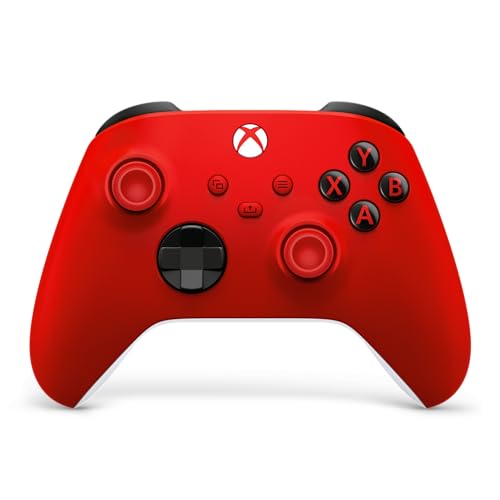
Xbox Wireless Controller
The official Xbox Wireless Controller is the benchmark for comfort and compatibility. It features a refined shape that fits most hand sizes, textured grips, and a dedicated Share button. It connects via Bluetooth or Xbox Wireless and charges over USB-C.
Pros
- Excellent comfort for a wide range of hand sizes
- Seamless compatibility with all Xbox consoles and PC
- USB-C port for convenient charging
Cons
- No built-in rechargeable battery
- Requires separate purchase for rechargeable pack

Xbox Elite Wireless Controller Series 2
The Elite Series 2 is a premium controller with adjustable tension thumbsticks, paddle buttons on the back, and a built-in rechargeable battery. It is built to last with a metal internal frame and comes with a carrying case.
Pros
- Customizable controls for different games
- Long battery life
- Premium build quality
Cons
- High price
- May be too complex for younger kids

PowerA Enhanced Wired Controller for Xbox Series X|S
This wired controller from PowerA offers a solid build with mappable advanced gaming buttons and a detachable USB-C cable. It is an affordable choice for families that don’t mind a wired connection.
Pros
- Affordable price
- No battery worries
- Detachable cable for easy storage
Cons
- Cable can be limiting for movement
- No wireless capability

Razer Wolverine V2 Chroma
The Razer Wolverine V2 Chroma is a wired controller with mechanical buttons and RGB lighting. It features remappable buttons and a hair trigger mode, making it popular with players who want a competitive edge.
Pros
- Responsive mechanical buttons
- Customizable RGB lighting
- Hair trigger mode for fast shooting
Cons
- Wired only
- Non-detachable cable
- May feel bulky for small hands

8BitDo Ultimate C Bluetooth Controller
The 8BitDo Ultimate C is a compact wireless controller that works with Xbox via Bluetooth. It has a comfortable design for smaller hands and includes a charging dock, making it easy to keep powered up.
Pros
- Compact and lightweight for kids
- Comes with charging dock
- Hall effect sticks resist drift
Cons
- No headphone jack
- Some features may be limited in Xbox mode

Xbox Elite Wireless Controller Series 2 Core
The Elite Series 2 Core is a more affordable version of the Elite Series 2. It retains the same comfort, adjustable tension thumbsticks, and built-in battery, but omits the paddles and carrying case.
Pros
- Premium feel and comfort
- Long battery life
- Lower price than full Elite
Cons
- No paddles included (sold separately)
- Still expensive for casual play

PowerA Fusion Pro 2 Wired Controller
The PowerA Fusion Pro 2 offers a pro-style design with swappable thumbsticks, four mappable buttons, and a braided USB-C cable. It includes a carrying case and is compatible with Xbox Series X|S and Xbox One.
Pros
- Mappable buttons for customization
- Detachable USB-C cable
- Includes carrying case
Cons
- Wired only
- No wireless option
How they stack up
| # | Model | Connection | Best for | Score | Price |
|---|---|---|---|---|---|
| 1 | Xbox Wireless Controller | Xbox Wireless, Bluetooth | Best overall for most families | 9.4 | Check price |
| 2 | Xbox Elite Wireless Controller Series 2 | Xbox Wireless, Bluetooth | Best for families with serious gamers | 9.1 | Check price |
| 3 | PowerA Enhanced Wired Controller for Xbox Series X|S | Wired (USB-C) | Best budget wired option | 8.8 | Check price |
| 4 | Razer Wolverine V2 Chroma | Wired (USB-C) | Best for competitive family members | 8.5 | Check price |
| 5 | 8BitDo Ultimate C Bluetooth Controller | Bluetooth, 2.4G (with dock) | Best for young kids and small hands | 8.3 | Check price |
| 6 | Xbox Elite Wireless Controller Series 2 Core | Xbox Wireless, Bluetooth | Best for those who want Elite features without the extras | 8.9 | Check price |
| 7 | PowerA Fusion Pro 2 Wired Controller | Wired (USB-C) | Best wired alternative with pro features | 8.4 | Check price |
Good to know
Are all Xbox Series X|S controllers USB-C?
Yes, all official Xbox Series X|S controllers, including the standard Wireless Controller and Elite Series 2, use USB-C for charging and connection. Third-party controllers also increasingly use USB-C, but always check the specifications.
Can I use my phone charger to charge my Xbox controller?
Yes, if your phone charger uses a USB-C cable and provides sufficient power (typically 5V/1A or higher), you can charge your Xbox controller. However, for the fastest charging, it’s recommended to use the official cable and a wall adapter.
Do Xbox controllers work on PC?
Yes, most Xbox controllers work on PC via USB-C or Bluetooth. The official Xbox Wireless Controller and Elite Series 2 are fully compatible with Windows. Some third-party controllers also support PC, but check the product description.
What is the battery life of the Xbox Elite Series 2?
The Elite Series 2 has a built-in rechargeable battery that lasts up to 40 hours per charge. This is significantly longer than many other controllers, making it great for extended gaming sessions.
Are wired controllers better for competitive gaming?
Wired controllers typically have lower input latency than wireless ones, which can be an advantage in fast-paced games. They also eliminate the risk of battery dying mid-game. However, the difference is minimal for most players, and modern wireless technology is very reliable.
Can I use a wired controller with an Xbox Series S?
Yes, wired controllers with a USB-C connection will work with Xbox Series S. Simply plug the cable into the console’s USB port. The PowerA and Razer controllers we reviewed are compatible with Xbox Series X|S.
How do I remap buttons on the Elite Series 2?
You can remap buttons on the Elite Series 2 using the Xbox Accessories app on your console or Windows PC. The app allows you to customize the paddle buttons, thumbstick sensitivity, and trigger stops.
What is the best controller for kids?
For younger kids, a smaller controller like the 8BitDo Ultimate C is easier to handle. It has a compact design and hall effect sticks that resist drift. The standard Xbox Wireless Controller also works for older kids, but its size may be too big for small hands.
Do all these controllers have a 3.5mm headphone jack?
No, the 8BitDo Ultimate C does not have a headphone jack. The official Xbox controllers and PowerA wired controllers do include a 3.5mm audio jack, allowing you to plug in a headset for private listening.
Is the PowerA Fusion Pro 2 worth the price?
The PowerA Fusion Pro 2 is a good value if you want pro-style features like mappable buttons and swappable thumbsticks without paying the high price of the Elite Series 2. It’s wired, so you don’t have to worry about battery, but you are limited by the cable length.
Our take
For most families, the standard Xbox Wireless Controller is the best choice because it offers reliable performance, comfort, and a reasonable price. If you have younger children, consider the 8BitDo Ultimate C for its smaller size and included charging dock. For those who want a premium experience, the Elite Series 2 Core provides excellent build and battery life without the extra cost of the full Elite package.


