Zigbee Hubs Compared for Seamless Smart Homes
The Amazon Echo Plus emerges as the top Zigbee hub for most households. It combines a reliable Zigbee radio with Alexa voice control. Its main advantage is the elimination of separate bridge devices for many sensors and bulbs. The limitation is its dependence on Amazon’s ecosystem, lacking support for Zigbee 3.0 devices.
Zigbee smart home hubs bring order to a growing collection of sensors, lights, and locks. They act as central translators, enabling devices from different brands to work together seamlessly.
The right hub expands your network’s reach and reduces reliance on internet connectivity for local automation. But with many options, finding one that fits your setup requires careful consideration.
What to look for
The best picks, ranked

Amazon Echo Plus (2nd Gen)
The Echo Plus serves as both a smart speaker and Zigbee hub, simplifying setup. It supports a wide range of Zigbee devices and integrates smoothly with Alexa routines. Its premium sound quality is a bonus, though it lacks Zigbee 3.0 support for the newest sensors.
Pros
- No separate hub required
- Excellent voice integration
- Good speaker quality
Cons
- No Thread support
- Limited to Amazon ecosystem

Samsung SmartThings Hub V3 (2021)
This hub supports Zigbee, Z-Wave, and Thread, making it the most versatile. It works with devices from hundreds of brands and offers local automation via the SmartThings app. Users report occasional cloud dependency, but the extensive compatibility is unmatched.
Pros
- Supports multiple protocols
- Large device database
- Local automation via edge drivers
Cons
- Setup can be complex
- Requires internet for some features

Hubitat Elevation Hub (Model C-7)
Hubitat processes all automations locally, ensuring fast response and privacy. It supports Zigbee and Z-Wave, with a powerful rule engine for advanced users. The interface is less polished, but owners value the reliability and no-cloud dependence.
Pros
- 100% local operation
- Powerful automation rules
- No subscription fees
Cons
- Steep learning curve
- App is not as polished
Aeotec Smart Home Hub
Aeotec took over SmartThings hardware, offering a solid Zigbee and Z-Wave hub. It integrates with the SmartThings app, providing a familiar experience. The hub supports local automations and works with many devices, but it requires a subscription for full remote access.
Pros
- Seamless SmartThings integration
- Reliable performance
- Compact design
Cons
- Subscription for remote access
- No Thread support

ConBee II (USB Stick)
The ConBee II is a USB Zigbee stick that plugs into a Raspberry Pi or PC. It works with open-source platforms like Home Assistant and provides local control. Its range is decent, but it lacks built-in automation, requiring a separate system.
Pros
- Low cost
- Works with open source
- No cloud dependency
Cons
- Requires technical setup
- No built-in apps
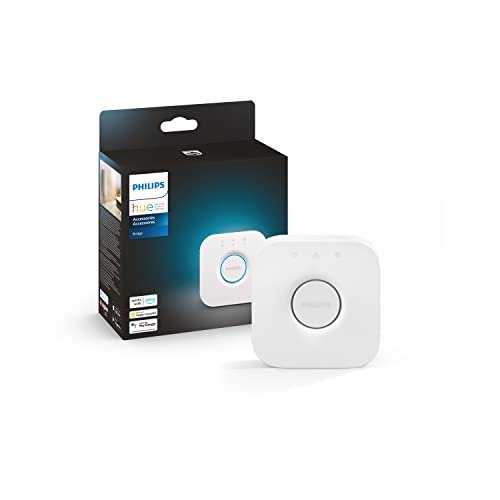
Philips Hue Bridge 2.1
The Hue Bridge is essential for unlocking advanced Philips Hue features. It supports Zigbee and communicates with the Hue app and voice assistants. While it only works with Hue lights, it excels at managing them with reliability.
Pros
- Rock-solid performance
- Extensive light controls
- Easy setup
Cons
- Limited to Hue ecosystem
- No Z-Wave support

IKEA DIRIGERA Hub
IKEA’s DIRIGERA hub connects Zigbee devices from IKEA and other brands. It offers simple setup and works with the IKEA Home smart app, but its feature set is limited compared to others. It is a budget-friendly choice for basic automation.
Pros
- Low price
- Simple design
- Matter support via update
Cons
- Limited device support
- App lacks advanced features
Side by side
| # | Model | Zigbee Support | Best for | Score | Price |
|---|---|---|---|---|---|
| 1 | Amazon Echo Plus (2nd Gen) | Zigbee 3.0 (via firmware, but limited) | Alexa users wanting a built-in hub | 9.2 | Check price |
| 2 | Samsung SmartThings Hub V3 (2021) | Zigbee, Z-Wave, Thread, BLE | Multi-protocol smart home enthusiasts | 9.4 | Check price |
| 3 | Hubitat Elevation Hub (Model C-7) | Zigbee, Z-Wave | Local processing and privacy | 9.0 | Check price |
| 4 | Aeotec Smart Home Hub | Zigbee, Z-Wave | Former SmartThings users | 8.8 | Check price |
| 5 | ConBee II (USB Stick) | USB | DIY Home Assistant setups | 8.6 | Check price |
| 6 | Philips Hue Bridge 2.1 | Zigbee Light Link | Philips Hue lighting ecosystems | 8.7 | Check price |
| 7 | IKEA DIRIGERA Hub | Zigbee | IKEA smart home users | 8.3 | Check price |
Questions worth asking
Do I need a Zigbee hub if I have Alexa or Google Home?
Some speakers like the Amazon Echo Plus have a built-in Zigbee hub. Others do not. If you have many Zigbee devices, a dedicated hub adds reliability and features.
Can a Zigbee hub connect to Wi-Fi devices?
No, Zigbee hubs only handle Zigbee devices. But many hubs also support other protocols like Z-Wave or Thread. Wi-Fi devices connect directly to your router and are managed by their own apps or a central controller.
What is the difference between Zigbee and Z-Wave?
Both are low-power mesh protocols. Zigbee uses the 2.4 GHz band, has many compatible devices, and supports up to 65,000 nodes. Z-Wave uses sub-GHz frequencies, offering less interference and longer range, but a smaller device ecosystem.
Will a Zigbee hub work with all Zigbee devices?
Not always. While Zigbee is a standard, manufacturers implement profiles differently. A hub must be compatible with the specific device profile. Check the hub’s compatibility list before purchase.
What is Zigbee 3.0?
Zigbee 3.0 is the latest standard that unifies profiles for greater interoperability. It improves security and simplifies pairing. Hubs and devices that support Zigbee 3.0 offer broader compatibility.
Can I use a Zigbee hub without internet?
Local processing hubs like Hubitat work without internet, but remote access and voice control may require it. Cloud-dependent hubs need internet for basic functions.
How many devices can a Zigbee hub handle?
Capacity varies by hub. Some support 40 devices, while others claim up to 200. The actual limit depends on the network traffic and the hub’s processing power.
Do Zigbee hubs support Matter?
Some newer hubs have Matter support or are updatable. Matter uses Thread, not Zigbee, so it requires additional hardware. Check the hub’s specifications for Matter compatibility.
What is a Zigbee router?
Zigbee routers are mains-powered devices that relay signals. They extend the network range. Most smart plugs and light bulbs act as routers automatically.
Can I use multiple Zigbee hubs in one home?
Yes, you can run separate networks, but they will not communicate with each other. It is better to use a single hub with sufficient capacity or a hub that supports multiple protocols.
Final word
For most users, the Samsung SmartThings Hub V3 is the best choice because it bridges Zigbee, Z-Wave, and Thread, ensuring broad compatibility. If you prioritize local control and privacy, the Hubitat Elevation is the way to go. The Amazon Echo Plus is ideal for Alexa loyalists who want simplicity. Pick the one that matches your ecosystem and automation needs.


