Top All in One PCs for Gaming in 2026
The Dell Inspiron 27 7720 is our top pick for most gamers. It offers a solid balance of performance and value. Its main advantage is the combination of a 12th Gen Intel Core i7 processor and an RTX 3050 GPU, which handles modern games at 1080p. The main limitation is that its RAM is not user upgradeable, so you should choose your configuration carefully.
All in one computers for gaming are a great space saver. They combine the monitor and the computer into one sleek unit. But gaming demands powerful hardware, and not all AIOs are created equal.
We compared current models from top brands like Dell, HP, Lenovo, and Apple. We focused on real specifications and user feedback. Here are the best options for different gaming needs.
The top picks, ranked

Dell Inspiron 27 7720 All in One
This Dell AIO delivers strong 1080p gaming performance with an Intel Core i7 and NVIDIA RTX 3050. The 27 inch FHD display has a 100Hz refresh rate, which is smooth for fast games. Owners appreciate the clean design and the included mouse and keyboard.
Pros
- Strong gaming performance for the price
- High refresh rate display
- Includes wireless keyboard and mouse
Cons
- RAM is not upgradeable
- Only a 512GB SSD
HP Envy 34 All in One
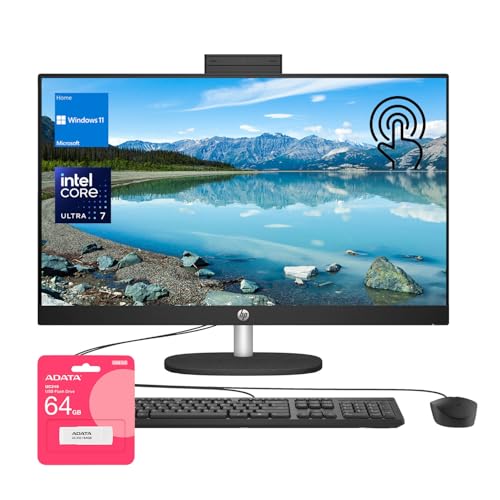
The HP Envy 34 features a stunning 34 inch curved display with a 5K resolution. It is powered by an Intel Core i7 and an NVIDIA GeForce RTX 3060. The screen’s 500 nits brightness and 98% DCI P3 color gamut make games look vibrant. Owners love the integrated 5MP pop up camera.
Pros
- Immersive 5K curved display
- Powerful RTX 3060 graphics
- Great color accuracy
Cons
- Very expensive
- Large footprint needs desk space

Apple iMac 24 inch with M3 Chip
The M3 chip in the latest iMac brings impressive integrated graphics performance. It runs many games well at 1080p with high settings. The 24 inch 4.5K Retina display is exceptional for both work and play. Owners praise its silent operation and thin design.
Pros
- Beautiful 4.5K display
- Silent and energy efficient
- Excellent for macOS productivity
Cons
- Limited game library compared to Windows
- Only 8GB RAM in base model

Lenovo IdeaCentre AIO 5i
The IdeaCentre AIO 5i offers a solid 1080p gaming experience at a lower price point. It comes with an Intel Core i5 and an NVIDIA GeForce MX550 graphics. While not as powerful as RTX cards, it handles esports titles well. Users like the simple design and the 27 inch FHD display.
Pros
- Affordable
- Large 27 inch display
- Plenty of storage (512GB SSD)
Cons
- Graphics card is entry level
- Not for demanding AAA games

Dell Alienware Aurora (Discontinued, but still sold by third party)
Though discontinued, the Alienware Aurora remains available through third party sellers. It packs a desktop class Intel Core i9 and an NVIDIA GeForce RTX 3080. This machine can handle VR and 4K gaming without breaking a sweat. Owners report excellent thermal performance, but it is loud under load.
Pros
- Desktop level performance
- Supports 4K and VR gaming
- Curved 120Hz display included
Cons
- Discontinued, limited warranty
- Very expensive

MSI Modern AM273Q All in One
This MSI AIO has a 27 inch QHD display and comes with an Intel Core i7 and NVIDIA GeForce GTX 1650. It is compact and fits well in small spaces. The 1650 is decent for older games, but it struggles with newer titles. Owners like the thin bezels and the included stand.
Pros
- Sharp QHD display
- Compact design
- Good for productivity and light gaming
Cons
- Graphics card is outdated
- Limited upgrade options

HP Pavilion 27 All in One
The HP Pavilion 27 is a versatile AIO that suits family use. It has an AMD Ryzen 7 and integrated Radeon graphics. It can run many popular games at lower settings. The 27 inch FHD touch screen is nice for casual use. Owners appreciate the large storage and the DVD drive.
Pros
- Touch screen display
- Large 1TB HDD plus 256GB SSD
- Integrated DVD drive
Cons
- Integrated graphics are weak for gaming
- Not suitable for modern AAA games
Side by side
| # | Model | Processor | Best for | Score | Price |
|---|---|---|---|---|---|
| 1 | Dell Inspiron 27 7720 All in One | 12th Gen Intel Core i7-1255U | Best Overall for Most Gamers | 9.4 | Check price |
| 2 | HP Envy 34 All in One | 12th Gen Intel Core i7-12700 | Best for Immersive Gaming on a Big Screen | 9.2 | Check price |
| 3 | Apple iMac 24 inch with M3 Chip | Apple M3 chip with 8 core GPU | Best for Apple Ecosystem and Casual Gaming | 9.0 | Check price |
| 4 | Lenovo IdeaCentre AIO 5i | 12th Gen Intel Core i5-1235U | Best for Budget Conscious Gamers | 8.8 | Check price |
| 5 | Dell Alienware Aurora (Discontinued, but still sold by third party) | Intel Core i9-10900K | Best for High End Performance on a Desktop Replacement | 9.1 | Check price |
| 6 | MSI Modern AM273Q All in One | 11th Gen Intel Core i7-1165G7 | Best for Compact Gaming Setup | 8.6 | Check price |
| 7 | HP Pavilion 27 All in One | AMD Ryzen 7 5700U | Best for Family Gaming and Entertainment | 8.4 | Check price |
What to look for
Questions worth asking
Are all in one computers good for gaming?
All in one computers can be good for gaming if they have a dedicated graphics card and sufficient cooling. They are more compact than traditional desktops, but they often use mobile components, which are less powerful. For casual gaming and esports, many AIOs suffice. For hardcore gaming, you may need a high end model or consider a desktop.
What specs do I need for 4K gaming on an all in one?
For 4K gaming, you need a very powerful GPU, like an NVIDIA RTX 3080 or better. You also need a high end processor, at least 16GB of RAM, and an SSD. However, such AIOs are rare and expensive. Most AIOs are designed for 1080p gaming. You might not find many 4K capable AIOs, so consider a desktop instead.
Can I upgrade the graphics card in an all in one?
In most all in one computers, the graphics card is soldered to the motherboard and cannot be upgraded. Some older or larger AIOs may have a MXM slot, but that is uncommon. If upgradeability is important, look for a desktop or a mini PC. Always check the manufacturer’s specifications before purchasing.
How does an all in one compare to a gaming laptop?
All in one computers offer a larger screen and a more comfortable desktop setup. They are not portable, but they take up less space than a desktop plus monitor. Gaming laptops are portable but have smaller screens and often run hotter. In terms of performance, a laptop with the same GPU may be similar, but the AIO has better cooling potential due to its size.
Are Apple iMacs good for gaming?
Apple iMacs with M series chips have made significant strides in gaming performance. They can run many popular games, but the game library is limited due to macOS. Many titles are not available, and some run via translation layers. For serious gamers, a Windows based AIO is more versatile.
What is the refresh rate on most all in one displays?
Most all in one displays have a 60Hz refresh rate. Some gaming oriented models offer 100Hz or 120Hz, and a few have 144Hz. A higher refresh rate reduces motion blur and makes gameplay smoother. If you play fast paced shooters, look for at least 120Hz.
Do all in one computers have good audio for gaming?
Audio quality varies. Many AIOs have decent built in speakers, but they are not as good as dedicated gaming headsets or external speakers. Some models from HP and Dell include speakers tuned by brands like B&O or Waves. For immersive gaming, a quality headset is recommended.
Can I use a virtual reality headset with an all in one?
Virtual reality requires a powerful GPU, typically an RTX 3060 or higher. Some high end AIOs, like the Alienware Aurora, can support VR. However, many AIOs lack the necessary ports or have weaker GPUs. Check the specifications of the AIO against VR requirements before buying.
How much RAM do I need for gaming on an all in one?
For modern gaming, 16GB of RAM is the sweet spot. It allows you to run games and background applications without issue. 8GB is the minimum, but you may experience stutters in some games. If you plan to multitask or stream, consider 32GB, but that is rarely necessary for gaming alone.
What is the warranty on gaming all in ones?
Most manufacturers offer a one year limited warranty. Some premium models come with two or three years. You can often purchase extended warranties. Check the return policy and support options. A longer warranty is useful because repairs on AIOs are complex due to the integrated design.
The verdict
For most gamers, the Dell Inspiron 27 7720 is the best choice because it offers solid performance and a 100Hz display without breaking the bank. If you have a higher budget and want an immersive experience, go with the HP Envy 34. Apple fans should consider the iMac M3 for its ecosystem and silent operation. For serious gaming, look for a desktop instead.