Best Beginner Embroidery Machines for Easy Stitching
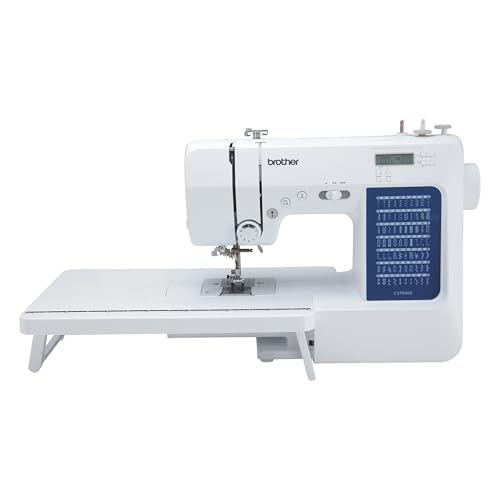
The Brother SE1900 is our top pick for beginners. It offers a large 5×7 inch embroidery area, 138 built in designs, and an automatic needle threader. It is user friendly and versatile, but its advanced features may overwhelm absolute novices.
Embroidery machines open a world of creative possibilities, but choosing your first one can feel overwhelming. We compared models that are easy to learn on, with clear controls and helpful features. Our focus is on machines that owners report being happy with, not just specs on paper.
The best beginner machines automate the tricky parts like threading and color changes. They also include a variety of built in designs and fonts so you can start stitching right away. We looked at machines that are reliable and have good support, so you can grow your skills without frustration.
The shortlist, ranked

Brother SE1900
The Brother SE1900 combines embroidery and sewing in one machine. It has a large 5×7 inch hoop and 138 built in designs. An automatic needle threader and drop in bobbin make setup simple. Owners praise its quiet operation and clear LCD touchscreen.
Pros
- Large color touchscreen makes selection easy
- Combines sewing and embroidery functions
- Fast threading with automatic needle threader
Cons
- Heavier than some portable models
- Advanced features may have a learning curve

Singer Legacy SE300
The Singer Legacy SE300 offers a generous 10.1 x 6 inch embroidery field, the largest in its class. It features 250 built in designs and a 7 inch touchscreen. The machine also sews with 300 stitches. Beginners appreciate the automatic thread tension and easy color sorting.
Pros
- Huge embroidery area for larger projects
- Intuitive touchscreen with color display
- Automatic thread tension for consistent stitches
Cons
- Expensive for a first machine
- Large footprint needs dedicated space

Brother PE535
The Brother PE535 is an embroidery only machine that is affordable and simple. It has a 4×4 inch hoop and 80 built in designs. The automatic needle threader and drop in bobbin are beginner friendly. Owners like its compact size and easy to navigate LCD screen.
Pros
- Compact and lightweight for small spaces
- Simple one touch operations
- Great price for starting out
Cons
- Small hoop limits project size
- No sewing function

Janome Memory Craft 500E
Janome is known for quality, and the Memory Craft 500E is no exception. It offers a 7.9 x 7.9 inch embroidery area and 160 built in designs. The machine has an advanced color LCD screen and a large hoop. It is sturdy and precise, ideal for those who want to grow into a serious hobby.
Pros
- Excellent stitch quality
- Large square embroidery field
- Durable construction
Cons
- Higher price point
- No sewing capabilities

Brother SE600
The Brother SE600 is a compact embroidery and sewing combo machine. It has a 4×4 inch hoop and 80 built in designs. The built in sewing stitches number 103. It is easy to switch between sewing and embroidery. Owners appreciate the color touchscreen and automatic thread tension.
Pros
- Two machines in one footprint
- Color touchscreen is intuitive
- Lightweight and portable
Cons
- Small embroidery area
- Limited design editing features

Singer Quantum Stylist 9960
The Singer Quantum Stylist 9960 is primarily a sewing machine with 600 built in stitches, but it adds embroidery capabilities through an optional hoop. It has a large work area and automatic features. Beginners who want to sew and sometimes embroider might find this versatile.
Pros
- Vast stitch library
- Strong for garment sewing
- User friendly features
Cons
- Embroidery hoop sold separately
- Not dedicated to embroidery

Brother PE800
The Brother PE800 is an embroidery only machine with 138 built in designs and 9 fonts. It has a 5×7 inch hoop and a large color touchscreen. The machine is known for its quick setup and intuitive operation. Owners report that it handles digitized files well via USB.
Pros
- Large touchscreen with preview
- Easy to import custom designs
- Quiet and smooth operation
Cons
- No sewing function
- Thread tension may need adjustment
Side by side
| # | Model | Embroidery area | Best for | Score | Price |
|---|---|---|---|---|---|
| 1 | Brother SE1900 | 5×7 inches | Overall best for beginners | 9.4 | Check price |
| 2 | Singer Legacy SE300 | 10.1 x 6 inches | Large embroidery area | 9.1 | Check price |
| 3 | Brother PE535 | 4×4 inches | Budget friendly | 8.8 | Check price |
| 4 | Janome Memory Craft 500E | 7.9 x 7.9 inches | Quality and reliability | 9.0 | Check price |
| 5 | Brother SE600 | 4×4 inches | Small projects and sewing | 8.5 | Check price |
| 6 | Singer Quantum Stylist 9960 | 600 | Sewing enthusiasts who want embroidery | 8.3 | Check price |
| 7 | Brother PE800 | 5×7 inches | Design library and speed | 8.7 | Check price |
How to choose
Frequently asked questions
How much should I spend on my first embroidery machine?
Beginner machines range from current price to current price. Models like the Brother PE535 offer basic features at a lower price. The Brother SE1900 is a step up with more designs and a larger hoop. Set a budget that allows for accessories like thread and stabilizer.
Can a beginner use a sewing and embroidery combo machine?
Yes, combo machines like the Brother SE600 and SE1900 are popular among beginners. They let you switch between sewing and embroidery. The learning curve is manageable. You save space and money compared to buying two machines.
What is a good hoop size for a beginner?
A 4×4 inch hoop is standard for beginners. It handles small projects like monograms and patches. If you want to do larger designs, consider a 5×7 inch hoop. Machines like the Brother SE1900 offer that size and are still easy to use.
Do I need an embroidery machine with a touchscreen?
Touchscreens make selecting and previewing designs easier. They are found on many beginner machines like the Brother SE600. However, some machines use buttons and a small LCD, which can be just as functional for basic projects. Choose based on your comfort with technology.
How many built in designs do I need?
For a beginner, having at least 80 designs is helpful. That gives you variety to practice. More designs, like 138 on the Brother SE1900, offer greater creative options. You can also import designs via USB, so the built in number is not a hard limit.
Can I embroider on any fabric?
You can embroider on many fabrics, from cotton to denim. Use a stabilizer to support the fabric during stitching. Some machines have adjustable presser foot pressure for different thicknesses. Beginners should start with medium weight woven fabrics.
What accessories come with beginner machines?
Most machines include a hoop, bobbins, needles, and a foot. Some include a starter pack of thread. It is wise to buy extra bobbins and needles. Check if the machine includes a dust cover and carrying case for storage.
Is it hard to learn embroidery machine software?
Modern machines are designed to be user friendly. Basic operations like selecting designs and thread colors are straightforward. Importing custom designs may require simple software. Many brands offer tutorials. Online videos can guide you through the process.
Final word
For most beginners, the Brother SE1900 is the best choice because it combines user friendly features with a larger embroidery area. If you are on a tight budget, the Brother PE535 offers reliable performance at a lower cost. For those who plan serious projects, the Singer Legacy SE300 provides a huge hoop and extensive design library. Choose the SE1900 as a well rounded machine that will grow with your skills.