USB Bluetooth Adapters for PC: What Actually Matters
TP-Link’s UB500 balances Bluetooth 5.0 range with automatic Windows driver installation, making it the strongest all-around pick. Cable Matters’ Bluetooth 5.3 adapter costs less while still handling everyday peripherals. Gamers chasing low audio lag should choose the Avantree DG60, which runs aptX Low Latency for wireless headset use during matches.
A USB Bluetooth adapter solves a common problem: most desktop PCs and many older laptops ship without wireless radio hardware. TP-Link’s UB500 handles everyday pairing with minimal setup, the Avantree DG60 targets gamers who need low latency audio, and the Cable Matters adapter fits a tight budget.
Chipset compatibility, Bluetooth version and antenna range vary more than the price tag suggests, and a poor match can cause stuttering audio or laggy mouse input. We compared listed specifications, supported audio profiles and owner feedback patterns across seven current models to separate real differences from marketing language.
Our top picks

TP-Link UB500 Bluetooth 5.0 Nano USB Adapter
Bluetooth 5.0 radio hardware powers this nano adapter, rated for roughly 30 feet with keyboards, mice and headsets. Windows Update installs drivers automatically across Windows 11, 10 and 8.1, cutting setup to a few minutes. Its flush, low-profile shell avoids blocking neighboring USB ports on a laptop.
Pros
- Drivers install automatically through Windows Update
- Compact nano shell fits flush against a laptop
- Holds a stable connection for peripherals and audio
Cons
- No Linux or macOS driver support
- Range shortens noticeably through multiple walls
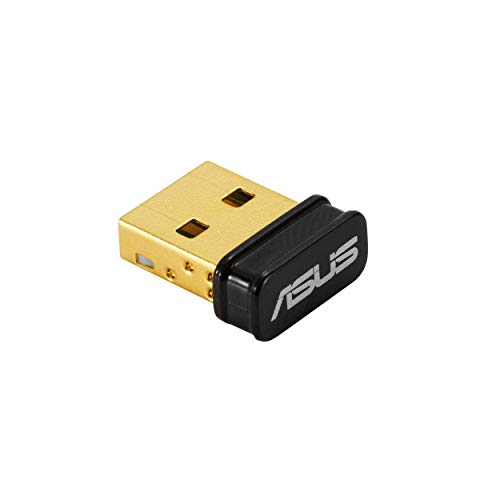
ASUS USB-BT500 Bluetooth 5.0 USB Adapter
Range extends to a claimed 50 feet outdoors on this Bluetooth 5.0 adapter, longer than most nano-style competitors. A bundled USB extension cable moves the dongle away from case interference that can weaken signal. Multiple Bluetooth devices can stay paired simultaneously without dropping the connection.
Pros
- Longer rated range than typical nano adapters
- Included extension cable reduces USB port interference
- Supports multiple simultaneous device pairings
Cons
- Housing is larger than nano-style competitors
- Driver setup sometimes needs a manual download

Avantree DG60 Bluetooth 5.0 USB Audio Adapter
Wireless headphone audio without lag is the focus here, aimed at PC gamers in voice chat or fast matches. aptX Low Latency support keeps two Bluetooth audio connections running at once. A physical toggle switches between low-latency gaming mode and standard listening mode.
Pros
- Noticeably lower audio lag during gameplay
- Streams audio to two devices at the same time
- Physical switch toggles latency mode instantly
Cons
- Built for audio, not ideal for mice or keyboards
- Full features need Windows-specific software

UGREEN Bluetooth 5.3 USB Adapter for PC
Bluetooth 5.3 brings better power efficiency and steadier connections than the older 5.0 standard. LE Audio support can extend battery life on compatible headphones. Plug and play detection skips extra software on most Windows 10 and 11 systems.
Pros
- Newer 5.3 standard improves power efficiency
- Plug and play setup with no extra software
- LE Audio support pairs well with newer headphones
Cons
- No macOS driver listed on the product page
- Fewer long-term owner reviews than older models
Cable Matters Bluetooth 5.3 USB Adapter
Lower pricing sets this Bluetooth 5.3 adapter apart from name-brand competitors offering similar specs. Basic tasks like connecting a mouse, keyboard or single audio device work without hassle. Power draws directly from the USB-A port, so no extension cable is needed.
Pros
- Costs less than comparable Bluetooth 5.3 adapters
- Plugs in and works with no extra setup
- Compact size fits tight port spacing
Cons
- Ships with fewer accessories than competitors
- Multi-device pairing is more limited than premium models

Plugable USB-BT4LE Bluetooth 4.0 Low Energy Micro Adapter
Years on the market have proven this adapter’s compatibility, with support listed back to Windows 7 for older office or workshop PCs. A Broadcom chipset keeps the footprint small, barely extending past the USB port. Bluetooth 4.0 covers basic peripherals but skips the range gains of newer versions.
Pros
- Wide OS compatibility reaching back to older Windows versions
- Small, low-profile design
- Long track record with many owner reviews
Cons
- Bluetooth 4.0 offers less range and speed than 5.x models
- Not ideal for high-bandwidth audio codecs

TP-Link UB400 Bluetooth 4.0 Nano USB Adapter
Nano-sized like its UB500 sibling, this adapter uses the older Bluetooth 4.0 standard at a lower price point. Basic tasks such as pairing a wireless mouse or keyboard suit it better than high-fidelity audio streaming. Its shell sits nearly flush against a laptop body.
Pros
- Very compact nano housing
- Simple driver installation on Windows
- Lower cost than Bluetooth 5.0 alternatives
Cons
- Shorter range than Bluetooth 5.0 models
- Not suited to high-quality wireless audio codecs
Side by side
| # | Model | Bluetooth version | Best for | Score | Price |
|---|---|---|---|---|---|
| 1 | TP-Link UB500 Bluetooth 5.0 Nano USB Adapter | 5.0 | Best overall | 9.4 | Check price |
| 2 | ASUS USB-BT500 Bluetooth 5.0 USB Adapter | 5.0 | Best value | 9.1 | Check price |
| 3 | Avantree DG60 Bluetooth 5.0 USB Audio Adapter | 5.0 | Best for gaming | 8.9 | Check price |
| 4 | UGREEN Bluetooth 5.3 USB Adapter for PC | 5.3 | Best for audio streaming | 8.6 | Check price |
| 5 | Cable Matters Bluetooth 5.3 USB Adapter | 5.3 | Best budget | 8.4 | Check price |
| 6 | Plugable USB-BT4LE Bluetooth 4.0 Low Energy Micro Adapter | 4.0 | Best for legacy Windows PCs | 8.2 | Check price |
| 7 | TP-Link UB400 Bluetooth 4.0 Nano USB Adapter | 4.0 | Best compact pick | 8.0 | Check price |
What to look for
How does a USB Bluetooth adapter work with a PC? A USB Bluetooth adapter adds wireless radio hardware to a desktop or laptop missing it from the factory. Plugging into a USB-A port, the dongle pairs with a chipset driver that either loads automatically or requires a download. Once installed, the PC can connect wireless mice, keyboards, headphones and speakers much like a phone does. Desktops without motherboard Bluetooth benefit most, since aging internal antennas on laptops sometimes lose radio performance over time.
Bluetooth 5.0 vs 5.3: what changes for PC use? TP-Link’s UB500 and the ASUS USB-BT500 both run Bluetooth 5.0, enough for most peripherals and casual audio use. UGREEN’s adapter and the Cable Matters model step up to Bluetooth 5.3, adding LE Audio support and better power efficiency. Chipset quality tends to matter more than version number for day-to-day reliability. Bluetooth 4.0 adapters, including the Plugable USB-BT4LE and TP-Link UB400, still handle mice and keyboards but offer shorter range.
Which adapter fits gaming, streaming, or an older PC? Wireless headset users chasing low latency should weigh chipset features over raw Bluetooth version, which is why the Avantree DG60 leans on aptX Low Latency rather than a 5.3 label. Anyone streaming music or podcasts gains from LE Audio support, found on the UGREEN adapter in this lineup. Offices still running Windows 7 or 8.1 need broad OS compatibility, where the Plugable USB-BT4LE has an edge. Budget buyers who only need basic peripheral pairing can skip audio-focused features and choose the Cable Matters or TP-Link UB400 instead.
What causes Bluetooth range and connection problems? USB 3.0 ports, metal PC cases and nearby Wi-Fi routers can all shrink real-world range well below the number on the box. Built-in motherboard Bluetooth sometimes conflicts with a USB adapter, so disabling one in Device Manager often clears up pairing failures. Outdated drivers can cause audio stutter or mouse lag even under Windows 11. Moving the adapter away from case interference, as the ASUS USB-BT500’s bundled extension cable does, often improves stability.
Frequently asked questions
What Bluetooth version should I look for in a PC adapter?
Bluetooth 5.0 covers most mice, keyboards and headphones with solid range. Version 5.3 adds LE Audio and better power efficiency, useful for newer wireless headphones. Bluetooth 4.0 still works but supports fewer profiles and shorter range.
Can I use a Bluetooth adapter if my PC already has Wi-Fi?
Yes, Wi-Fi and Bluetooth run on separate radios, so a USB adapter works fine alongside a Wi-Fi card. Combo cards include both, but a dedicated adapter can still add features like LE Audio or lower latency.
Which adapter works best for wireless gaming headsets?
Avantree’s DG60 targets gaming audio specifically, using aptX Low Latency to cut lag during voice chat and matches. Standard Bluetooth 5.0 adapters can work too, though they may introduce noticeable delay in fast-paced games.
Do Bluetooth adapters work on older Windows 7 or 8.1 PCs?
Some do. The Plugable USB-BT4LE and TP-Link UB400 both list support back to Windows 7 or 8.1. Newer Bluetooth 5.3 adapters often support only Windows 10 and 11.
How far can a USB Bluetooth adapter reach?
Listed ranges run from about 20 feet on Bluetooth 4.0 models up to 50 feet on adapters like the ASUS USB-BT500. Walls, metal cases and USB 3.0 interference typically cut real-world range below the listed figure.
Is a nano Bluetooth adapter better than a full-size one?
Nano adapters like the TP-Link UB500 and UB400 sit nearly flush against a laptop, lowering snag risk while traveling. Full-size adapters, such as the ASUS USB-BT500, sometimes include an extension cable that improves range by moving the antenna away from the case.
What is the real difference between Bluetooth 5.0 and 5.3 on a PC?
Bluetooth 5.3 improves power efficiency and adds LE Audio support for compatible headphones and earbuds. Bluetooth 5.0 stays reliable for mice, keyboards and standard audio, and most current software does not require 5.3 specifically.
Can one adapter connect to multiple devices at once?
Most adapters here support multiple simultaneous pairings for peripherals like a mouse and keyboard. The Avantree DG60 goes further, supporting two simultaneous Bluetooth audio connections so two people can listen on separate headphones.
Do I need a Bluetooth adapter for a desktop gaming PC?
Most desktop motherboards skip Bluetooth entirely unless a Wi-Fi combo card is installed. A USB adapter fills that gap without opening the case, and low-latency models like the DG60 suit gaming audio specifically.
The bottom line
TP-Link’s UB500 remains the safest default for dependable Bluetooth 5.0 performance without driver headaches. Gamers chasing low latency audio should look at the Avantree DG60, while the Cable Matters adapter covers basic peripheral needs on a tight budget. Matching the adapter to your actual use case beats chasing the newest Bluetooth version alone.


