How to Choose a Laptop for Work Travel and Meetings
The Lenovo ThinkPad X1 Carbon Gen 12 leads this comparison for keyboard feel, weight and repairable parts. Apple’s MacBook Air with M4 wins on battery life and silent operation. HP’s EliteBook 840 G11 fits organizations that need to manage a whole fleet of laptops remotely.
The Lenovo ThinkPad X1 Carbon Gen 12 is the business laptop worth choosing overall. Battery life and silent operation go to the Apple MacBook Air with M4. IT departments managing many machines should look at the HP EliteBook 840 G11 first.
A laptop spec sheet says little about keyboard feel, hinge rigidity or whether a broken part can be swapped without shipping the whole machine away. We compared seven current models on weight, keyboard travel, ports and docking, security hardware, serviceability and stated battery life, then weighed those against what owners report about throttling, coil whine and long term keyboard wear.
How to pick the right one
Why does keyboard quality matter more than the spec sheet? Anyone who writes for hours touches the keyboard more than any other component, yet no spec sheet describes it well. Around 1.5mm of travel with a firm bottoming out is the general target. A rigid deck matters just as much, since a flexing base makes even a good switch feel mushy.
How much do docking and port selection change daily use? Thunderbolt or USB-C docking lets one cable carry monitors, Ethernet, keyboard and power, which is the single biggest quality of life gain for desk and travel work. Check how many external displays a machine supports and at what refresh rate. Built in HDMI and Ethernet save carrying adapters on the road.
Which security and serviceability features are worth checking for? A TPM module, a fingerprint reader and an infrared camera for face sign in are standard on business machines and rare on consumer ones. Whether the machine opens matters just as much. A replaceable battery, an accessible M.2 slot and a published service manual keep a laptop useful through several users, while a sealed design becomes disposable once the battery degrades.
How much should you trust stated battery life? Manufacturer battery figures come from light conditions that rarely match a working day of video calls, a bright screen and a dozen open applications. Roughly half to two thirds of the stated figure is a realistic expectation under real use. Apple silicon machines land closer to their claims than most, since they avoid aggressive fan and boost cycles to stay responsive.
The top picks, ranked

Lenovo ThinkPad X1 Carbon Gen 12
This ThinkPad still sets the reference for business laptops, with real key travel, a hinge that will not wobble on a train table, and a published service manual covering battery and drive swaps. Weighing under 2.5 pounds with a carbon fibre lid, it survives a bag better than that weight suggests. Its engineering carries a price premium.
Pros
- Keyboard travel and feel lead the category
- Light yet durable in daily transport
- Documented, serviceable internal parts
Cons
- Expensive for its raw specification
- Speakers are weak for media playback

Apple MacBook Air 13 with M4
No fan means silent operation for anyone whose work does not require Windows only software. Sustained loads stay cool, and a full working day away from an outlet is realistic. Port count is the tradeoff, so a dock becomes necessary at a desk.
Pros
- Long stated battery life
- Fully silent fanless design
- Strongest display in this comparison
Cons
- Only two Thunderbolt ports without a dock
- No user upgradeable memory or storage

HP EliteBook 840 G11
IT departments get what they typically ask for here: firmware level security, remote management, a predictable dock ecosystem and a chassis that stays consistent across generations. Accessories carry over between models as a result. Its keyboard trails the ThinkPad slightly, but this remains the safer institutional pick over the more exciting one.
Pros
- Strong firmware and remote management features
- Consistent chassis simplifies accessory planning
- Good keyboard and a large trackpad
Cons
- Heavier than the lightest ultraportables
- Preinstalled management software adds overhead
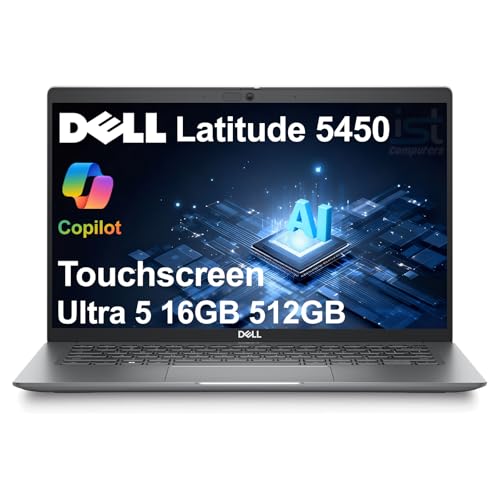
Dell Latitude 5450
Maintenance drives this design, from an accessible bottom panel to replaceable memory in most configurations. A serviceable battery and long term parts availability keep it usable through several owners. Thicker and plainer than premium rivals, that plainness is exactly the point.
Pros
- Genuinely easy to open and service
- Wired Ethernet built in, no dongle needed
- Long term parts availability
Cons
- Thicker and heavier than premium rivals
- Display quality is average for the class

ASUS ExpertBook B9 B9403
Barely over two pounds, this is the lightest full function business laptop in the group, and its magnesium lithium alloy chassis feels stiffer than that weight implies. Two Thunderbolt ports plus HDMI and Ethernet sit built into the body, so dongles can stay home. Shallower key travel than the ThinkPad is the compromise for the thinness.
Pros
- Lightest machine in this comparison
- Ethernet and HDMI built into the body
- Stiff chassis despite very low weight
Cons
- Shallow key travel next to rivals
- Smaller battery than the class average

Lenovo ThinkPad T14 Gen 5
Trading carbon fibre and thinness for a lower price, more ports and easier internal access, this ThinkPad keeps the same keyboard design as the X1 Carbon. Desk bound workers who travel occasionally get a better set of compromises here. Sustained loads also run cooler than on the thinner models.
Pros
- Same excellent ThinkPad keyboard
- Better sustained performance than thinner models
- Upgradeable memory on most configurations
Cons
- Noticeably heavier than the X1 Carbon
- Chassis is plainer and less rigid

Acer TravelMate P4 TMP414
Business basics show up here: a fingerprint reader, a full port selection including Ethernet, a durability rated chassis and business grade driver support. Keyboard feel and display quality trail the premium machines in this list. A small business buying its first fleet gets a reasonable compromise for the price.
Pros
- Full business port selection including Ethernet
- Security hardware at an accessible price
- Durability rated chassis
Cons
- Display brightness and colour are average
- Keyboard feel trails the premium options
The lineup, side by side
| # | Model | Weight | Best for | Score | Price |
|---|---|---|---|---|---|
| 1 | Lenovo ThinkPad X1 Carbon Gen 12 | Around 2.4 pounds | Best overall | 9.4 | Check price |
| 2 | Apple MacBook Air 13 with M4 | Apple M4 | Best value | 9.2 | Check price |
| 3 | HP EliteBook 840 G11 | About 2.9 pounds | Best for IT managed fleets | 9.0 | Check price |
| 4 | Dell Latitude 5450 | About 3.1 pounds | Best for repairability | 8.8 | Check price |
| 5 | ASUS ExpertBook B9 B9403 | Around 2.2 pounds | Best for travel | 8.6 | Check price |
| 6 | Lenovo ThinkPad T14 Gen 5 | About 3.0 pounds | Best for daily workhorse duty | 8.3 | Check price |
| 7 | Acer TravelMate P4 TMP414 | About 3.1 pounds | Best budget | 8.0 | Check price |
Good to know
What actually makes a laptop a business laptop?
Four things stand out: a sturdier keyboard and chassis than consumer models, security hardware like a TPM and fingerprint reader, IT manageability for remote deployment, and long term parts and driver support. Consumer laptops with similar processors typically lack all four, which explains most of the price gap.
How much RAM does a business laptop need?
Sixteen gigabytes covers a browser with many tabs, a video call and office apps at once. Thirty two gigabytes suits developers, analysts with large datasets and anyone running virtual machines. Soldered memory cannot be added later, so buy for future needs up front.
Is a MacBook a reasonable choice for business use?
For most knowledge work, yes, and battery life plus silence are real advantages. Some enterprise line of business software, accounting packages and industry specific tools remain Windows only though. Mac fleet management has improved but still runs on a separate track from Windows management.
Do you need a dedicated graphics chip for business work?
Only for specific tasks such as 3D modelling, video editing or GPU accelerated data science. Office work, browsing and video calls run fine on integrated graphics, with better battery life and a quieter machine as the reward. Discrete graphics bring a heavier chassis and audible fans.
How many years should a business laptop last?
Based on specifications and what owners report, four to six years is realistic for a premium business machine, longer than the three to four typical of consumer models. Batteries usually need replacing first, which is why serviceability affects the total cost over that span.
Is a 14 inch or 15 inch screen better for work?
Fourteen inches at a 16 by 10 aspect ratio has become the standard, balancing portability against usable space for documents and spreadsheets. Fifteen and sixteen inch machines suit people who rarely travel and want a second window visible. Aspect ratio matters more than diagonal size for document work.
What should you look for in a laptop docking station?
Match the dock to the laptop’s port standard, since a Thunderbolt dock on a USB-C only machine runs at reduced capability. Check how many displays and what resolution the laptop itself supports, not just the dock’s rating. Power delivery wattage should meet or exceed the laptop’s charger.
Are refurbished business laptops worth buying?
Often, especially premium models a generation or two old, which tend to have better keyboards and chassis than new budget machines. Check stated battery health, remaining warranty and whether a previous management enrolment has been cleared, since an enrolled machine can be hard to reconfigure.
Our take
The Lenovo ThinkPad X1 Carbon Gen 12 remains the pick for most buyers, since keyboard feel, chassis rigidity and documented serviceability matter across years of daily use. Work that is not tied to Windows favors the Apple MacBook Air with M4 for its battery life and silent operation. Organizations deploying at scale should look at the HP EliteBook 840 G11 for its management and firmware security features.