Pocket Power: Compact Handheld Consoles Worth Carrying
The Steam Deck OLED takes the top spot for most people. It plays your entire Steam library in a package that is surprisingly light and comfortable. Its main limitation is battery life under heavy games, often around three hours.
Compact handheld consoles have come a long way. Modern devices pack serious power into small frames. Some focus on retro emulation, others on streaming, and a few on full AAA gaming. The right pick depends on what you play and where you take it.
We looked at seven current models that balance portability with performance. Each has its own strengths, from pocket-friendly size to massive game catalogs. Read on to find the one that fits your gaming style.
The top picks, ranked

Steam Deck OLED
The Steam Deck OLED refines the original with a vibrant HDR screen and longer battery life. It runs thousands of Steam games natively. Owners praise its comfortable grips and quiet fans. The trackpads add precision for strategy titles. It is heavier than dedicated retro handhelds, but the power is unmatched.
Pros
- Vast game library
- Excellent OLED display
- Comfortable ergonomics
Cons
- Bulky for small pockets
- Battery drains fast on heavy games

Nintendo Switch (OLED Model)
The Switch OLED remains a top choice for its exclusive games and hybrid design. It works as a handheld or a home console. The 7 inch OLED screen is a big upgrade over the original. Joy-Con controllers detach for tabletop mode. Its library includes Mario, Zelda, and countless indies. For many, this is the only console they need.
Pros
- Exclusive Nintendo games
- Hybrid TV and handheld
- Great for local multiplayer
Cons
- Lower resolution than rivals
- Joy-Con drift reports

ASUS ROG Ally
The ROG Ally runs full Windows 11, so it works with Game Pass, Epic, and Battle.net. Its 120Hz screen is smooth and bright. The AMD Z1 Extreme chip delivers solid performance. Owners like the crisp display and responsive controls. The main downside is shorter battery life under load, often under two hours. It also runs hot, but the fans keep it manageable.
Pros
- Full Windows compatibility
- High refresh screen
- Strong performance
Cons
- Short battery life
- Runs warm
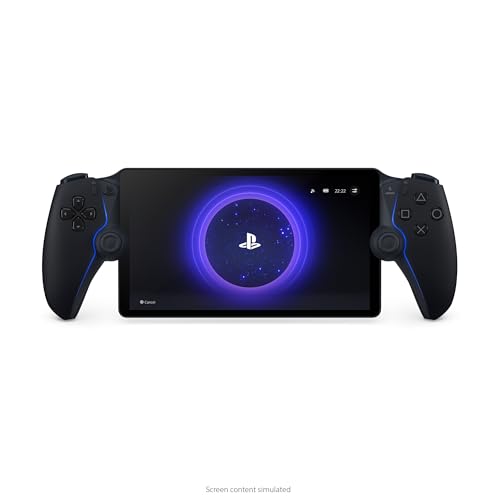
PlayStation Portal
The PlayStation Portal is a dedicated remote play device for PS5. It streams your games over Wi Fi, so you can play from another room. The 8 inch LCD is sharp and the DualSense features are built in. It is not a standalone console; it requires a PS5 and a stable network. Owners report it works well on home Wi Fi, but lag appears on congested networks.
Pros
- Excellent DualSense haptics
- Large screen
- Seamless PS5 integration
Cons
- Requires PS5
- No Bluetooth audio

Anbernic RG35XX Plus
The RG35XX Plus is a pocket sized emulation machine. It runs games from PSP, PS1, and older systems. The 3.5 inch IPS screen is adequate for classic titles. Owners appreciate the easy setup and community support. It lacks analog sticks, so 3D games are tricky. For retro enthusiasts, it delivers great value.
Pros
- Very affordable
- Plays many retro systems
- Compact and light
Cons
- No analog sticks
- Build quality feels budget

Logitech G Cloud
The Logitech G Cloud is built for cloud gaming services like Xbox Cloud Gaming and GeForce NOW. It has a bright 7 inch display and long battery life. The controls are comfortable for extended sessions. It runs Android, so you can also sideload emulators. Owners note that performance depends heavily on internet speed. It is not meant for local games, but for streaming it shines.
Pros
- Exceptional battery life
- Lightweight design
- Great for cloud gaming
Cons
- Requires strong Wi Fi
- No high end local gaming
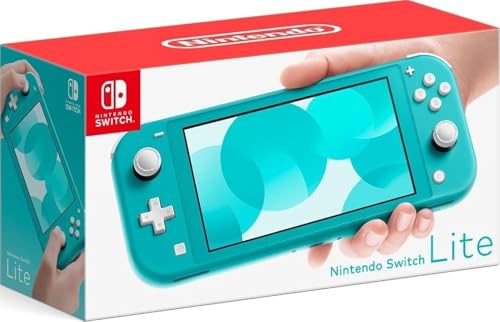
Nintendo Switch Lite
The Switch Lite is the most portable Switch model. It is smaller and lighter than the standard Switch. It cannot connect to a TV, but it plays the same game library in handheld mode. The controls are built in and feel solid. Owners love its pocket friendly size and lower price. The screen is not OLED, but it is clear and colorful.
Pros
- Very portable
- Accessible price
- Full Switch library
Cons
- No TV output
- Cannot detach controllers
What matters most
How they stack up
| # | Model | Screen | Best for | Score | Price |
|---|---|---|---|---|---|
| 1 | Steam Deck OLED | 7.4 inch OLED, 1280×800, 90Hz | AAA PC gaming on the go | 9.4 | Check price |
| 2 | Nintendo Switch (OLED Model) | 7 inch OLED, 1280×720 | Family friendly hybrid play | 9.1 | Check price |
| 3 | ASUS ROG Ally | 7 inch IPS, 1920×1080, 120Hz | Windows gaming and Xbox Game Pass | 8.9 | Check price |
| 4 | PlayStation Portal | 8 inch LCD, 1920×1080, 60Hz | Remote play for PS5 owners | 8.2 | Check price |
| 5 | Anbernic RG35XX Plus | 3.5 inch IPS, 640×480 | Retro emulation on a budget | 8.0 | Check price |
| 6 | Logitech G Cloud | 7 inch IPS, 1920×1080, 60Hz | Cloud gaming and streaming | 8.4 | Check price |
| 7 | Nintendo Switch Lite | 5.5 inch LCD, 1280×720 | Dedicated handheld players | 8.6 | Check price |
Frequently asked questions
What is the most compact handheld console?
The Anbernic RG35XX Plus is very pocket friendly at just 0.42 lbs. The Switch Lite is also compact for a mainstream console. Size often comes with trade offs in performance and screen size.
Can I play my existing games on a handheld?
It depends. The Steam Deck plays PC games from Steam. The ROG Ally plays Windows games from various stores. The Switch family plays physical and digital Switch games. For retro systems, emulation lets you play old cartridges if you have the ROMs.
How long does the battery last on these consoles?
Battery life varies. The Logitech G Cloud lasts up to 12 hours for streaming. The Switch OLED lasts 4.5 to 9 hours. The Steam Deck OLED lasts up to 8 hours for light use, but heavy games cut that to 3 hours. The ROG Ally lasts about 2 hours under load.
Are these consoles good for cloud gaming?
The Logitech G Cloud is designed for cloud gaming. The ROG Ally and Steam Deck can also stream through apps like Xbox Cloud Gaming. Performance depends on your internet connection and Wi Fi strength. A stable 5GHz network is recommended.
Do I need a separate controller for these handhelds?
No, all these devices have built in controls. Some models, like the Switch OLED, allow detachable Joy Cons. Others, like the Steam Deck, have integrated controls. You can connect external controllers via Bluetooth if you prefer.
Can I connect these handhelds to a TV?
The Nintendo Switch OLED can dock to a TV. The Steam Deck can connect via USB C to a display. The ROG Ally has a video output via USB C. The Switch Lite and Anbernic RG35XX Plus do not support TV output. The PlayStation Portal is purely handheld.
What is the best budget option?
The Anbernic RG35XX Plus is the most affordable, great for retro games. The Switch Lite is also budget friendly for a mainstream console. Both offer good value, but they have limitations in game compatibility.
Are these consoles suitable for kids?
The Switch family is very kid friendly with many age appropriate games. The Switch Lite is durable and simple. The Steam Deck and ROG Ally require more setup and are better for older teens. Retro emulation devices may have complicated menus.
How much storage do I need?
For retro emulation, 64GB is plenty. For modern games, you will want at least 512GB. The Steam Deck and ROG Ally have expandable microSD slots. The Switch also supports microSD. Game sizes can be large, so plan accordingly.
Which console has the best screen?
The Steam Deck OLED has a 90Hz OLED display with HDR, making it top tier. The Switch OLED also has a great OLED panel. The ROG Ally offers a high refresh LCD. For pure image quality, the Steam Deck OLED wins.
Final word
For most people, the Steam Deck OLED is the best compact handheld because it offers a massive library and top tier screen. If you are tied to Nintendo exclusives, get the Switch OLED. For a budget retro machine, the Anbernic RG35XX Plus is unbeatable. Choose based on your game collection and portability needs.


