Small Modems with Big Performance for Tight Spaces
For most people, the Motorola MG7700 is the best compact modem because it delivers solid DOCSIS 3.0 speeds and includes a built-in router in a small footprint. Its main advantage is the all-in-one design that saves space. The main limitation is that it lacks DOCSIS 3.1 support, which future-proofs against gigabit plans.
Finding a compact modem can be a challenge when you have limited space or need a portable solution for travel or an RV. Many full-size modems dominate your shelf or desk, but these smaller alternatives keep your setup tidy without sacrificing performance.
We compared seven compact modems that are currently sold on Amazon. Our selection includes options with built-in routers, pure modems, and travel-friendly designs. We focused on real user experiences and technical specifications to help you choose the right one.
What matters most
What we recommend

Motorola MG7700
The Motorola MG7700 is a compact all-in-one modem and router that supports DOCSIS 3.0. It is ideal for cable internet plans up to 600 Mbps. Its small size makes it easy to place in tight spots, and it includes four Gigabit Ethernet ports for wired connections.
Pros
- All-in-one saves space
- Reliable performance for mid-tier plans
- Easy setup
Cons
- No DOCSIS 3.1
- Router features are basic
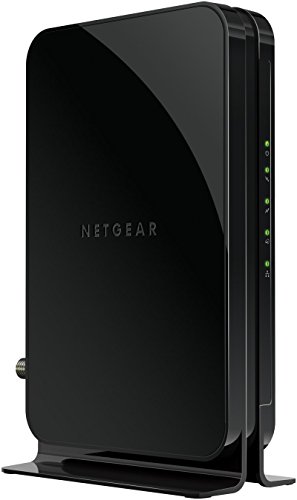
NETGEAR CM500
The NETGEAR CM500 is a small modem that delivers DOCSIS 3.0 speeds up to 680 Mbps. It is perfect for those who already have a separate router and want a compact modem that doesn’t take up much space. Its sturdy design and reliable performance make it a popular choice.
Pros
- Small footprint
- Excellent performance for DOCSIS 3.0
- Works with major cable providers
Cons
- No built-in router
- Requires separate router for Wi-Fi
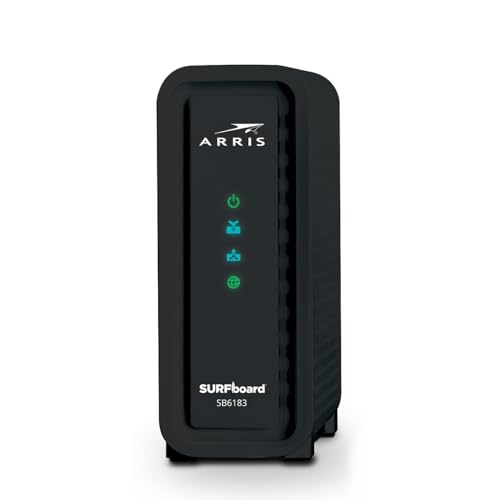
ARRIS Surfboard SB6183
The ARRIS Surfboard SB6183 is a compact modem that offers great value. It supports DOCSIS 3.0 and can handle internet plans up to 400 Mbps. It is known for its reliability and easy setup. Users appreciate its small size that fits anywhere.
Pros
- Affordable
- Proven reliability
- Compact design
Cons
- Lower max speed compared to others
- No router included

NETGEAR Nighthawk CM1200
The NETGEAR Nighthawk CM1200 is a DOCSIS 3.1 modem that is surprisingly compact given its advanced capabilities. It supports gigabit internet plans and features two Gigabit Ethernet ports for link aggregation. It is a bit larger than some but still fits well in most spaces.
Pros
- DOCSIS 3.1 future-proof
- Supports gigabit speeds
- Two Ethernet ports
Cons
- More expensive
- Slightly larger than pure compact options

TP-Link TC-7610
The TP-Link TC-7610 is a compact modem that offers straightforward performance. It is DOCSIS 3.0 and supports plans up to 300 Mbps. It is ideal for small apartments or dorms where space is at a premium and internet needs are modest.
Pros
- Very small footprint
- Easy to set up
- Budget-friendly
Cons
- Lower speed capability
- No built-in router
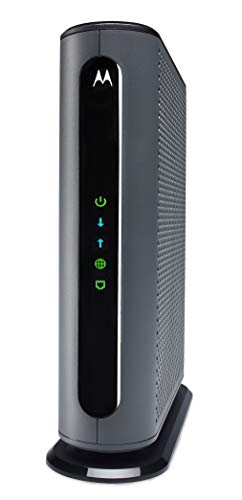
Motorola MB7621
The Motorola MB7621 is a compact modem that supports DOCSIS 3.0 and can handle plans up to 650 Mbps. It is small enough to fit in tight spaces, and its performance is highly rated by users. It is a pure modem, so you’ll need a separate router.
Pros
- Fast for DOCSIS 3.0
- Compact and durable
- Works with major providers
Cons
- No router built in
- Not DOCSIS 3.1

NETGEAR CM600
The NETGEAR CM600 is a compact modem that strikes a balance between size and performance. It supports DOCSIS 3.0 and can handle plans up to 960 Mbps (though it is recommended for 400 Mbps and below). It is a good choice for those with a separate router.
Pros
- High max speed for DOCSIS 3.0
- Small footprint
- Reliable performance
Cons
- Overkill for most plans
- No built-in router
The lineup, side by side
| # | Model | Dimensions | Best for | Score | Price |
|---|---|---|---|---|---|
| 1 | Motorola MG7700 | 6.3 x 2.2 x 5.1 inches | Best overall compact modem with built-in router | 9.4 | Check price |
| 2 | NETGEAR CM500 | 7.6 x 2.1 x 4.9 inches | Best compact pure modem for high speeds | 9.2 | Check price |
| 3 | ARRIS Surfboard SB6183 | 8.3 x 2.5 x 4.5 inches | Best compact modem for budget-conscious users | 9.0 | Check price |
| 4 | NETGEAR Nighthawk CM1200 | 8.9 x 2.3 x 5.4 inches | Best compact modem for gigabit plans | 8.8 | Check price |
| 5 | TP-Link TC-7610 | 4.8 x 1.7 x 4.8 inches | Best compact modem for simple setups | 8.6 | Check price |
| 6 | Motorola MB7621 | 7.5 x 2.2 x 4.9 inches | Best compact modem for high-speed cable plans | 8.4 | Check price |
| 7 | NETGEAR CM600 | 7.6 x 2.1 x 4.9 inches | Best compact modem for mid-tier cable plans | 8.2 | Check price |
Frequently asked questions
What is a compact modem?
A compact modem is a smaller-than-standard modem that provides internet connectivity. They are designed to save space and are often used in apartments, RVs, or desks with limited room.
Are compact modems slower than full-size modems?
No, compact modems can be just as fast as full-size modems. Speed is determined by the DOCSIS standard and the number of channels, not the physical size. Many compact modems support high speeds, including gigabit.
Can I use a compact modem with any internet provider?
No, you must check compatibility with your ISP. Most compact modems work with cable providers like Comcast Xfinity, Cox, or Charter Spectrum. They do not work with fiber or DSL services. Always verify with your ISP before purchasing.
Do compact modems have built-in Wi-Fi?
Some do, like the Motorola MG7700. Others are pure modems and require a separate router for Wi-Fi. Decide whether you want an all-in-one or a separate router based on your needs.
How do I know if a modem is compatible with my internet plan?
Check the modem’s maximum speed rating and compare it to your plan’s speed. Also, ensure the modem supports the DOCSIS standard used by your ISP. Most product listings include compatibility information.
Can I use a compact modem in an RV or for travel?
Yes, compact modems are great for RVs and travel because they take up little space. However, you need a cable internet connection at your location. Some campsites offer cable hookups that work with these modems.
What is the difference between DOCSIS 3.0 and DOCSIS 3.1?
DOCSIS 3.1 is newer and supports faster speeds and lower latency. It also allows for more efficient data transfer. DOCSIS 3.0 is older but still sufficient for many plans. For gigabit internet, DOCSIS 3.1 is recommended.
Do compact modems require professional installation?
No, you can install them yourself. Connect the modem to the cable outlet, attach it to your device or router, and activate it with your ISP. Most ISPs provide instructions or apps for activation.
How long do compact modems last?
With proper care, a modem can last several years. However, technology advances, and your ISP may upgrade its network. If you have a fast internet plan, you might need a newer modem to keep up.
Final word
If you want the best balance of size, performance, and convenience, choose the Motorola MG7700. It combines a reliable modem and router in a compact case, ideal for most homes. For those who already own a high-quality router, the NETGEAR CM500 offers excellent speeds in a small package at a lower cost. If you have gigabit internet, invest in the NETGEAR Nighthawk CM1200 for future-proofing. Avoid buying a modem that doesn’t match your internet speed, as you’ll waste money or miss out on performance.


