Compact Portable Monitors That Fit Any Bag
The ASUS ZenScreen MB16ACE is the top pick for most people because it balances a slim profile with a crisp 15.6 inch Full HD IPS display and USB-C connectivity. Its main advantage is the hybrid signal and power via a single USB-C cable, which simplifies setup. Its main limitation is that it lacks a built-in battery, so it draws power from the host device, which can drain a laptop faster.
A compact portable monitor turns your laptop into a dual screen setup wherever you go. These lightweight displays slip into a backpack and connect via USB-C or HDMI. They help you work spreadsheets, code, or edit photos on a larger canvas.
We compared top selling models based on specifications and user feedback. We focused on screens under 16 inches that are easy to carry. We also considered resolution, brightness, and connectivity options.
Before you buy
The shortlist, ranked

ASUS ZenScreen MB16ACE
The ASUS ZenScreen MB16ACE is a 15.6 inch Full HD IPS portable monitor that is only 0.3 inches thin and weighs 1.7 pounds. It connects via USB-C or USB-A with the included adapter, making it versatile for laptops and even some smartphones. The display is bright and color accurate, and the built in stand is a simple flap that folds out for landscape or portrait orientation. Owners praise its plug and play simplicity, though it lacks speakers and a battery.
Pros
- Slim and light design
- Hybrid signal and power via one cable
- Folds into a sturdy stand
Cons
- No built in battery
- No speakers
Lenovo ThinkVision M14t
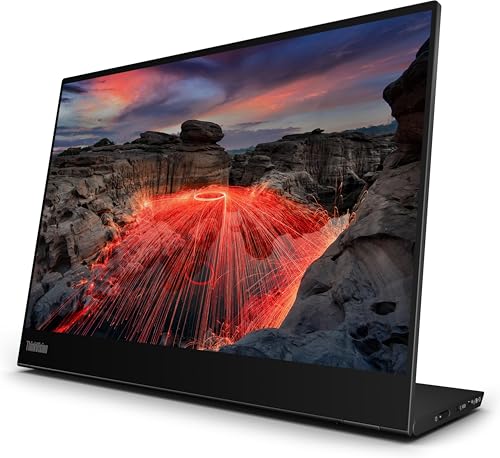
The Lenovo ThinkVision M14t is a 14 inch Full HD IPS monitor with 10 point touch and pen support. It has a sleek aluminum body and weighs just 1.3 pounds. The display has anti smudge coating and covers 72% NTSC color gamut. It connects via two USB-C ports, one for power and one for video, and can be used in portrait mode. Owners report that the touch response is accurate, making it great for note taking or design work. The main downside is the higher price and the need for an external power source for full brightness.
Pros
- Touch and stylus support
- Lightweight aluminum build
- Anti smudge screen
Cons
- Requires external power for full brightness
- Expensive
Lepow Z1 Gamut
The Lepow Z1 Gamut is a 15.6 inch Full HD IPS monitor that offers great value for the price. It has a 100% sRGB color gamut and 178 degree viewing angles. The monitor is slim and lightweight at 1.9 pounds, and it comes with a smart cover that doubles as a stand. It has both mini HDMI and USB-C inputs, giving you flexibility with older laptops or game consoles. Owners appreciate the low cost and good color accuracy, but the built in speakers are weak and the stand can be flimsy.
Pros
- Affordable price
- Good color accuracy
- Multiple connectivity options
Cons
- Weak speakers
- Stand may be unstable

ViewSonic VG1655
The ViewSonic VG1655 is a 15.6 inch Full HD IPS monitor designed for productivity. It features dual HDMI and USB-C ports, allowing you to connect two devices at once. The monitor includes a kickstand that supports multiple angles and a carrying case. It has built in dual speakers and a headphone jack. The display is bright and sharp, with a flicker free technology to reduce eye strain. Owners like the flexibility of inputs but note that the monitor is a bit heavier at 2.6 pounds.
Pros
- Dual HDMI and USB-C ports
- Built in speakers
- Flicker free screen
Cons
- Heavier than some competitors
- Speakers are not very loud

UPERFECT Portable Monitor 15.6 inch
The UPERFECT Portable Monitor is a 15.6 inch Full HD IPS display that is marketed for dual screen setups. It has a slim profile and weighs 1.9 pounds. It comes with a smart cover that can fold into a stand. It offers both mini HDMI and USB-C connectivity, and it supports VESA mounting. The monitor has a blue light filter and anti glare coating. Owners report that it works well as a secondary screen, but the color accuracy is not as high as more expensive models.
Pros
- Affordable for the size
- VESA mountable
- Blue light filter
Cons
- Color accuracy is average
- No speakers

ASUS ZenScreen MB16ACV
The ASUS ZenScreen MB16ACV is a 15.6 inch Full HD IPS monitor that is very similar to the MB16ACE but with a different stand design. It comes with a foldable kickstand that is more stable than the flap style. It weighs 1.6 pounds and is 0.3 inches thick. It connects via USB-C and also has a micro HDMI port, giving you extra flexibility. The display is bright and has a matte finish to reduce glare. Owners enjoy the sturdy stand and the two cable options, but it still lacks a battery.
Pros
- Stable kickstand
- Micro HDMI port
- Lightweight
Cons
- No built in battery
- No speakers

Arzopa Z1FC 15.6 inch
The Arzopa Z1FC is a 15.6 inch Full HD IPS monitor that is a popular choice for gamers. It has a 60Hz refresh rate and a 5ms response time, which is decent for casual gaming. The monitor has two USB-C ports and one mini HDMI, allowing you to connect to a laptop, phone, or console. It includes a smart cover that acts as a stand. The color gamut covers 72% NTSC, which is adequate. Owners report that it works well with the Nintendo Switch and PS4, but the built in speakers are poor.
Pros
- Good for gaming
- Multiple inputs
- Slim design
Cons
- Speakers are weak
- Not the brightest screen
Compared at a glance
| # | Model | Screen Size | Best for | Score | Price |
|---|---|---|---|---|---|
| 1 | ASUS ZenScreen MB16ACE | 15.6 inches | Best overall for most users | 9.4 | Check price |
| 2 | Lenovo ThinkVision M14t | 14 inches | Best for touch screen and stylus users | 9.1 | Check price |
| 3 | Lepow Z1 Gamut | 15.6 inches | Best budget pick | 8.8 | Check price |
| 4 | ViewSonic VG1655 | 15.6 inches | Best for productivity with dual inputs | 8.6 | Check price |
| 5 | UPERFECT Portable Monitor 15.6 inch | 15.6 inches | Best for dual screen setup with two monitors | 8.5 | Check price |
| 6 | ASUS ZenScreen MB16ACV | 15.6 inches | Best for travelers who need a sturdy stand | 8.9 | Check price |
| 7 | Arzopa Z1FC 15.6 inch | 15.6 inches | Best for gaming consoles and laptops | 8.3 | Check price |
Good to know
Can I use a compact portable monitor with my phone?
Yes, if your phone supports USB-C video output (DisplayPort Alt Mode) or you have an adapter. Many monitors work with Samsung DeX and other phone desktop modes. Check the monitor’s specifications for compatibility.
Do portable monitors need a battery?
No, most portable monitors do not have a built in battery. They are powered through the USB-C or HDMI connection. Some models offer an optional battery, but they are heavier and less common.
Can I use a portable monitor for gaming?
Yes, but look for a monitor with a higher refresh rate (at least 60Hz) and a low response time. Most portable monitors are 60Hz, which is fine for casual gaming. For fast paced games, consider a model with 144Hz if available.
What is the difference between USB-C and USB-A connections?
USB-C carries video and power in one cable, making it easier. USB-A only carries data and power, so you need a special adapter for video. Most modern laptops have USB-C, but older ones may only have USB-A.
How do I set up dual monitors with a laptop?
Connect the portable monitor to your laptop via USB-C or HDMI. Your operating system should detect it automatically. You can then choose to extend or duplicate your display in the display settings.
Are portable monitors good for photo editing?
Some are, but look for one with high color accuracy, such as 100% sRGB or Adobe RGB coverage. Budget monitors may have lower color accuracy. Calibration is also important for professional work.
Do portable monitors come with a carrying case?
Many models include a smart cover that acts as a protective case and a stand. Some come with a separate sleeve. Check the product description to see what is included.
Can I connect a portable monitor to a game console?
Yes, if the monitor has an HDMI input. Many consoles like the Nintendo Switch work well with portable monitors. However, the monitor may not support HDCP for some streaming services, so check the specs.
Final word
For most people, the ASUS ZenScreen MB16ACE is the best compact portable monitor. It offers a winning combination of portability, display quality, and ease of connection. If you need touch support and are willing to spend more, the Lenovo ThinkVision M14t is a great choice. On a tight budget, the Lepow Z1 Gamut delivers solid performance without breaking the bank.


