Computer Cases With USB-C Ports for Every Builder
The Fractal Design North stands out as the top choice for most builders because it wraps premium materials around excellent airflow and includes a front USB-C port. Its main limitation is the reduced space for large radiators compared to full-tower cases.
Modern motherboards and peripherals increasingly rely on USB-C, making a front-panel port a must-have for convenient connections. Computer cases with USB-C let you plug in fast storage, VR headsets, and modern phones without reaching around the back.
We analyzed top-selling cases that include USB-C on their front I/O panels. Our focus is on real-world usability, thermal performance, and build quality, drawing from detailed specifications and owner reports.
The best picks, ranked

Fractal Design North Charcoal Black
The Fractal Design North stands out with its elegant wood front panel and mesh side option. It includes a USB-C 3.2 Gen 2 port, excellent airflow, and a spacious interior for most builds.
Pros
- Stunning design with real wood accents
- Excellent airflow with included fans
- Tool-free panels for easy access
Cons
- Limited radiator support in top
- Only two fans included

NZXT H7 Flow (2024)
The NZXT H7 Flow (2024) is a refined mid-tower with a perforated top and front for unrestricted airflow. Its front I/O includes a USB-C port, and the interior offers excellent cable management channels.
Pros
- Outstanding thermal performance
- Spacious interior for large GPUs
- Clean cable management with integrated channels
Cons
- Glass side panel is standard, not optional
- No PWM fan hub included

Corsair 4000D Airflow
The Corsair 4000D Airflow is a beloved case for its straightforward design and solid airflow. The front panel includes a USB-C 3.2 Gen 2 port, and the interior is easy to build in.
Pros
- Excellent build quality for the price
- Easy cable management with velcro straps
- Perforated front enhances airflow
Cons
- Only two fans included
- Top radiator clearance is limited

Lian Li Lancool 216
The Lian Li Lancool 216 comes with two massive 160 mm front fans and a 140 mm rear fan, providing exceptional out-of-the-box cooling. It features a front USB-C port and a mesh front panel for maximum airflow.
Pros
- Included high-performance fans
- Great cooling performance
- Tool-free fan mounting
Cons
- Bulkier design may not suit all tastes
- Plastic front clips can feel flimsy

Phanteks Eclipse G500A
The Phanteks Eclipse G500A is a mid-tower with a sleek aesthetic and optional RGB fans. It includes a USB-C port on the top panel, a mesh front, and a hinged tempered glass side.
Pros
- Hinged glass door for easy access
- Supports up to 420 mm radiator in front
- Clean interior with many cable routing points
Cons
- RGB version is pricier
- Top USB ports are not angled

Cooler Master MasterBox TD500 Mesh V2
The Cooler Master MasterBox TD500 Mesh V2 features a distinctive diamond-cut mesh front and three ARGB fans. It includes a USB-C port, a tempered glass side, and a clean interior layout.
Pros
- Eye-catching front panel design
- Good airflow with mesh front
- Three ARGB fans included
Cons
- Cable management space is somewhat tight
- No fan controller included
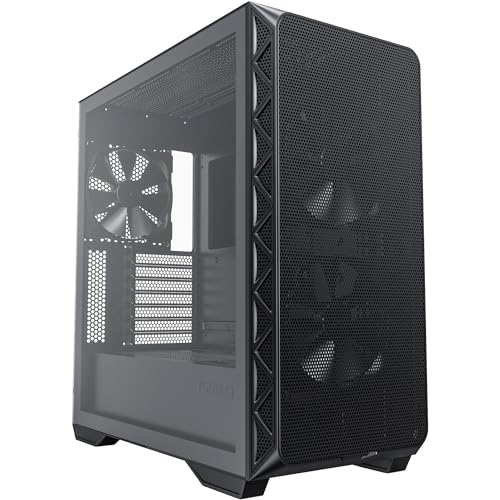
Montech AIR 903 Base
The Montech AIR 903 Base offers a mesh front, two 140 mm fans, and a front USB-C port at an aggressive price. It provides good airflow and a straightforward building experience for budget builders.
Pros
- Very affordable price point
- Good airflow with mesh front
- Includes two 140 mm fans
Cons
- Build quality is not as premium
- Limited cable management space behind motherboard
What to look for
Why USB-C on a PC Case Matters USB-C is becoming the standard for connecting modern devices. A front USB-C port makes it easy to plug in high-speed external SSDs, smartphones, and VR headsets without reaching behind your desk. When choosing a case, check the USB-C version (usually 3.2 Gen 2) to ensure fast transfer speeds up to 10 Gbps.
How to Choose the Right Case Size Case size determines compatibility with your motherboard and GPU. ATX mid-towers are the most popular because they fit standard ATX boards and offer plenty of room for GPUs and cooling. If you have an E-ATX motherboard or need multiple radiators, consider a full tower. Mini-ITX cases are compact but may limit GPU size and cooling options.
Airflow and Cooling Considerations Look for cases with mesh front panels and multiple fan mounts for optimal airflow. Cases that come with quality fans can save you money. Consider whether you plan to use air cooling or liquid cooling. If using an AIO, check radiator support in the top and front. Good airflow not only keeps components cool but also reduces fan noise.
Build Quality and Cable Management A well-designed case makes assembly easier. Look for features like tool-free panels, removable dust filters, and ample cable routing holes. Cable management space behind the motherboard is important for hiding cables and maintaining clean airflow. Check user reviews for any reports of sharp edges or flimsy materials.
How they stack up
| # | Model | Form Factor | Best for | Score | Price |
|---|---|---|---|---|---|
| 1 | Fractal Design North Charcoal Black | ATX Mid Tower | Best overall for stylish airflow with USB-C | 9.4 | Check price |
| 2 | NZXT H7 Flow (2024) | ATX Mid Tower | Best for high-airflow builds with roomy interior | 9.2 | Check price |
| 3 | Corsair 4000D Airflow | ATX Mid Tower | Best value with proven airflow design | 9.0 | Check price |
| 4 | Lian Li Lancool 216 | ATX Mid Tower | Best for cooling with large fans included | 9.1 | Check price |
| 5 | Phanteks Eclipse G500A | ATX Mid Tower | Best for RGB enthusiasts needing USB-C | 8.8 | Check price |
| 6 | Cooler Master MasterBox TD500 Mesh V2 | ATX Mid Tower | Best for unique style with solid airflow | 8.6 | Check price |
| 7 | Montech AIR 903 Base | ATX Mid Tower | Best budget option with USB-C and mesh | 8.4 | Check price |
Questions worth asking
Do all computer cases have USB-C ports?
No, not all cases have USB-C. Many budget and older cases only offer USB-A ports. If USB-C is essential, check the specifications before buying. Front USB-C ports are becoming more common on mid-range and high-end cases.
What is the difference between USB-C and USB-A?
USB-C is a newer connector that is reversible and supports higher power delivery and faster data transfer speeds. USB-A is the traditional rectangular connector. USB-C can also carry video signals and is used for charging many devices.
How fast is USB-C on a PC case?
Most cases with USB-C use USB 3.2 Gen 2, which supports data transfer speeds up to 10 Gbps. Some premium cases may use Thunderbolt or USB4, but that is rare. Standard USB-C ports are sufficient for most peripherals.
Can I connect a USB-C front panel to any motherboard?
No, you need a motherboard with a USB-C header. Most modern mid-range and high-end motherboards include at least one USB-C header. If your motherboard lacks one, you may need an adapter, but that can be inconvenient. Check your motherboard’s manual before buying a case.
What is the best airflow case with USB-C?
The NZXT H7 Flow and Lian Li Lancool 216 are top choices for airflow. They feature mesh fronts and come with high-quality fans. Both include front USB-C ports and have received positive feedback for cooling performance.
Are more fans always better?
Not necessarily. The type and placement of fans matter more than the quantity. A case with three well-designed fans can outperform one with five generic fans. Look for cases with large fans (140 mm or 160 mm) that move more air at lower noise levels.
Can I install a liquid cooler in a case with USB-C?
Yes, most cases with USB-C support liquid cooling. Check the radiator support in the specifications. For example, the Fractal Design North supports up to 240 mm in the top, while the Phanteks G500A can fit a 420 mm in the front. Ensure your AIO fits your case.
Do these cases include RGB fans?
Some do. The Phanteks Eclipse G500A and Cooler Master TD500 Mesh V2 include ARGB fans. Others like the Corsair 4000D and Fractal Design North come with non-RGB fans. If you want RGB, choose a case that includes them or plan to add your own.
What is the best budget case with USB-C?
The Montech AIR 903 Base is a great budget option. It includes a USB-C port, two 140 mm fans, and a mesh front at a low price. While the build quality is not as premium as more expensive cases, it offers good value for money.
How do I know if a case fits my GPU?
Check the maximum GPU length in the specifications and compare it to your graphics card’s length. Most cases list this clearly. For example, the Lian Li Lancool 216 supports GPUs up to 392 mm, which will fit virtually all consumer graphics cards.
Our pick
For most builders, the Fractal Design North is the case to get. It combines premium aesthetics with superb airflow and a front USB-C port, making it a worthy investment. If you are on a tighter budget, the Corsair 4000D Airflow provides excellent value without sacrificing essential features. Gamers who prioritize maximum cooling should consider the Lian Li Lancool 216 for its exceptional included fan setup.



