Computer Cases That Balance Airflow and Style
The Corsair 4000D Airflow is our top pick for most builders because it offers excellent thermal performance, a clean aesthetic, and tool-free panels at a reasonable price. Its main limitation is that it lacks front USB-C, which may matter to some users.
Choosing the right computer case is crucial for performance and aesthetics. A good case provides ample airflow, easy installation, and future upgrade options.
We compared seven best-selling cases from trusted brands to help you decide. From budget-friendly options to premium full-tower chassis, there’s a case for every build.
What matters most
What to Look for in a Computer Case Consider the motherboard form factor (ATX, Micro-ATX, Mini-ITX) to ensure compatibility. Also, check the maximum CPU cooler height and GPU length. Airflow is crucial; look for mesh fronts and multiple fan mounts. Aesthetically, decide between tempered glass, RGB, and color options.
Airflow vs. Silence Cases with mesh fronts and more fans offer better cooling but may be louder. Cases with sound-dampening materials and solid panels are quieter but can run warmer. Decide based on your hardware’s heat output and your noise tolerance.
Building Considerations Look for cable management features like rubber grommets and sufficient space behind the motherboard tray. Tool-free drive bays and removable dust filters make maintenance easier. Read reviews to gauge the ease of installation.
Compatibility Checks Ensure your power supply fits (check length), and that there are enough drive bays for your storage. Also, verify that your radiator size fits if using liquid cooling. Use PC part picker tools to double-check.
The shortlist, ranked

Corsair 4000D Airflow
The Corsair 4000D Airflow is a mid-tower case with a front mesh panel that delivers excellent airflow. It features a spacious interior, excellent cable management, and two included 120mm fans. Owners report easy building and quiet operation.
Pros
- Excellent airflow with mesh front
- Tool-free side panels
- Great cable management
Cons
- No front USB-C
- Only two fans included
Fractal Design Meshify 2
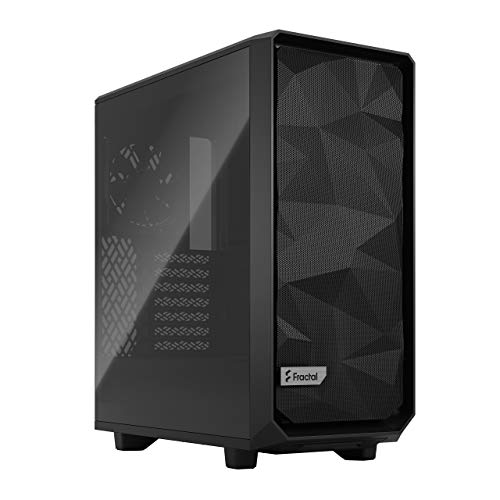
The Fractal Design Meshify 2 is a refined mid-tower with a distinctive angular mesh front. It offers outstanding airflow, versatile interior layout, and excellent build quality. It supports large radiators and multiple GPUs, making it ideal for enthusiast builds.
Pros
- Superb airflow and cooling
- Versatile interior with modular storage
- Premium build quality
Cons
- Higher price point
- Angular design not for everyone

Lian Li Lancool 216
The Lian Li Lancool 216 is a mid-tower that comes with two large 160mm front fans and a 140mm rear fan, providing impressive out-of-the-box cooling. It features a mesh front, tool-free panels, and a focus on airflow. Users note excellent thermal performance for the price.
Pros
- Three quality fans included
- Excellent airflow
- Great value for money
Cons
- Cable management space is tight
- Only available in black or white

NZXT H510 Flow
The NZXT H510 Flow takes the popular H510 design and adds a perforated front panel for improved airflow. It retains the clean, minimalist aesthetic with a tempered glass side panel. It’s a great choice for those who want a stylish case without sacrificing cooling.
Pros
- Clean, modern design
- Improved airflow over original H510
- Easy cable management
Cons
- No front USB-C
- Limited radiator support on top

Cooler Master MasterBox TD500 Mesh V2
The Cooler Master MasterBox TD500 Mesh V2 is a mid-tower with a diamond-cut mesh front and three pre-installed ARGB fans. It offers good airflow and a striking appearance. The case includes a controller for fan and RGB management.
Pros
- Three ARGB fans included
- Mesh front for airflow
- Integrated RGB controller
Cons
- No USB-C front port
- Glass side panel may show fingerprints

Phanteks Eclipse P400A
The Phanteks Eclipse P400A is an affordable mid-tower that doesn’t skimp on airflow. It features a mesh front and comes in versions with or without RGB fans. The interior is spacious enough for most builds, and owners appreciate the easy-to-clean dust filters.
Pros
- Very affordable
- Good airflow with mesh front
- Removable dust filters
Cons
- Only one fan included in non-RGB version
- No USB-C

Fractal Design North
The Fractal Design North is a unique mid-tower with an oak wood front panel that adds a touch of warmth. It offers good airflow through the mesh sides and a stylish interior. It’s perfect for those who want a case that stands out.
Pros
- Distinctive wood front design
- Excellent build quality
- Good airflow
Cons
- Limited GPU clearance
- Price is on the higher side
The lineup, side by side
| # | Model | Form Factor | Best for | Score | Price |
|---|---|---|---|---|---|
| 1 | Corsair 4000D Airflow | Mid Tower | Best overall airflow | 9.4 | Check price |
| 2 | Fractal Design Meshify 2 | Mid Tower | Best for high-end builds | 9.2 | Check price |
| 3 | Lian Li Lancool 216 | Mid Tower | Best value airflow | 9.0 | Check price |
| 4 | NZXT H510 Flow | Mid Tower | Best minimalist design | 8.6 | Check price |
| 5 | Cooler Master MasterBox TD500 Mesh V2 | Mid Tower | Best with ARGB fans | 8.8 | Check price |
| 6 | Phanteks Eclipse P400A | Mid Tower | Best budget airflow | 8.4 | Check price |
| 7 | Fractal Design North | Mid Tower | Best aesthetic with wood | 9.1 | Check price |
Common questions
What is the best computer case brand?
Corsair, Fractal Design, Lian Li, NZXT, and Cooler Master are all reputable brands. Each offers different strengths, such as airflow, aesthetics, or value.
How many fans should a computer case have?
At least two fans are recommended for a typical build. More fans can improve airflow, but diminishing returns occur beyond three or four properly placed fans.
Are full tower cases better than mid towers?
Full towers offer more space for E-ATX motherboards, multiple radiators, and many drives. However, they are larger and heavier. Mid towers are sufficient for most builds.
What is the difference between a mesh and glass front?
Mesh fronts allow better airflow, leading to lower temperatures. Glass fronts look sleek but restrict airflow, potentially causing higher temps.
Do computer cases come with fans?
Many cases include one to three fans. Higher-end cases may include more or premium fans. Check the product specifications to confirm.
How important is cable management?
Good cable management improves airflow and makes future upgrades easier. Cases with ample space behind the motherboard and velcro straps simplify the process.
Can I fit a large graphics card in any case?
No, you must check the maximum GPU length. Most mid towers support GPUs up to 350-400mm, but some smaller cases have shorter limits.
What is the best case for liquid cooling?
Cases with support for 360mm radiators in the front or top are ideal. Look for cases with good radiator mounting options and enough clearance.
Are tempered glass side panels safe?
Tempered glass is strong but can shatter if struck. Handle with care and avoid tightening screws excessively. Many cases offer alternative panels like acrylic.
How do I clean dust from my computer case?
Use compressed air to blow out dust from fans and filters. Removable filters can be washed with water. Regular cleaning every few months is recommended.
Our take
For most builders, the Corsair 4000D Airflow is the best choice, offering a balance of performance, features, and price. If you have a higher budget and want top-tier airflow and build quality, choose the Fractal Design Meshify 2. For those on a tight budget, the Phanteks Eclipse P400A delivers solid airflow without breaking the bank.