2.1 vs Stereo: Picking Computer Speakers That Fit Your Desk
The Logitech Z407 leads this ranking with balanced sound and a wireless control puck for volume and bass. The Creative Pebble V3 is the strongest budget pick. The Bose Companion 2 III gives the cleanest audio for everyday desktop listening.
The Logitech Z407 is the top overall pick for balanced sound and its handy wireless control puck. On a tight budget, the Creative Pebble V3 punches well above its size. For a tidy desk, the Bose Companion 2 III delivers the cleanest everyday audio.
Wattage specs rarely explain how a speaker actually sounds, and needs vary widely between a music listener, a gamer and someone stuck in back-to-back calls. We compared published specifications, driver and connection details, and patterns in what long-term owners report. Each set was then weighed on sound balance, connectivity, build quality and value, so a pick can match a desk instead of chasing the biggest number.
What we recommend

Logitech Z407
A compact 2.1 layout pairs with Bluetooth and a wireless control puck for volume and bass. Owners praise the full low end for such a small footprint. Multiple inputs make it easy to share between a phone and a laptop.
Pros
- Strong bass for a compact system
- Wireless control puck adjusts from anywhere
- Bluetooth plus wired inputs cover multiple devices
Cons
- Puck relies on a coin battery over time
- No dedicated headphone passthrough

Creative Pebble V3
USB-C power and Bluetooth fit into angled drivers built for crowded desks. Reviewers note it plays louder and clearer than its size suggests. Space and budget both stay tight without much sacrifice in sound.
Pros
- Very compact and desk-friendly
- USB-C power keeps cabling simple
- Angled drivers aim sound at the listener
Cons
- Limited low end without a subwoofer
- Not built for large rooms
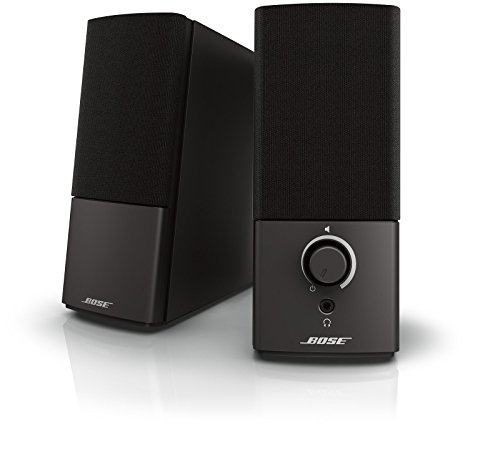
Bose Companion 2 III
Clear, natural sound takes priority over heavy bass for music, video and calls. Long-term owners describe an easy plug-and-play setup. A front headphone jack and volume knob keep daily use simple.
Pros
- Clean, balanced everyday sound
- Front headphone jack is genuinely handy
- Plug-and-play setup needs no software
Cons
- No Bluetooth or USB input
- Bass stays modest for gaming

Edifier G2000
RGB lighting and multiple sound modes lean into a gaming aesthetic. Bluetooth and USB inputs both cover modern sources. Owners appreciate the punchy tuning, though the lighting stays purely decorative.
Pros
- Punchy tuning suits games
- Bluetooth and USB cover modern sources
- Angled cabinets face the listener
Cons
- RGB adds little to the actual audio
- Bass can feel forward for music

Logitech Z313
A compact subwoofer adds warmth to a full 2.1 setup without dominating the desk. Owners describe it as dependable for everyday listening. A wired control pod is the only adjustment point.
Pros
- Adds a subwoofer at a low price point
- Compact, unobtrusive cabinet design
- Wired control pod is simple to use
Cons
- Only one 3.5mm input available
- No Bluetooth connectivity
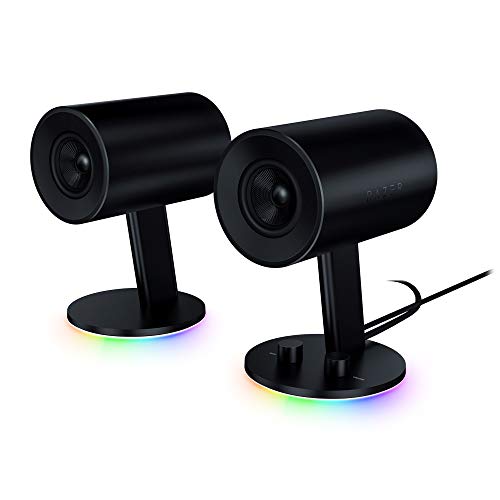
Razer Nommo
Larger drivers and rear-firing bass ports fill a room without a separate subwoofer. Reviewers note wide, open sound for movies and games. Cylindrical cabinets take up more desk space than smaller sets.
Pros
- Room-filling sound without a subwoofer
- Wide, open sound presentation
- Handles movies and games well
Cons
- Cabinets need real desk space
- No Bluetooth on the base model

Audioengine A2+
A built-in DAC and USB input target detailed, accurate playback in a compact powered set. Owners value the refined tuning for music. The premium build sits above what casual desktop users typically need.
Pros
- Detailed, accurate music playback
- Built-in USB DAC handles conversion
- Compact yet solid build quality
Cons
- Priced above casual desktop needs
- No wireless Bluetooth option
The lineup, side by side
| # | Model | Configuration | Best for | Score | Price |
|---|---|---|---|---|---|
| 1 | Logitech Z407 | 2.1 with subwoofer | Best overall | 9.4 | Check price |
| 2 | Creative Pebble V3 | 2.0 stereo | Best budget | 9.1 | Check price |
| 3 | Bose Companion 2 III | 2.0 stereo | Best for everyday desktop audio | 8.9 | Check price |
| 4 | Edifier G2000 | 2.0 stereo | Best for gaming | 8.7 | Check price |
| 5 | Logitech Z313 | 2.1 with subwoofer | Best for small setups | 8.5 | Check price |
| 6 | Razer Nommo | 2.0 full-range | Best full-range 2.0 | 8.3 | Check price |
| 7 | Audioengine A2+ | 2.0 powered stereo | Best for audiophiles | 8.1 | Check price |
What matters most
Which speaker configuration fits your desk? Stereo 2.0 sets keep things simple and save space. A 2.1 system adds a subwoofer for warmer bass that gamers and movie fans often prefer. A compact pair like the Pebble V3 makes more sense than a system with a separate sub on a crowded desk, so measure your space before choosing a configuration.
Which connections do you actually need? A simple 3.5mm jack works fine for one computer. Bluetooth and USB let you switch between a laptop, phone and desktop without swapping cables. Sets like the Z407 and G2000 cover more sources, so think about how many devices you feed audio to before settling on a single-input model.
Does higher wattage mean better sound? Peak wattage figures grab attention but say little about clarity or how a speaker sounds at normal volume. Balanced tuning, driver size and cabinet design matter more day to day. Owner feedback and driver specifications tell you more than a single big number on the box.
Which small features matter day to day? Small conveniences add up over months of use. A front headphone jack, an easy volume knob or a wireless control puck can make a set far nicer to live with. Weigh these touches alongside sound when two picks otherwise land close together.
Good to know
Are 2.1 speakers better than 2.0 for a computer?
Not automatically. A 2.1 system adds a subwoofer for deeper bass that suits games and movies, while a good 2.0 pair can sound cleaner and take up less space. Choose based on whether bass depth or a simpler desk matters more.
Do I need Bluetooth on computer speakers?
Only if you plan to stream from a phone or tablet as well as a computer. A wired connection works fine when everything runs through one machine and avoids pairing hassles.
How much power do I really need for a desk?
For a normal desk, most sets in the 16W to 80W peak range are plenty at typical listening distance. Higher wattage mainly matters for larger rooms, so focus on tuning and clarity instead.
Can these speakers work for both music and gaming?
Yes, most on this list handle both, though tuning varies. The G2000 leans punchy for games, while the Companion 2 III and A2+ aim for balanced, natural sound that suits music and calls.
Will a soundbar be better than desktop speakers?
A soundbar can save space, but stereo desktop speakers usually give a wider, more separated sound because the left and right channels sit apart. A dedicated pair is generally the stronger choice at a desk.
Do I need a subwoofer for good bass?
Not necessarily. Full-range designs like the Nommo produce noticeable bass through larger drivers and rear ports. A subwoofer helps if you want deeper, more physical low end.
Are USB-powered speakers loud enough for a desk?
For close-range desktop use, yes. USB-powered sets like the Pebble V3 play louder than their size suggests, though they are not meant to fill a large room the way a mains-powered system can.
How important is a built-in DAC?
A built-in DAC, like the one in the A2+, can improve clarity by handling audio conversion in the speaker instead of a basic onboard chip. It matters most to careful music listeners.
Can I connect computer speakers to a TV or console?
Many sets with RCA or 3.5mm inputs can, depending on the device’s outputs. Check whether a TV or console offers a compatible analog output, since some newer devices only provide optical or HDMI audio.
Our pick
For most desks the Logitech Z407 is the pick to beat thanks to its balanced sound, flexible inputs and handy wireless control puck. When budget or space is tight the Creative Pebble V3 punches well above its footprint. The Bose Companion 2 III remains the cleanest choice for everyday listening and calls.
You might also need

How to Choose a Desktop Computer That Fits Your Budget

Wireless Computer Cases That Keep Your Desk Clutter Free
