Top Computer Webcams for Sharp Video Calls
The Logitech Brio 4K is our top pick for most people. It offers crisp 4K video, excellent low light performance, and versatile mounting. Its main limitation is the higher price compared to 1080p models.
A good webcam can make a huge difference in how you appear on video calls. Built-in laptop cameras often produce grainy, dark images. A dedicated webcam provides clearer video and better sound.
We compared top models from Logitech, Razer, and others. Our selection covers various budgets and needs. Whether you need 4K for streaming or a budget option for meetings, you will find a suitable choice here.
How to choose
The top picks, ranked

Logitech Brio 4K Webcam
The Logitech Brio delivers stunning 4K video with HDR support. It offers three field of view options and excellent low light correction. The built-in dual microphones capture clear audio. Users report sharp images in various lighting.
Pros
- Excellent video quality in all lighting
- Multiple FOV options for different use cases
- Compatible with Windows, Mac, and Chrome OS
Cons
- Price is higher than 1080p models
- No privacy shutter
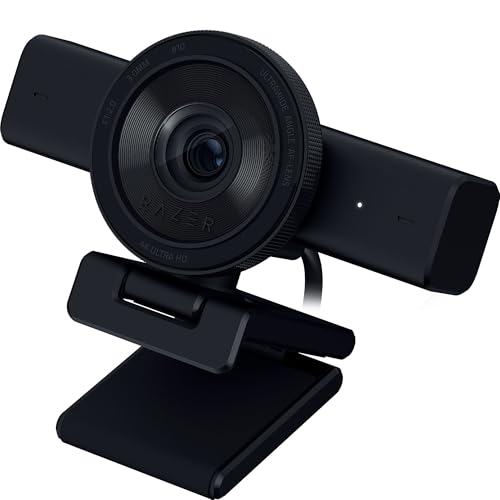
Razer Kiyo Pro
The Razer Kiyo Pro uses a high-performance sensor with STARVIS technology for clear video even in dim settings. It offers uncompressed 1080p at 60fps or 30fps with HDR. The adaptive sensor adjusts to lighting changes automatically.
Pros
- Outstanding low light performance
- HDR mode improves dynamic range
- Rigid aluminum build
Cons
- No built-in microphone
- Large footprint

Logitech C920x HD Pro Webcam
The Logitech C920x is a popular choice for its reliable performance and affordable price. It records in full HD 1080p at 30fps with clear stereo audio. The autofocus and light correction produce vibrant video. Many users have used it for years without issues.
Pros
- Great image quality for the price
- Reliable and widely compatible
- Includes privacy shutter and tripod mount
Cons
- No 60fps option
- Plastic build feels less premium

Elgato Facecam
The Elgato Facecam is designed for streaming with a fixed focus lens that ensures sharp video. It captures 1080p at 60fps with high dynamic range. The camera works with Elgato’s Camera Hub software for advanced controls. It has a high-quality glass lens and a durable aluminum body.
Pros
- Smooth 60fps video
- Fixed focus avoids auto-focus hunting
- Excellent software control
Cons
- No microphone
- Price is higher for a 1080p camera

Anker PowerConf C200
The Anker PowerConf C200 is a 2K webcam that provides sharp images for meetings. It features dual microphones with noise reduction and AI framing that keeps you centered. The webcam has a built-in privacy cover and works with major platforms. Its compact design is easy to mount.
Pros
- Sharp 2K resolution
- AI auto-framing keeps you in view
- Affordable price with good features
Cons
- No 60fps
- Software might be less polished than others
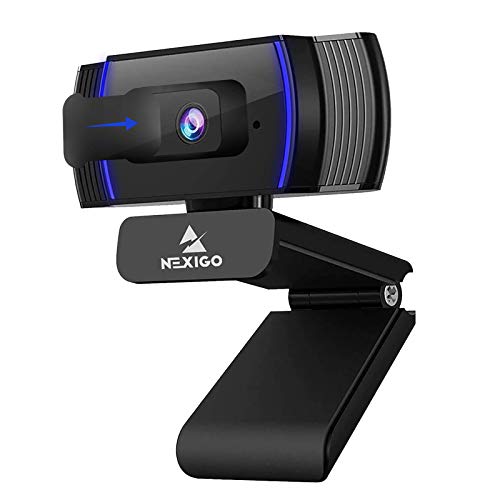
NexiGo N930AF Webcam
The NexiGo N930AF is an affordable webcam that still offers full HD 1080p video. It features a ring light with three brightness levels to improve your appearance. The camera has auto-focus and dual microphones. It is a great option for students and casual users.
Pros
- Integrated ring light
- Very budget friendly
- Plug and play setup
Cons
- Ring light can be harsh
- Image quality is not as sharp as premium models

Logitech C925e
The Logitech C925e is a business-focused webcam with a 1080p sensor and a wide 78-degree field of view. It supports HDR for balanced exposure and has dual noise-reducing mics. The camera is certified for use with Skype for Business and Teams. It comes with a privacy shutter and a universal clip.
Pros
- HDR improves image quality
- Business certifications
- Privacy shutter included
Cons
- No 4K or 60fps
- Not as feature rich as consumer models
How they compare
| # | Model | Resolution | Best for | Score | Price |
|---|---|---|---|---|---|
| 1 | Logitech Brio 4K Webcam | 4K Ultra HD (up to 4096×2160) | Best overall for crisp 4K and advanced features | 9.4 | Check price |
| 2 | Razer Kiyo Pro | 1080p Full HD | Best for low light conditions | 9.1 | Check price |
| 3 | Logitech C920x HD Pro Webcam | 1080p Full HD | Best budget 1080p webcam | 8.9 | Check price |
| 4 | Elgato Facecam | 1080p Full HD | Best for streamers | 8.8 | Check price |
| 5 | Anker PowerConf C200 | 2K QHD (2560×1440) | Best for video conferencing and meetings | 8.5 | Check price |
| 6 | NexiGo N930AF Webcam | 1080p Full HD | Best budget option under current price | 8.2 | Check price |
| 7 | Logitech C925e | 1080p Full HD | Best for business use | 8.0 | Check price |
Good to know
What is the best resolution for a webcam?
For most people, 1080p is sufficient. It provides clear video without needing high bandwidth. If you have a fast internet connection and want extra detail, consider 4K. However, 4K is not necessary for standard video calls.
Do I need a webcam with 60fps?
Only if you record fast-moving content or stream gameplay. Video calls rarely exceed 30fps. 60fps offers smoother motion but requires more processing and bandwidth. For regular meetings, 30fps is fine.
Can I use a webcam with a laptop?
Yes. Most webcams connect via USB and work with laptops. They usually clip onto the screen or stand on a desk. Using an external webcam can improve video quality over the built-in camera.
How do I improve low light performance?
Webcams with larger sensors or special low light technologies perform better. Look for features like HDR or high dynamic range. You can also add a ring light or place a lamp behind your monitor. Avoid sitting with a bright window behind you.
Are webcams with built-in microphones good?
They are convenient and often sufficient for calls. Many include noise reduction to minimize background sounds. However, for the best audio quality, a dedicated microphone is recommended. If you want simplicity, a webcam with a good mic is fine.
What is the difference between autofocus and fixed focus?
Autofocus adjusts the lens to keep you sharp as you move. It can sometimes hunt or lose focus. Fixed focus keeps everything at a certain distance in focus, which is reliable for a static setup. Some cameras have both modes.
How do I know if a webcam is compatible with my computer?
Most webcams are plug and play with Windows 10 and later, macOS, and Chrome OS. Some require software for full features. Check the product page for system requirements. Also ensure you have an available USB port.
Do I need a privacy shutter?
A privacy shutter is useful if you want to physically block the lens when not in use. It provides peace of mind. Many webcams include a sliding shutter or a snap-on cover. If not, you can buy one separately.
Which webcam is best for streaming?
For streaming, look for 1080p at 60fps or 4K. The Elgato Facecam is popular because it offers 60fps and has a fixed focus, which prevents blurring when you move. The Logitech Brio is also a good choice if you want 4K.
The bottom line
For most users, the Logitech Brio 4K is the best investment due to its superior video quality and versatility. If you are on a budget, the Logitech C920x offers exceptional value. Streamers should consider the Elgato Facecam for its 60fps performance.