Dual Monitor Arms That Free Up Your Desk Space
Ergotron LX Dual Side-by-Side Arm holds position best over years of adjustment, thanks to its constant force gas spring. HUANUO Dual Monitor Stand covers most home setups for far less, while VIVO STAND-V002 is the dependable budget option.
Ergotron LX Dual Side-by-Side Arm is the mount worth buying if you adjust your screens often. HUANUO Dual Monitor Stand is the value pick for typical home offices. VIVO STAND-V002 covers basic dual screen duty on a tighter budget.
Weight rating per arm is the specification that most often gets overlooked, and modern large panels exceed it more easily than people expect, causing an arm to sag or drift over time. We compared published load ranges, VESA patterns, mounting hardware, reach and articulation, weighing whether each arm holds a set position without retightening and whether its clamp suits real desk thicknesses.
The shortlist, ranked

Ergotron LX Dual Side-by-Side Arm
A constant force gas spring keeps this arm moving smoothly with one hand and staying exactly where you leave it. Aluminium construction feels substantially more rigid than steel and plastic rivals. Owners report it still holds tension years later, which is where cheaper spring arms usually fail.
Pros
- Smooth one handed adjustment
- Holds position without drifting
- Long term durability owners consistently note
Cons
- Priced well above budget arms
- Heaviest panels approach the upper weight limit

HUANUO Dual Monitor Stand
Gas spring adjustment, both clamp and grommet mounting and integrated cable clips all come at a fraction of the premium arm price. A home office with mid sized panels gets everything most people actually need. Based on specifications, it handles typical 24 to 27 inch monitors comfortably.
Pros
- Gas spring adjustment at a low price
- Both mounting methods in the box
- Tidy built in cable routing
Cons
- Spring tension needs occasional retightening
- Struggles with very heavy ultrawide panels

VIVO STAND-V002 Dual Monitor Desk Mount
A tension knob replaces the gas spring here, making adjustment less elegant but very predictable once set. Screens that stay in one position most of the time make that a reasonable trade. Owners report it feels sturdy for the money, provided you stay within the weight rating.
Pros
- Very low cost dual mount
- Stable once tightened
- Both mounting options included
Cons
- Adjustment needs a tool rather than one hand
- Limited reach compared with premium arms

North Bayou NB F160 Dual Monitor Mount
Gas spring arms here float easily, suiting anyone who repositions screens between sitting and standing several times a day. Vertical range runs wide for the price. A standard thickness desk works best, since the clamp is less suited to very thick worktops.
Pros
- Effortless height changes for sit stand use
- Generous vertical travel
- Light enough to reposition easily
Cons
- Clamp limited on very thick desks
- Lighter build than aluminium premium arms

Amazon Basics Dual Side-by-Side Monitor Stand
Clear instructions and straightforward hardware get dual screens up in about twenty minutes with this gas spring arm. It lacks the refinement of the Ergotron, though the fundamentals hold up well. Standard sized office monitors suit it especially well.
Pros
- Quick and clear installation
- Solid for standard office panels
- Widely available replacement parts
Cons
- Less refined motion than premium arms
- Modest maximum reach
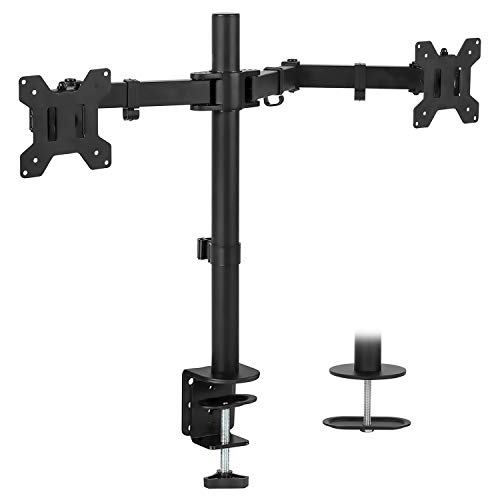
Mount-It! MI-2752 Dual Monitor Arm
Extended arm geometry pushes screens further from the desk edge, useful on deep desks or when panels need to sit back to free up keyboard space. That reach puts more leverage on the clamp, so a solid desk matters here. Standard VESA patterns mount without adapters.
Pros
- Longer reach than most dual arms
- Useful on deep desks
- Full articulation including portrait rotation
Cons
- More leverage stresses thin desk edges
- Bulkier behind the screens

WALI Dual LCD Monitor Desk Mount
A compact footprint suits smaller and lighter panels, where the lower weight rating stops being a limitation. Little space is taken up behind the desk, and installation goes quickly. Monitors comfortably inside the rating, not at the top of it, are the best pairing.
Pros
- Small footprint behind the desk
- Quick installation
- Low cost for two screens
Cons
- Lower weight rating than rivals
- Not suited to large or heavy panels
Compared at a glance
| # | Model | Mechanism | Best for | Score | Price |
|---|---|---|---|---|---|
| 1 | Ergotron LX Dual Side-by-Side Arm | Constant force gas spring | Best overall | 9.4 | Check price |
| 2 | HUANUO Dual Monitor Stand | Gas spring | Best value | 9.2 | Check price |
| 3 | VIVO STAND-V002 Dual Monitor Desk Mount | Manual tension adjustment | Best budget | 9.0 | Check price |
| 4 | North Bayou NB F160 Dual Monitor Mount | Gas spring, free floating | Best for frequent adjustment | 8.7 | Check price |
| 5 | Amazon Basics Dual Side-by-Side Monitor Stand | Gas spring | Best simple setup | 8.5 | Check price |
| 6 | Mount-It! MI-2752 Dual Monitor Arm | Extended arm geometry | Best reach | 8.3 | Check price |
| 7 | WALI Dual LCD Monitor Desk Mount | Tension adjustment | Best for light monitors | 8.0 | Check price |
What matters most
Check the weight rating per arm, not the total Most dual monitor arm disappointment starts here. A mount advertised for two monitors may quote a combined figure that each individual arm cannot support on its own, and any panel above the per arm rating will droop no matter how tight the spring runs. Find your monitor’s actual weight without its original stand, usually listed on the manufacturer specification sheet, and choose an arm with meaningful headroom above it. Curved and ultrawide panels weigh more than their diagonal size suggests.
Clamp or grommet changes which desks work C clamps grip the rear edge of the desk and suit most setups, needing only a clear overhang and an edge thick enough to grip yet within the clamp range. Grommet mounts pass through a hole in the desk and hold more securely on thin or glass topped desks, at the cost of drilling. Thin veneer over hollow core desks can bow under a clamp, making a spreader plate or a grommet fixing worth considering there.
Reach and articulation should match your desk depth A short arm on a deep desk leaves screens too close and forces you to sit forward. A long arm on a shallow desk pushes the panels past the desk edge. Measure from your intended mounting point to where you want the screen center, then compare that figure with the published maximum reach, remembering a fully extended arm has the least stability. Portrait rotation is worth having for anyone who reads long documents or writes code.
Plan cable routing before final tightening Dual arms move constantly, and cables routed too tightly will either unplug themselves or restrict movement. Route display and power cables along the arm channels with a little slack at each joint, then test the full range of motion before clipping everything down. Owners report that most cable damage on monitor arms happens at the first joint, where repeated flexing wears the sheath without enough slack.
Good to know
How much weight can a dual monitor arm hold?
It varies by model, commonly from around three kilograms per arm on budget mounts to over ten on premium ones. Always check the per arm figure rather than a combined total.
Will a monitor arm fit my monitor?
If the monitor has a VESA pattern of 75 by 75 or 100 by 100 millimeters, almost certainly. Monitors without VESA holes need a specific adapter plate made for that model.
Is a clamp or grommet mount better for a desk?
Clamps are easier to install and fully reversible. Grommet mounts hold more securely on thin, glass or hollow core desks but require a hole through the desk surface.
Why does a monitor arm sag over time?
Usually the monitor exceeds the arm’s weight rating, or the spring tension bolt needs tightening. Check the rating first, since tension adjustment cannot fix an overloaded arm.
Can monitor arms hold curved or ultrawide screens?
Yes, if the weight rating allows it. Ultrawides run heavy and put more leverage on the arm, so choose a mount with a clear margin above the panel weight.
Do monitor arms damage desks?
Clamps can dent soft surfaces, so use the supplied pads. Hollow core desks can bow under clamp pressure, in which case a grommet mount or a spreader plate is safer.
Can you mount monitors in portrait orientation?
Most articulated arms rotate ninety degrees. Check that your desk depth and cable slack allow the extra height before committing to portrait mode.
Do gas spring monitor arms wear out?
Quality gas springs last many years. Cheaper springs lose tension gradually, which shows up as screens drifting downward over months.
Single vs dual monitor arm, which should you buy?
A dual arm keeps both screens on one base and frees up desk space compared to two separate single arms. Single arms suit desks where screens need independent positions far apart.
Final word
Ergotron LX Dual Side-by-Side Arm is the one to buy if you move your screens regularly, because it adjusts with one hand and stays put long after cheaper arms have started to drift. HUANUO Dual Monitor Stand covers the same ground well enough for most home offices, and VIVO STAND-V002 is a sound choice when screens rarely move.