Which Motion Sensor Actually Keeps False Alarms Away?
Aqara’s Motion Sensor P1 wins overall for its adjustable detection interval and long coin-cell battery life. The Philips Hue Motion Sensor reacts fastest for lighting automations, and the TP-Link Tapo T100 sets up without joining a whole new smart home ecosystem.
Aqara’s Motion Sensor P1 suits most smart homes, lasting years on a coin cell while letting you set how often it reports motion. Lights that snap on the instant you walk in call for the Philips Hue Motion Sensor instead. Anyone wanting triggers without adopting a new platform can start with the TP-Link Tapo T100.
Spec sheets hide the differences that actually matter with motion sensors. Two units with identical detection range can behave completely differently depending on retrigger delay, hub dependency and whether the battery lasts three months or three years. We compared seven current sensors on protocol, latency, detection geometry, power draw and what owners report about false triggers.
The best picks, ranked
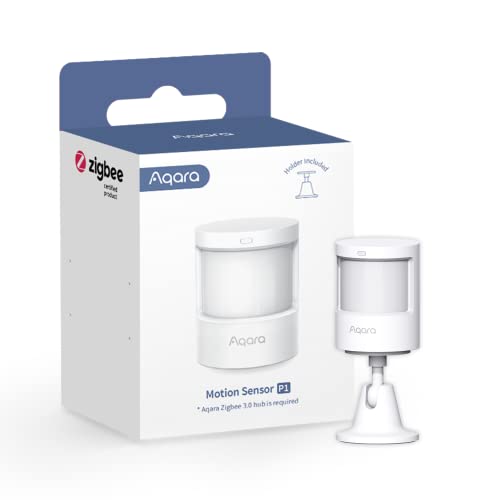
Aqara Motion Sensor P1
An adjustable detection interval solves the biggest annoyance with battery motion sensors, trading a rapid few-second report for lighting against a longer gap that stretches battery life. Built-in light level sensing skips daytime triggers automatically. Owners report multi-year battery life, and the sensor works across several Zigbee hub platforms rather than one app.
Pros
- Adjustable detection interval balances speed and battery
- Light level sensing avoids daytime triggers
- Works with multiple Zigbee hub platforms
Cons
- Needs a compatible Zigbee hub
- Shortest detection interval reduces battery life
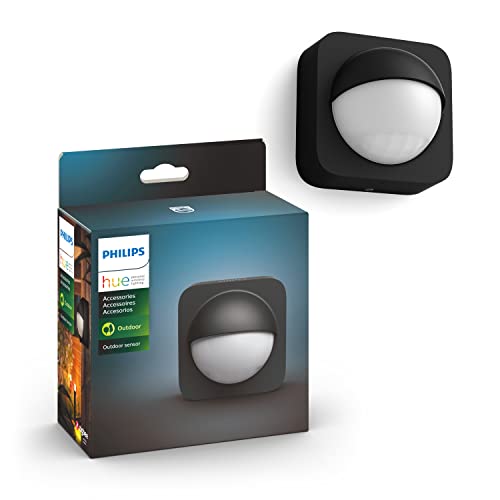
Philips Hue Motion Sensor
Nothing here turns lights on faster than this sensor. Talking directly to the Hue bridge and lights over the same Zigbee network keeps the delay between entering a room and the light switching on barely noticeable. Daylight sensing sets different scenes for day and night, and a magnetic mount makes positioning simple.
Pros
- Near instant response with Hue lights
- Daylight sensing built into the automation logic
- Magnetic mount makes repositioning easy
Cons
- Really only makes sense inside the Hue system
- AAA batteries need replacing more often than a coin cell

TP-Link Tapo T100 Smart Motion Sensor
Pairing takes minutes on the Tapo T100, which triggers Tapo plugs, bulbs and cameras with almost no configuration once it joins a Tapo hub. Detection is quick, mounting is magnetic and adhesive, and the battery is rated in years rather than months. Owners call it the simplest route into motion automation.
Pros
- Very simple pairing and automation setup
- Good detection range for the price
- Flexible magnetic mounting
Cons
- Requires a Tapo hub to function
- Works best within the Tapo ecosystem

Ring Alarm Motion Detector (2nd Gen)
Security, not automation, is the job here: this sensor arms and disarms with a Ring Alarm system and distinguishes a person from a moving pet. Three sensitivity modes tune out animals up to a set weight, which keeps a household from disabling the alarm out of frustration. Owners report solid reliability and long battery life.
Pros
- Pet sensitivity modes cut false alarms
- Integrates with full alarm arming schedules
- Long lithium battery life
Cons
- Only usable with a Ring Alarm base station
- Not designed for general lighting automation
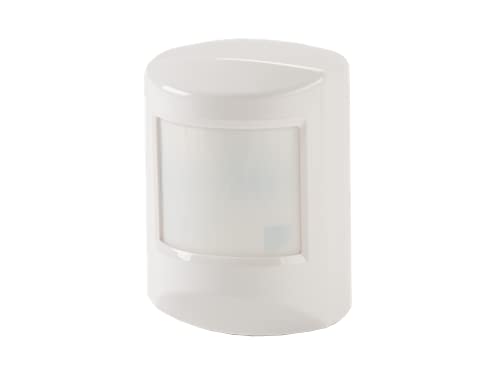
Ecolink Z-Wave Plus PIR Motion Detector
DIY smart home builders favor the Ecolink PIR because it is inexpensive, compatible with nearly every Z-Wave hub, and runs for years on a single lithium cell. A wide detection lens, pet immunity setting and tamper switch round out the housing. Owners describe it as unglamorous but dependable once the reporting interval is reconfigured.
Pros
- Works with almost any Z-Wave hub
- Very long battery life
- Inexpensive enough to deploy several
Cons
- Default retrigger interval is slow until reconfigured
- Plain housing and basic mounting hardware
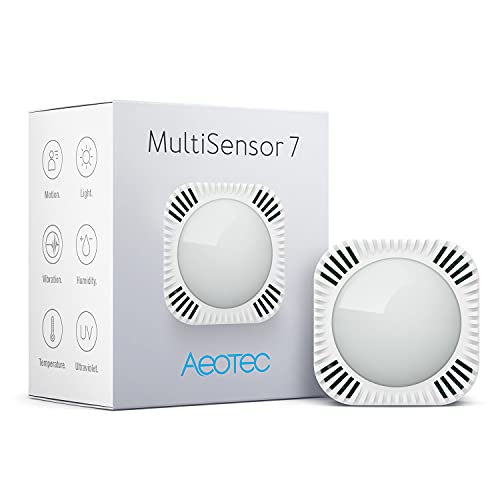
Aeotec MultiSensor 7
Motion, temperature, humidity, light, ultraviolet and vibration sensing pack into one small unit here, letting a single device drive several unrelated automations. Battery or USB power keeps options open, and USB removes any concern about reporting frequency. Owners call it the most capable sensor in this lineup and also the most involved to configure.
Pros
- Replaces several separate sensors
- USB power option for fast reporting
- Ball mount aims precisely
Cons
- Configuration is complex for beginners
- Battery life drops sharply with frequent reporting

THIRDREALITY Zigbee Motion Sensor
A low price makes this Zigbee sensor easy to deploy in every room rather than agonizing over placement. It pairs with common hubs including SmartThings and Home Assistant, reports motion promptly, and mounts with adhesive or a small bracket. Owners call the housing lighter than premium sensors but the battery life respectable.
Pros
- Cheap enough to deploy across a whole home
- Broad Zigbee hub compatibility
- Prompt motion reporting
Cons
- Housing feels less solid than premium units
- Battery life shorter than coin cell sensors
How to pick the right one
Which hub or protocol should you choose first? Nearly every capable motion sensor here needs a hub, and the one you already own narrows the field fast. Zigbee sensors such as the Aqara P1 and Third Reality unit work with SmartThings, Home Assistant and Hue bridges depending on the model. Z-Wave sensors like the Ecolink and Aeotec need a Z-Wave controller, while Ring and Tapo sensors stay locked to their own systems.
Why response speed makes or breaks automated lighting A light that comes on half a second after entering a room feels effortless. One that takes three seconds feels broken, because a hand has already reached for the switch. Sensors that talk directly to lights on the same network, like the Philips Hue sensor paired with Hue bulbs, respond fastest. Anything routed through a cloud service adds noticeable delay.
What is the retrigger interval and why it matters Most battery sensors ignore motion for a set period after reporting it, purely to save power. A sixty-second interval means a light on a short timer can switch off while someone is still in the room. The Aqara P1 makes this setting adjustable, and the Ecolink can be reconfigured through hub parameters. This single setting causes more complaints than detection range ever does.
How to place a sensor to avoid false triggers Passive infrared sensors detect changes in heat across their field of view, so heating vents, sunlit windows, ceiling fans and pets all cause phantom triggers. Mounting a sensor to look across a path of travel, rather than straight down it, cuts false alarms. Corner placement away from radiators and direct sun helps too, and pet immunity settings on the Ring and Ecolink units add another layer.
The lineup, side by side
| # | Model | Protocol | Best for | Score | Price |
|---|---|---|---|---|---|
| 1 | Aqara Motion Sensor P1 | Zigbee 3.0, hub required | Best overall | 9.4 | Check price |
| 2 | Philips Hue Motion Sensor | Zigbee, Hue bridge required | Best for lighting | 9.2 | Check price |
| 3 | TP-Link Tapo T100 Smart Motion Sensor | Sub-GHz, Tapo hub required | Best value | 9.0 | Check price |
| 4 | Ring Alarm Motion Detector (2nd Gen) | Z-Wave, Ring Alarm base required | Best for security systems | 8.8 | Check price |
| 5 | Ecolink Z-Wave Plus PIR Motion Detector | Z-Wave Plus, hub required | Best for Z-Wave homes | 8.6 | Check price |
| 6 | Aeotec MultiSensor 7 | Z-Wave Plus, hub required | Best multi function sensor | 8.3 | Check price |
| 7 | THIRDREALITY Zigbee Motion Sensor | Zigbee, hub required | Best budget | 8.0 | Check price |
Good to know
Do motion sensors need a hub to work?
Most of the capable ones do. Zigbee and Z-Wave sensors need a matching controller, and Ring and Tapo sensors need their own base stations. In exchange, battery life and reliability beat WiFi sensors, which drain quickly from maintaining a constant connection.
How long do motion sensor batteries actually last?
Reporting frequency changes the answer enormously. Coin-cell sensors like the Aqara P1 reach multi-year life on longer intervals, while the same sensor reporting every few seconds drains much faster. AAA-powered sensors need replacing more often, and USB-powered units avoid the question entirely.
What causes false motion alerts indoors?
Heat sources moving through the field of view are the usual culprit: vents, direct sunlight crossing a room, ceiling fans and pets. Repositioning a sensor to look across an entry path rather than at a heat source resolves most cases, and pet immunity modes handle animals under a set weight.
Can indoor motion sensors work outdoors too?
Only if they carry a specific outdoor rating. The models here are indoor devices, and outdoor conditions add rain, temperature swings and far more false triggers from wind-blown foliage and passing cars. An outdoor-rated sensor or a camera with motion detection is the better fit outside.
How far can a motion sensor actually detect?
Typical indoor sensors cover roughly five to seven metres across a detection angle between 100 and 170 degrees. That range drops for slow movement heading straight at the sensor, since passive infrared reads motion crossing its zones more readily than motion approaching head on.
Are motion sensors better for security or for lighting?
Different products suit each job. The Ring Alarm Motion Detector is built as a security device that arms with a system and reports intrusions. Lighting-focused sensors like the Hue unit prioritize instant response and daylight awareness instead. Using an automation sensor as an alarm usually means losing tamper detection and arming schedules.
Where is the best place to mount a motion sensor?
A corner around two metres up, angled so people cross the field of view rather than walk straight at it, works best. Keep it clear of vents, radiators, direct sunlight and fans. In a hallway, mounting near the end so the beam crosses the corridor triggers faster than pointing it down the length.
Can one sensor trigger multiple lights at once?
Yes, though the hub or app handles that logic rather than the sensor itself. A single trigger can switch several lights, adjust brightness by time of day, or start a whole scene. Light level sensing on the Aqara P1 and Hue sensor makes this especially useful, since automations can behave differently in daylight.
Aqara vs Hue vs Tapo: which motion sensor should I buy?
Choose Aqara for flexible Zigbee hub support and adjustable battery life, Hue for the fastest lighting response inside a Hue system, and Tapo for the simplest setup without learning a new platform. All three cover typical home automation well.
The verdict
The Aqara Motion Sensor P1 stands as the best all-round motion sensor, giving control over the trade-off between response speed and battery life while working with more than one hub platform. Households already running Philips Hue lighting get faster, more coherent results from the Hue Motion Sensor. Anyone wanting motion automation without a platform learning curve should start with the TP-Link Tapo T100 instead.


