Top Electronic Learning Toys That Make Kids Smarter
The LeapFrog LeapPad Academy tops our list for its robust library and durable design, ideal for kids ages 3 to 8 who are ready for structured learning. Its main advantage is the included kid-safe tablet with a shatter-safe screen. A notable limitation is the need to manage charging and screen time.
Electronic learning toys have transformed how kids engage with education. They combine play with skill development, making learning feel like an adventure. But with so many options, choosing the right one can be overwhelming.
We compared popular models across different categories and age ranges. Our focus is on real products that deliver genuine educational benefits. Here are seven top choices that stand out for their quality and learning impact.
What we recommend

LeapFrog LeapPad Academy Kids Learning Tablet
This kid-safe tablet comes preloaded with 20 educational apps and a free year of LeapFrog Academy. It includes a shatter-safe screen and a built-in camera. Parents appreciate the robust parental controls and durable design.
Pros
- High educational value with structured curriculum
- Durable build withstands drops
- Comprehensive parental controls
Cons
- Requires regular charging and screen time management
- Some apps require internet connection

Osmo Little Genius Starter Kit for iPad
Osmo merges physical play with digital feedback. The kit includes four games that teach letters, shapes, and creativity. It uses reflective AI technology to see and respond to real-world pieces. Parents love the active engagement it encourages.
Pros
- Combines tactile play with digital interaction
- Encourages creativity and problem-solving
- Easy setup and clean-up
Cons
- Requires an iPad, not included
- Games can be short-lived for advanced kids

Sphero Mini (Blue) App-Enabled Programmable Robot Ball
Sphero Mini is a tiny robot ball that teaches coding through a companion app. Kids can drive it, play games, and program with block-based coding. It includes a clear shell and obstacle course pieces. Parents appreciate the screen-time balance it promotes.
Pros
- Hands-on coding experience
- Durable and portable
- App offers many learning activities
Cons
- Requires smartphone or tablet for full use
- Battery life is modest

VTech KidiZoom Creator Cam
This durable kids camera records video and takes photos with fun effects. It includes a green screen feature for creative projects. The camera has a built-in microphone and speaker. Parents like the included memory card and editing software.
Pros
- Encourages creativity and storytelling
- Sturdy design for kids
- Expandable storage
Cons
- Video quality is not high-definition
- Interface may be complex for younger kids
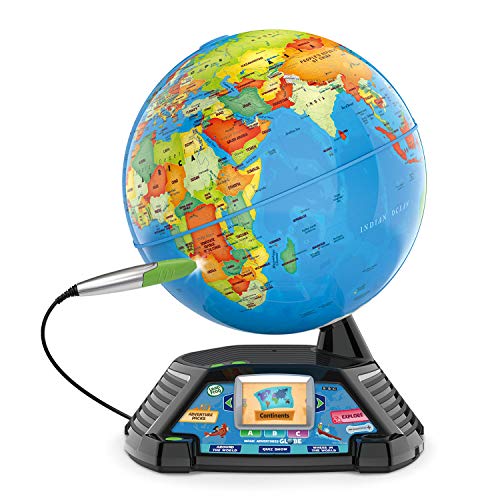
LeapFrog Magic Adventures Globe
This interactive globe uses a stylus to touch and learn about world facts. It includes games and a video screen that shows cultures and animals. The globe has a built-in quiz mode. Parents appreciate the engaging way it teaches geography.
Pros
- Interactive learning with videos
- Covers various subjects beyond geography
- Quiz mode reinforces learning
Cons
- Batteries drain quickly
- Stylus can be misplaced

ThinkFun Code Master Programming Logic Game
This board game teaches programming logic without screens. Players navigate an avatar through levels using coding principles. It includes 40 challenges from beginner to expert. Parents like that it is travel-friendly and fosters critical thinking.
Pros
- No screen required
- Builds logic and problem-solving skills
- Portable and easy to set up
Cons
- Single player only
- May not appeal to kids who prefer digital games

Educational Insights Hot Dots Jr. Let’s Master Pre-K Reading Set
This set includes an interactive pen and 85 lessons covering alphabet, phonics, and sight words. Kids press the pen to answer, receiving audio feedback. The pen lights up and makes sounds. Parents appreciate the self-paced learning.
Pros
- Self-paced learning
- Portable and easy to use
- Audio feedback encourages independent play
Cons
- Lessons are not customizable
- Pen may be fragile if dropped
What to look for
The lineup, side by side
| # | Model | Screen | Best for | Score | Price |
|---|---|---|---|---|---|
| 1 | LeapFrog LeapPad Academy Kids Learning Tablet | 7-inch shatter-safe LCD | Versatile learning tablet for ages 3-8 | 9.4 | Check price |
| 2 | Osmo Little Genius Starter Kit for iPad | iPad (most models) | Interactive hands-on learning with iPad | 9.2 | Check price |
| 3 | Sphero Mini (Blue) App-Enabled Programmable Robot Ball | 1.57 inches diameter | Intro to coding and STEM for ages 8+ | 9.0 | Check price |
| 4 | VTech KidiZoom Creator Cam | 2.0 MP photos, 720p video | Young creators who love video and photography | 8.8 | Check price |
| 5 | LeapFrog Magic Adventures Globe | 2.4-inch video display | Exploring geography and cultures for ages 5+ | 8.7 | Check price |
| 6 | ThinkFun Code Master Programming Logic Game | Board game | Screen-free coding logic for ages 8+ | 8.5 | Check price |
| 7 | Educational Insights Hot Dots Jr. Let’s Master Pre-K Reading Set | Pen and 85 lessons | Early reading skills for ages 4-6 | 8.3 | Check price |
Frequently asked questions
What age group are electronic learning toys suitable for?
Electronic learning toys span all ages, from infants to teens. For babies, look for cause-and-effect toys. For toddlers, interactive tablets and simple games. Older kids can handle coding robots and complex logic games.
How much screen time is appropriate for kids using electronic toys?
The American Academy of Pediatrics recommends limiting screen time for young children. For educational use, 1 to 2 hours a day is a common guideline. Balance with physical play and offline learning.
Are electronic learning toys better than traditional toys?
Not necessarily. Both have benefits. Electronic toys can offer interactive feedback and adaptive learning. Traditional toys foster imagination and fine motor skills. A mix is often ideal.
Can electronic learning toys replace teachers or parents?
No. They are tools that supplement learning. Parental involvement enhances the experience. Discussing concepts and playing together reinforces learning.
How do I know if an electronic toy is safe?
Look for safety certifications like ASTM and CPSIA. Check for small parts that could be choking hazards. Read reviews for any reported issues.
What are the benefits of coding toys for kids?
Coding toys teach problem-solving, logic, and sequencing. They prepare kids for a tech-driven world. Many are designed to be fun and collaborative.
Do electronic learning toys require internet access?
Some do for downloads or online features. Others are standalone. Check the product specs. For young kids, offline toys may be preferable.
How long do batteries last in these toys?
Varies widely. Tablets and cameras may last several hours. Board games with pens may last months. Rechargeable options are more sustainable.
Can these toys grow with my child?
Many offer adjustable difficulty levels or expandable content. Some have companion apps with new challenges. Look for toys labeled with a wide age range.
Are there any maintenance or cleaning tips?
Follow manufacturer instructions. Use a soft cloth for screens. Keep batteries away from young children. Store parts in a dry place.
Our take
For most families, the LeapFrog LeapPad Academy offers the best all-around value with its durable design and extensive library. Parents seeking screen-free coding should choose the ThinkFun Code Master. The Osmo Little Genius Starter Kit excels for interactive play, but requires an iPad you already own.