Electronic Learning Toys Kids Actually Keep Playing With
The LeapFrog LeapStart 3D leads this list because its book library grows from preschool through early reading. The Osmo Genius Starter Kit pairs physical tiles with tablet apps, and the VTech Touch and Learn Activity Desk converts into three play modes as toddlers grow.
LeapFrog LeapStart 3D offers the longest useful life of any toy here, thanks to its expanding book library. Osmo Genius Starter Kit blends tablet apps with physical pieces on the table. VTech’s Touch and Learn Activity Desk converts as a toddler grows into new stages of play.
Nearly every learning toy claims to teach letters, numbers and shapes. Most fail not by teaching badly, but by being finished within two weeks. Expandable content, multiple difficulty levels and child directed play separate the toys that last from the ones that end up in a closet. We compared stated age ranges, content libraries and expansion options against consistent parent feedback on replay value, durability and volume control.
What we recommend

LeapFrog LeapStart 3D Interactive Learning System
LeapStart pairs a stylus with interactive books rather than a screen. Touching an illustration triggers questions, explanations and activities that increase in difficulty over time. Its book library spans preschool letter recognition through first grade reading and math, so one set of hardware stays useful for years. Parents report children returning to it without prompting, which is the real test of a learning toy.
Pros
- Book library spans several years of development
- Play happens without a screen
- Each book offers multiple difficulty levels
Cons
- Books cost extra beyond the base unit
- Stylus cable can tangle in a toy box

VTech Touch and Learn Activity Desk Deluxe
This desk starts as an interactive touch surface, then converts into an easel and later a chalkboard as a child’s interests shift. That transformation is genuine functional design, not a marketing line. Interchangeable page cards cover letters, numbers and music, with extra card sets sold separately. Floor space is the main tradeoff, since the desk needs real room to sit.
Pros
- Three configurations extend its useful life
- Sturdy enough for daily toddler use
- Expansion card packs add fresh content
Cons
- Takes up significant floor space
- Assembly is fiddly the first time

Osmo Genius Starter Kit for iPad
A mirror attachment lets the tablet camera see physical tiles and drawings on the table in front of it. That trick turns screen time into something involving hands and objects instead of swiping. The Genius kit covers words, numbers, tangram shapes and drawing across five separate apps. A compatible iPad or Fire tablet is required, which is the significant catch.
Pros
- Physical pieces keep hands busy during screen play
- Content adapts based on the child’s answers
- Five distinct games included in one kit
Cons
- Requires a compatible tablet you already own
- Small tiles are easy to misplace

Fisher-Price Laugh and Learn Smart Stages Chair
Three manually selected content levels let this chair grow from simple sounds to phrases to imaginative prompts. Sitting in a chair of their own tends to hold a toddler’s attention longer than a handheld toy does. Volume control exists, though the loudest setting is genuinely loud. Battery power keeps it portable around the house.
Pros
- Three content stages extend its useful window
- Sturdy chair suits early sitting and standing
- Simple enough for very young children
Cons
- Outgrown by around three years old
- Loud even on reduced volume
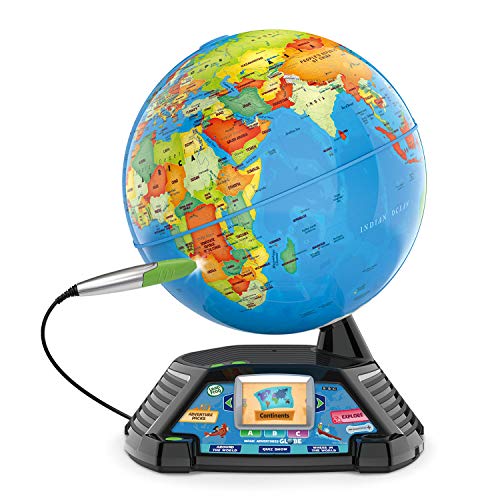
LeapFrog Magic Adventures Globe
A physical globe pairs with a small screen and stylus, so touching a country plays short video clips and facts. That content library runs deep enough to satisfy a child who has moved past letters and numbers. Quizzes and challenges layer on top of the exploration itself. The tradeoff is a small screen and a globe that needs its own shelf.
Pros
- Substantial content library for older children
- Combines a physical globe with video learning
- Quiz modes add replay value
Cons
- Screen is small for video content
- Bulky item needs dedicated shelf space

VTech KidiZoom Smartwatch DX3
Worn on the wrist instead of stored in a toy box, this watch combines a camera, learning games, a step counter and time telling practice. Being worn changes how often a toy actually gets used. A school mode in the parental controls disables games during set hours. Battery life is the recurring complaint, since daily use often means daily charging.
Pros
- Worn rather than stored, so it gets used more
- School mode disables games on a schedule
- Camera encourages creative use
Cons
- Needs charging most days
- Photo quality is very basic

LeapFrog 100 Animals Book
This bilingual talking book covers a hundred animals with names, sounds and facts across sturdy board pages. Cost sits far below the systems above it. Content is deliberately narrow, so a child will eventually exhaust it, but early vocabulary building gets real value for the price. Parents report clear audio, and consider the volume switch essential.
Pros
- Excellent value for early vocabulary
- Bilingual content in a single book
- Board pages survive toddler handling
Cons
- Fixed content that cannot be expanded
- Narrower subject range than full systems
Before you buy
What makes a learning toy last longer than a few weeks? Whether new content exists for a toy predicts how long it stays in use better than any other factor. A toy with a fixed set of phrases is finished once a child has heard them, often within two weeks. Systems built around books, cartridges or app libraries keep offering something new. Factor the ongoing cost of that content into your budget, since the base unit is rarely the full price.
Are the age ranges on the box accurate? Manufacturers print wide ranges to broaden appeal, and the real sweet spot is usually narrower. A toy marked two to seven years typically shines across two or three of those years. Read the actual activities instead of trusting the range on the box. A five year old who already reads will be bored by letter recognition content regardless of the packaging.
Screen or screen free: which suits my child? Screen free toys such as talking books and stylus systems suit younger children and sidestep the screen time debate entirely. Tablet systems offer far more content and adapt to a child’s answers, but they need a device and encourage sitting still. Hybrid toys, where physical pieces feed into a screen, tend to hold attention longest because hands stay busy while the content adapts. Base the choice on how your household already handles screens.
What do parents notice after the first week? Volume control is not a luxury, since any toy stuck on one loud setting ends up in a cupboard. Check whether the toy runs on standard batteries or charges over USB, because four AA cells every fortnight adds up. Automatic shut off matters too, as toys that chirp from a bin at midnight are a known complaint. Small pieces are worth counting before buying, since a missing tile can make a whole set unusable.
How they compare
| # | Model | Age range | Best for | Score | Price |
|---|---|---|---|---|---|
| 1 | LeapFrog LeapStart 3D Interactive Learning System | Roughly 2 to 7 years | Best overall | 9.4 | Check price |
| 2 | VTech Touch and Learn Activity Desk Deluxe | Roughly 2 to 5 years | Best for toddlers | 9.2 | Check price |
| 3 | Osmo Genius Starter Kit for iPad | Roughly 6 to 10 years | Best screen and physical blend | 9.0 | Check price |
| 4 | Fisher-Price Laugh and Learn Smart Stages Chair | Roughly 6 months to 3 years | Best for babies and young toddlers | 8.8 | Check price |
| 5 | LeapFrog Magic Adventures Globe | Roughly 5 to 10 years | Best for older children | 8.6 | Check price |
| 6 | VTech KidiZoom Smartwatch DX3 | Roughly 4 to 9 years | Best wearable | 8.3 | Check price |
| 7 | LeapFrog 100 Animals Book | Roughly 18 months to 4 years | Best budget | 8.0 | Check price |
Good to know
At what age should a child start using electronic learning toys?
Simple cause and effect toys suit babies from around six months, while genuine learning content becomes useful from about eighteen months to two years. Before that, children benefit far more from books, conversation and open ended play than from any electronic toy.
Do electronic learning toys actually help children learn?
They can reinforce recognition of letters, numbers and vocabulary, particularly through repetition a child controls. They work best alongside reading together and conversation rather than in place of it, since interaction with an adult drives most early language development.
How do I stop these toys being so loud?
Check for a volume switch before buying, since not every toy has one. A common parent fix is a small piece of tape over the speaker grille, which noticeably reduces volume without damaging the toy and can be removed later.
Are tablet based learning systems better than standalone toys?
They usually offer more content and adapt to the child’s level, which extends their life considerably. Standalone toys avoid the screen entirely and need no device. The best compromise for many families is a system that uses physical pieces alongside the screen.
How long will a child actually use one of these?
Fixed content toys typically hold attention for weeks to a few months. Expandable systems with book or app libraries commonly stay in use for two to three years, since new content can be added as ability grows.
Do these toys need batteries constantly?
Many take standard AA or AAA cells and can go through them quickly with heavy use, so rechargeable batteries pay for themselves. Some newer toys charge over USB instead, which is cheaper to run but means remembering to charge them.
Are bilingual learning toys worthwhile?
They offer useful exposure to a second language’s sounds and vocabulary, particularly if that language is spoken at home or being learned elsewhere. As a standalone route to fluency they achieve little, so treat the bilingual mode as a bonus rather than the reason to buy.
What should I look for in durability?
Sealed battery compartments with a screw, rounded corners, and a body that survives being dropped from a table all matter. Check whether small pieces are essential to operation, since a system missing two of its tiles often becomes unusable rather than just incomplete.
What is the best learning toy for a 2 year old?
Toys built for the 18 month to 3 year range, such as the Fisher-Price Smart Stages Chair or the LeapFrog 100 Animals Book, match a toddler’s attention span and vocabulary level best. Systems aimed at preschool and up tend to feel too advanced at this age.
Can electronic toys replace reading with a parent?
No single toy replicates the language development that comes from an adult reading aloud and responding to a child. Treat electronic learning toys as a supplement that reinforces recognition skills, not a substitute for shared reading time.
Final word
LeapFrog LeapStart 3D stands out because its expanding book library keeps the toy relevant well past the first month. Choose the Osmo Genius Starter Kit if a compatible tablet is already in the house and screen time involving physical pieces appeals. Pick the VTech Touch and Learn Activity Desk for a toddler who needs a seat of their own to play from.


