Top Ergonomic Correction Supplies for Pain-Free Computing
For most people, the Logitech MX Vertical mouse is the top pick because it reduces wrist strain with a 57 degree handshake position, but it lacks extra buttons for gaming.
Prolonged computer use often leads to discomfort in the wrists, back, and neck. Ergonomic correction supplies aim to fix these issues by promoting better posture and reducing strain.
We compared seven top-rated products that target common pain points. Whether you need a vertical mouse or a supportive chair, this list helps you choose the right one.
The top picks, ranked

Logitech MX Vertical Wireless Mouse
The Logitech MX Vertical is a premium vertical mouse that positions your hand in a natural handshake grip. It features a 4000 DPI sensor and can connect to three devices via Bluetooth or USB receiver. Users report reduced wrist pain after switching, but its shape may feel large for small hands.
Pros
- Reduces wrist pronation
- High precision sensor
- Multi-device pairing
Cons
- Large for small hands
- No left-handed version

ErgoFoam Ergonomic Keyboard Wrist Rest
This memory foam wrist rest provides a soft, supportive cushion for your palms while typing. It is designed to keep your wrists in a neutral position, reducing pressure on the carpal tunnel. The non-slip base keeps it in place, and the gel-infused foam stays cool during long sessions.
Pros
- Soft and supportive
- Non-slip backing
- Cooling gel layer
Cons
- May flatten over time
- Only for standard keyboards

Loctek Dual Monitor Mount Stand
This gas-spring monitor mount holds two monitors up to 27 inches each, allowing full height and tilt adjustments. It frees up desk space and helps position screens at eye level, reducing neck strain. The clamp fits desks up to 3.3 inches thick. Users praise its sturdy build, but installation requires some effort.
Pros
- Great adjustability
- Sturdy aluminum arms
- Cable management clips
Cons
- Complex setup
- Requires sturdy desk

Flexispot Ergonomic Office Chair
This ergonomic chair features adjustable lumbar support, headrest, armrests, and seat depth. It promotes a healthy sitting posture with a breathable mesh back that keeps you cool. The chair supports up to 330 pounds and has a smooth-rolling caster base. Some users find the seat cushion too firm initially.
Pros
- Multiple adjustment points
- Breathable mesh
- High weight capacity
Cons
- Assembly required
- Seat cushion may be firm

Amazon Basics Monitor Stand Riser
This simple monitor stand raises your screen by 4.5 inches, bringing it closer to eye level. It has a sturdy steel frame and a hollow space underneath for storing a keyboard or documents. The stand is easy to assemble and supports up to 44 pounds. Minimal adjustability, but excellent value.
Pros
- Affordable
- Stable construction
- Creates extra desk space
Cons
- Fixed height
- No tilt or swivel
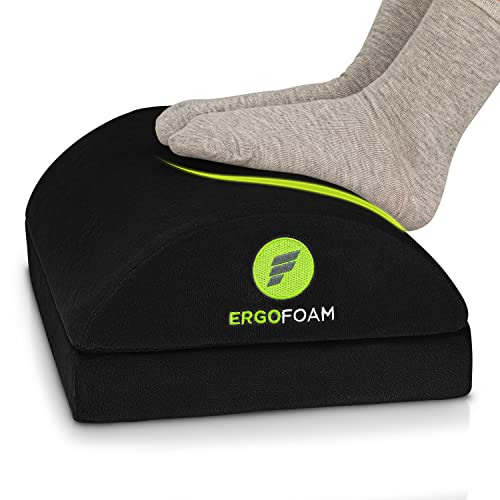
ErgoFoam Foot Rest Under Desk
This foot rest encourages proper sitting posture by supporting your feet, reducing pressure on the back of your legs. It features a non-slip surface and an adjustable tilt angle to suit your preference. The platform is made of durable plastic with a cushioned top. Users find it comfortable for short and tall people alike.
Pros
- Adjustable tilt
- Promotes better posture
- Non-slip surface
Cons
- Not height adjustable
- May slide on carpet

3M Gel Pro Sports Gel-Filled Mouse Pad
This mouse pad features a gel-filled wrist rest that conforms to your hand, reducing pressure points. The low-friction surface allows smooth mouse movement. It is designed for right-handed users and has a non-skid base. Some users note the gel can feel sticky in hot weather.
Pros
- Reduces wrist fatigue
- Smooth surface
- Non-skid backing
Cons
- Right-handed only
- Gel may warm up
What to look for
How they stack up
| # | Model | Connection | Best for | Score | Price |
|---|---|---|---|---|---|
| 1 | Logitech MX Vertical Wireless Mouse | Bluetooth or USB receiver | Reducing wrist and forearm strain | 9.4 | Check price |
| 2 | ErgoFoam Ergonomic Keyboard Wrist Rest | Memory foam with gel | Supporting wrists during typing | 9.1 | Check price |
| 3 | Loctek Dual Monitor Mount Stand | Up to 27 inches | Adjusting monitor height and angle | 9.0 | Check price |
| 4 | Flexispot Ergonomic Office Chair | Mesh back, foam seat | Full back support during long workdays | 9.2 | Check price |
| 5 | Amazon Basics Monitor Stand Riser | 4.5 inches | Elevating monitors and organizing desk | 8.7 | Check price |
| 6 | ErgoFoam Foot Rest Under Desk | Adjustable 5 positions | Improving leg circulation and posture | 8.9 | Check price |
| 7 | 3M Gel Pro Sports Gel-Filled Mouse Pad | Gel wrist rest | Cushioning wrist during mouse use | 8.5 | Check price |
Questions worth asking
What is the most important ergonomic correction supply?
The most important is often a chair that supports your lower back and promotes neutral posture. But if you have wrist pain, a vertical mouse or wrist rest may be more critical. Focus on the area that causes you the most discomfort.
Do I need an ergonomic mouse if I have a laptop?
Yes, because using a laptop trackpad for long periods can strain your wrist. An ergonomic mouse like a vertical mouse keeps your hand in a natural position, reducing strain.
How high should my monitor be?
Your monitor should be at eye level or slightly lower. When you look straight ahead, your eyes should align with the top of the screen. A monitor stand or mount helps achieve this.
Can a foot rest improve my posture?
Yes, a foot rest helps you sit with your feet flat and knees at a 90 degree angle. This reduces pressure on your lower back and improves circulation.
Are gel wrist rests better than foam ones?
Gel wrist rests conform to your hand and provide a cooler feel, but some people find them too soft. Foam rests are firmer and more supportive. Choose based on personal comfort.
How do I know if an ergonomic chair fits me?
When seated, your feet should be flat on the floor, knees at 90 degrees, and back supported. Check that you can adjust the seat height, lumbar support, and armrests to achieve this.
Is a monitor mount worth the investment?
A monitor mount is worth it if you need to adjust your screen frequently or want to free up desk space. It reduces neck strain by allowing easy height and angle changes.
Can these products prevent carpal tunnel syndrome?
While they cannot cure carpal tunnel, they can reduce strain and pressure on your wrist, which may help prevent symptoms. It is also important to take frequent breaks and stretch.
What should I look for in a wrist rest?
Look for a wrist rest that is about the same height as your keyboard. It should support your palm, not your wrist, and be made of a comfortable material like foam or gel.
How often should I replace my ergonomic equipment?
Replace items when they show signs of wear like flattened foam, loose joints, or reduced support. A good chair can last 5 to 10 years, while wrist rests may need replacing every 1 to 2 years.
The bottom line
If you can only choose one item, start with the Logitech MX Vertical mouse because it directly addresses the most common issue of wrist strain. For full setup correction, invest in the Flexispot chair to support your back. Combine these with a monitor riser for the best improvement in posture.


