Portable Hard Drives Built for the Road
The LaCie Rugged Mini is the top pick for most travelers. It combines shock resistance, a compact build, and reliable performance. Its main limitation is the need for a USB cable, though newer models offer USB-C.
A good travel hard drive must survive bumps, drops, and the occasional splash. It also needs to be light enough to slip into a backpack without adding bulk. We compared leading models to find which ones hold up on the road.
Capacity and speed are important, but so is ruggedness. Some drives are built like tanks, others are featherlight. We looked at real user reports and specifications to see which drives deliver on their promises.
The top picks, ranked

LaCie Rugged Mini 2TB
This drive has a shock-resistant sleeve and a metal body. It is drop tested from 4 feet and is IP54 water and dust resistant. Owners report it survives rough handling. It is a bit heavier than some, but the protection is worth it.
Pros
- Excellent shock absorption
- Water and dust resistant
- Reliable data protection
Cons
- Heavier than some rivals
- Requires adapter for USB-C

SanDisk Extreme Portable SSD 1TB
This is an SSD, not a traditional hard drive, meaning it has no moving parts. It is incredibly fast with read speeds up to 1050MB/s. It also features a rugged design with IP55 water and dust resistance. It is pricier per GB, but for those who need speed, it is a top choice.
Pros
- Very fast transfer speeds
- Compact and lightweight
- No moving parts
Cons
- Higher cost per GB
- May get warm under load

WD My Passport Ultra 2TB
This traditional hard drive offers a lot of storage for the price. It has a sleek, slim design and comes with password protection and hardware encryption. It is not rugged like others, so a protective case is recommended. Owners like its reliability and ease of use.
Pros
- High capacity for low price
- Built-in encryption
- Slim profile
Cons
- Not shockproof
- Slower than SSDs

Samsung T7 Shield 1TB
This SSD combines ruggedness and speed. It has an IP65 rating, meaning it is dust-tight and can withstand water jets. It also survives drops from 3 meters. With read speeds up to 1050MB/s, it is perfect for backing up photos and video on the go. It is slightly larger than the Extreme, but still pocketable.
Pros
- IP65 water and dust resistance
- Fast transfer speeds
- 3-meter drop protection
Cons
- Price is on the higher side
- Not as small as some SSDs
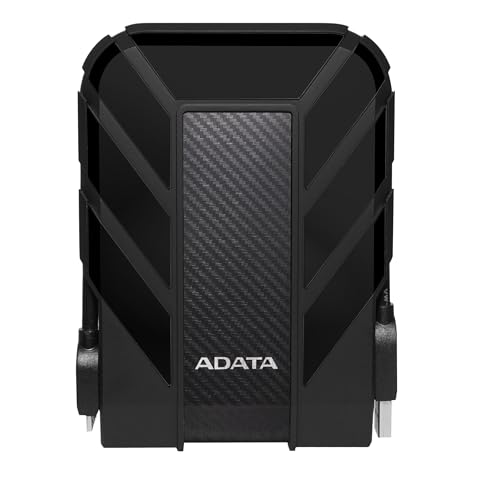
ADATA HD710 Pro 2TB
This drive is known for its military-grade shock resistance. It is IP68 waterproof and dustproof, so it can survive immersion in water. It is a traditional hard drive, so speeds are moderate. Users appreciate the ruggedness at a lower price point.
Pros
- IP68 waterproof
- Military-grade shock resistance
- Affordable
Cons
- Bulky and heavy
- Slower transfer speeds

G-Technology ArmorATD 1TB
This drive is built like a tank. It has a rugged aluminum enclosure and a shock-absorbing rubber bumper. It is IP54 water and dust resistant and can withstand a 1-ton crush. It also offers hardware encryption. It is a bit pricey but very reliable.
Pros
- Crushproof and dustproof
- Hardware encryption
- Durable build
Cons
- Heavier than many
- Only 1TB capacity

Toshiba Canvio Advance 2TB
This drive is incredibly slim and lightweight, making it easy to slide into a laptop bag. It offers a generous 2TB capacity for backing up files. It is not rugged, so it is suited for careful travelers. It comes in multiple colors and includes useful software.
Pros
- Very slim and light
- Large capacity
- Multiple color options
Cons
- No shock protection
- Slower than SSDs
What matters most
The lineup, side by side
| # | Model | Capacity | Best for | Score | Price |
|---|---|---|---|---|---|
| 1 | LaCie Rugged Mini 2TB | 2TB | Overall travelers who need durability | 9.4 | Check price |
| 2 | SanDisk Extreme Portable SSD 1TB | 1TB | Fast transfers and extreme portability | 9.3 | Check price |
| 3 | WD My Passport Ultra 2TB | 2TB | Budget-conscious travelers with large storage needs | 8.9 | Check price |
| 4 | Samsung T7 Shield 1TB | 1TB | Rugged SSD with top-notch performance | 9.2 | Check price |
| 5 | ADATA HD710 Pro 2TB | 2TB | Shockproof and waterproof on a budget | 8.6 | Check price |
| 6 | G-Technology ArmorATD 1TB | 1TB | Dustproof and crushproof for outdoor enthusiasts | 8.7 | Check price |
| 7 | Toshiba Canvio Advance 2TB | 2TB | Slim design with plenty of storage | 8.4 | Check price |
Good to know
What is the difference between an SSD and a hard drive?
An SSD uses flash memory with no moving parts, making it faster and more durable. A hard drive uses spinning disks, so it is more prone to damage from drops but offers more storage per dollar.
How much storage do I need for travel?
It depends on your content. For documents and photos, 1TB is plenty. For video editing, consider 2TB or more. Remember that higher capacities are heavier and more expensive.
Are rugged drives worth the extra cost?
If you travel often or work in harsh environments, yes. Rugged drives prevent data loss from drops and water exposure. For gentle use, a standard drive with a protective case can suffice.
Can I use a travel drive with my smartphone?
Some drives are compatible with USB-C smartphones and tablets. You may need a powered USB hub or an OTG cable. Check the drive’s specifications for mobile support.
How do I keep my data safe while traveling?
Use a drive with hardware encryption or password protection. Also, consider cloud backup as an additional layer, but be aware of internet availability.
What is the best way to care for a travel hard drive?
Keep it in a padded case when not in use. Avoid extreme temperatures and always eject it properly before unplugging. For SSDs, there is less risk of damage from movement.
Do I need a USB-C or USB-A drive?
Check your devices. Newer laptops and tablets have USB-C ports. If you have older devices, look for a drive with USB-A or get a USB-C to USB-A adapter.
How fast can I transfer files?
SSDs can reach speeds of 1000MB/s or more, while hard drives typically max out around 150-200MB/s. Actual speeds depend on the drive and the port you use.
Is it better to have a drive with a built-in cable or a separate one?
A built-in cable is convenient and prevents losing it, but it can be stiff. Separate cables are replaceable. Many rugged drives have a detachable cable for easier storage.
What is the warranty on these drives?
Most come with a limited warranty ranging from 2 to 3 years. Check the product page for warranty details. Some manufacturers offer longer warranties for SSDs.
Our pick
For most travelers, the LaCie Rugged Mini is the safest bet because it offers proven durability without a huge price premium. If you need maximum speed for media editing, the SanDisk Extreme is the way to go. If you are on a tight budget, the ADATA HD710 Pro gives you ruggedness at a low cost.


