Which Film Scanner Actually Captures 35mm Detail Best
Epson Perfection V600 leads this comparison for anyone with mixed 35mm and medium format negatives, since its flatbed design and Digital ICE scratch removal cover both without a second device. Plustek OpticFilm 8200i Ai sharpens fine 35mm grain at 7200 dpi, and Wolverine Titan 8-in-1 converts Super 8 and 110 reels without a computer.
Epson Perfection V600 suits anyone scanning both 35mm strips and medium format rolls, since its flatbed tray accepts film up to 6x22cm and Digital ICE clears dust automatically. It processes one frame at a time, so a shoebox of loose negatives takes longer here than on a feed-through converter.
Dedicated feed-through scanners favor speed while flatbeds favor format flexibility, so we compared optical resolution, supported film sizes, and owner feedback on scanning curled or faded negatives. Standalone units that skip a computer entirely got extra weight for anyone digitizing without existing photo software.
What we recommend

Epson Perfection V600 Photo Scanner
This flatbed model pairs a transparency unit with a document scanning bed, so 35mm negatives, slides, and medium format film all fit under one lid. Digital ICE strips dust and scratch marks during the scan pass, skipping manual retouching. Remove the film holders and it converts back into a standard photo and document scanner.
Pros
- Handles medium format film alongside standard 35mm strips
- Digital ICE clears dust and scratches without extra software steps
- Converts into a flatbed photo and document scanner
Cons
- Scans one frame at a time, slower than feed-through units
- Needs a connected computer, no built-in preview screen

Plustek OpticFilm 8200i Ai
Grain-level detail comes through at 7200 dpi optical resolution on this dedicated 35mm unit. SilverFast Ai software runs the scan, and its iSRD channel removes dust using infrared light rather than manual cleanup. Multi-exposure scanning pulls extra detail out of shadow areas on dense color negatives.
Pros
- Captures fine 35mm grain at 7200 dpi optical resolution
- Infrared iSRD channel removes dust automatically during scanning
- Multi-exposure mode recovers shadow detail on dark negatives
Cons
- Limited to 35mm, no medium format support
- SilverFast software takes time to learn for new users
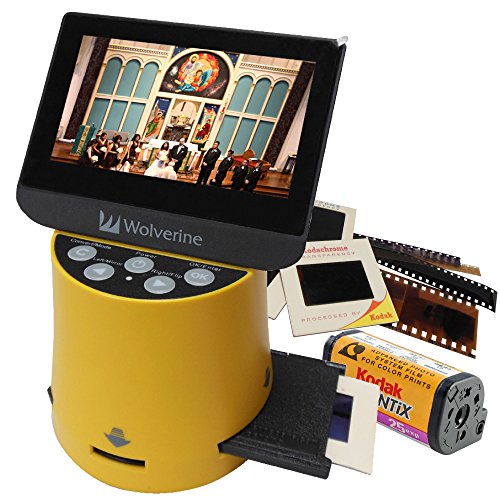
Wolverine Titan 8-in-1 Film to Digital Converter
Swappable adapters let this standalone converter digitize eight formats, from 35mm strips to Super 8 reels. A 4.3 inch screen previews, crops, and saves each frame without a computer. HDMI output sends converted files straight to a television for group viewing.
Pros
- Converts eight film and slide formats using swappable adapters
- Built-in screen previews and crops frames before saving
- Runs fully standalone, no computer connection required
Cons
- Fixed sensor resolution limits enlargement compared to dedicated scanners
- Swapping adapters by hand slows down mixed-format batches

Kodak Slide N SCAN Digital Film Scanner
A 5 inch screen makes framing and reviewing scans easier than on smaller standalone units. Separate adapters handle mounted slides and negative strips from 35mm, 126, and 110 film. Finished files save straight to an SD card as JPEG images, with no software step in between.
Pros
- Large 5 inch screen simplifies reviewing scans before saving
- Separate adapters cover both slides and negative strips
- Skips computer software entirely, saving JPEGs to SD card
Cons
- JPEG-only output limits later post-processing options
- Adapters can be fiddly with curled or older film strips

Kodak Scanza Digital Film Scanner
Five film formats, including Super 8 and 8mm, fit through this compact converter using swappable adapters. Its 3.5 inch screen tilts upward, which helps when composing warped or damaged frames. Finished scans move over by USB cable or straight to an SD card.
Pros
- Tilting screen helps compose awkward or damaged frames
- Covers five formats, including Super 8, with one device
- Compact size stores easily between scanning sessions
Cons
- Small screen makes checking fine detail harder
- Image quality trails dedicated flatbed or 35mm-only scanners

DIGITNOW 22MP Film Scanner
One button starts the scan on this simplified 35mm converter, aimed at occasional archiving rather than large collections. A 2.4 inch screen shows a live preview before each capture. USB power alone runs the unit, so no separate AC adapter is needed.
Pros
- One-button operation suits first-time users
- Compact and lightweight for occasional archiving projects
- Runs on USB power without a separate adapter
Cons
- Covers 35mm only, no adapters for other formats
- Small screen limits image review before saving

Magnasonic All-in-One High Resolution 24MP Film Scanner
Three common formats, 35mm, 126, and 110, run through this entry-level converter with one 2.4 inch preview screen. A bundled TV cable sends saved files to a larger display instead of the small built-in one. Files land on an SD card in JPEG format, ready to copy elsewhere.
Pros
- TV cable included for viewing scans on a larger screen
- Covers three common negative and slide formats
- Simple setup suits occasional home archiving
Cons
- Plastic build feels less sturdy under frequent use
- Color accuracy needs manual tweaking on faded film
How they stack up
| # | Model | Optical resolution | Best for | Score | Price |
|---|---|---|---|---|---|
| 1 | Epson Perfection V600 Photo Scanner | 6400 x 9600 dpi | Best overall | 9.4 | Check price |
| 2 | Plustek OpticFilm 8200i Ai | 7200 dpi | Best for image quality | 9.1 | Check price |
| 3 | Wolverine Titan 8-in-1 Film to Digital Converter | 35mm, 126, 110, Super 8, 8mm negatives and slides | Best for multiple film formats | 8.8 | Check price |
| 4 | Kodak Slide N SCAN Digital Film Scanner | 5 inch LCD screen | Best for slides and negatives | 8.5 | Check price |
| 5 | Kodak Scanza Digital Film Scanner | 3.5 inch tilt-up LCD | Best value | 8.2 | Check price |
| 6 | DIGITNOW 22MP Film Scanner | 2.4 inch LCD screen | Best for beginners | 8.1 | Check price |
| 7 | Magnasonic All-in-One High Resolution 24MP Film Scanner | 2.4 inch LCD screen | Best budget | 8.0 | Check price |
How to pick the right one
What to look for in a film scanner Optical resolution decides how much detail survives enlargement. A 35mm frame captured at 7200 dpi holds up better in a large print than one taken at 22MP through a fixed sensor. Film format range matters just as much, since a 35mm-only scanner cannot touch a box of 110 or Super 8 reels. Some buyers also want a flatbed that doubles as a photo and document scanner instead of a single-purpose unit.
Standalone converters vs computer-based scanners Standalone units like the Wolverine Titan and Kodak Scanza save straight to an SD card, skipping software installation entirely. Plustek OpticFilm and Epson Perfection instead connect over USB and lean on bundled software for cropping, color correction, and dust removal. Desktop software gives finer control during large batch edits, which matters for anyone digitizing thousands of frames.
Which scanner fits mixed film collections Boxes holding 35mm strips, 110 cartridges, and Super 8 reels need a converter with swappable adapters rather than a single-format scanner. Wolverine Titan and Kodak Scanza both cover five or more formats, while Plustek and DIGITNOW handle only 35mm. Medium format rolls only fit the Epson Perfection V600, since none of the standalone converters here accept film wider than 35mm.
Scanning faded or curled negatives Curled or yellowed negatives scan more evenly on units with adjustable film holders, since a flatter frame reduces focus drift. Infrared dust removal, built into the Plustek and Epson models, corrects surface scratches without manual retouching. Badly faded color negatives still need manual color balance adjustments afterward, regardless of which scanner captures them.
Common questions
What resolution do I need to scan 35mm negatives?
Prints up to 8×10 inches generally need 3600 to 4800 dpi. Archival scans meant for large enlargements benefit from 7200 dpi units like the Plustek OpticFilm 8200i Ai.
Can a film scanner handle both negatives and slides?
Most models here, including the Kodak Slide N SCAN and Kodak Scanza, ship with separate adapters for mounted slides and negative strips in one device.
Which film scanner works without a computer?
Wolverine Titan 8-in-1, Kodak Scanza, Kodak Slide N SCAN, DIGITNOW 22MP, and Magnasonic 24MP all run standalone, saving files to an SD card.
Is a flatbed scanner better than a dedicated film scanner?
A flatbed like the Epson Perfection V600 offers more format flexibility, including medium format film. A dedicated unit like the Plustek OpticFilm usually resolves finer 35mm detail instead.
What is the best film scanner for Super 8 and 8mm movie reels?
Wolverine Titan 8-in-1 and Kodak Scanza both include adapters for Super 8 and 8mm frames alongside standard negative formats.
Kodak Scanza vs Kodak Slide N SCAN, what’s the difference?
Scanza covers five film formats, including Super 8 and 8mm, through a compact 3.5 inch screen. Slide N SCAN focuses on 35mm, 126, and 110 with a larger 5 inch display.
Do film scanners remove dust and scratches automatically?
Epson Perfection V600 and Plustek OpticFilm 8200i Ai both use infrared-based dust and scratch correction. Standalone converters rely on manual editing after saving instead.
What file format do film scanners save to?
Standalone converters like the Kodak Slide N SCAN and Magnasonic 24MP save JPEG files to an SD card. Computer-connected scanners can export additional formats through their bundled software.
Is a 22MP film scanner good enough for printing?
A 22MP sensor works fine for prints up to roughly 8×10 inches. Larger enlargements show more detail from a dedicated optical scanner like the Plustek at 7200 dpi.
Final word
Epson Perfection V600 fits most households best, since its flatbed tray covers 35mm and medium format film without a second device. Anyone focused purely on 35mm sharpness should pick the Plustek OpticFilm 8200i Ai instead, given its 7200 dpi resolution and infrared dust removal. Owners with Super 8 or 110 cartridges get more use out of the Wolverine Titan 8-in-1 or Kodak Scanza.



