Flight Sim Joysticks That Bring the Cockpit Home
The Thrustmaster T.16000M FCS stands out as the top pick for most simmers because it offers exceptional precision with its magnetic sensors and a comfortable grip that suits long sessions. Its main advantage is the combination of accuracy and affordability, but its limited number of buttons may require add-on peripherals for complex aircraft.
Flying a virtual aircraft demands a joystick that translates your inputs with accuracy and feel. Simmers spend hours perfecting approaches and aerial maneuvers, and the right stick can make a world of difference. From entry-level models to high-end systems, the market offers a range of options, each tailored to different flying styles.
We compared the most popular joysticks currently on the market, focusing on precision, ergonomics, and overall value. Whether you are a beginner or a seasoned virtual aviator, our roundup will help you identify the stick that fits your needs, budget, and desk space.
The shortlist, ranked

Thrustmaster T.16000M FCS
The T.16000M FCS uses magnetic HallEffect sensors for pinpoint accuracy and a twist rudder for easy yaw control. Its ambidextrous design suits both left and right handed pilots, and the trigger and buttons are well placed. Owners report smooth, durable operation, making it a favorite among virtual pilots.
Pros
- Excellent precision
- Comfortable for all hand sizes
- Twist rudder adds convenience
Cons
- Limited number of buttons
- Throttle not included

Logitech G Extreme 3D Pro
This classic joystick has been a staple for years, offering solid performance at an affordable price. With a twist handle for rudder control, a throttle on the base, and 12 programmable buttons, it covers the essentials. Users appreciate its sturdy build and comfortable grip, though the spring centering is a bit stiff after heavy use.
Pros
- Great value
- Integrated throttle
- Reliable and durable
Cons
- Plastic build feels less premium
- No vibration feedback

Thrustmaster HOTAS Warthog
The Warthog is a professional grade HOTAS system modeled after the A-10C cockpit. Its metal construction and heavy base provide a realistic feel that serious simmers crave. The separate throttle and joystick offer immense control and a vast array of programmable buttons. This is an investment, but owners say it transforms the sim experience.
Pros
- Realistic and immersive
- Excellent build quality
- Separate throttle for precise control
Cons
- Very expensive
- No twist rudder (requires pedals)

Logitech G Saitek X56
The X56 is a feature packed HOTAS with a joystick and separate throttle that includes mini joysticks and analog dials. It offers extensive customization through software, making it ideal for complex cockpits. While it has a learning curve and occasional build quality concerns, its versatility is unmatched.
Pros
- Many buttons and controls
- Separate throttle with extra features
- Good for space sims
Cons
- Software can be finicky
- Some users report quality control issues

Thrustmaster T-Flight HOTAS X
The T-Flight HOTAS X is an affordable way to try a throttle and stick setup. It features a realistic design with a detachable throttle for versatile positioning. It works on both PC and PlayStation, making it a popular choice for console players. The lack of dedicated rudder pedals is compensated by a twist handle.
Pros
- Affordable HOTAS solution
- Compatible with PlayStation
- Good for beginners
Cons
- Plastic build feels light
- Limited precision
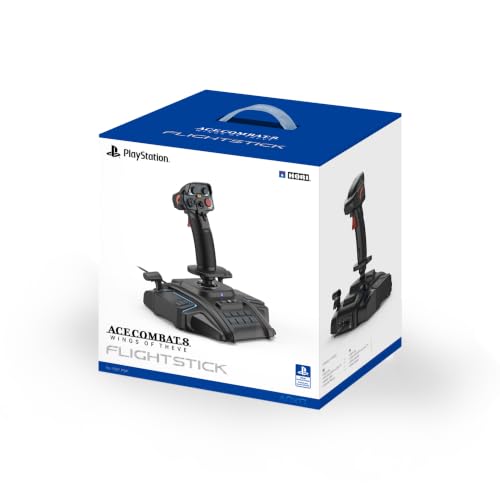
HORI Flightstick for Aces
This officially licensed joystick is designed for Nintendo Switch, perfect for games like Ace Combat and Sky Rogue. It features a large flight stick with a throttle lever and motion controls. The build is solid, but it lacks the button complexity of PC joysticks. Switch owners will find it a fun addition.
Pros
- Great for Switch games
- Comfortable stick
- Motion controls
Cons
- Limited to Switch
- Fewer buttons than PC sticks

Thrustmaster Airbus Edition TCA Sidestick
This sidestick replicates the actual Airbus control, with a realistic feel and interchangeable modules. It offers a smooth, precise motion and includes a USB connection for PC. The separate throttle quadrant is sold separately, but the stick itself brings cockpit authenticity to your setup.
Pros
- Realistic Airbus design
- Excellent precision
- Modular system
Cons
- Throttle not included
- May be too specialized
How to choose
Compared at a glance
| # | Model | Sensor | Best for | Score | Price |
|---|---|---|---|---|---|
| 1 | Thrustmaster T.16000M FCS | HallEffect magnetic | Best overall for precision and value | 9.4 | Check price |
| 2 | Logitech G Extreme 3D Pro | Optical | Best budget joystick for beginners | 8.8 | Check price |
| 3 | Thrustmaster HOTAS Warthog | Metal and plastic | Best high-end simulation experience | 9.2 | Check price |
| 4 | Logitech G Saitek X56 | 31 programmable | Best for space sims and multi-engine aircraft | 8.9 | Check price |
| 5 | Thrustmaster T-Flight HOTAS X | 12 with 5 axes | Best entry-level HOTAS | 8.4 | Check price |
| 6 | HORI Flightstick for Aces | Nintendo Switch | Best for Nintendo Switch | 8.1 | Check price |
| 7 | Thrustmaster Airbus Edition TCA Sidestick | HallEffect | Best for Airbus enthusiasts | 9.0 | Check price |
Frequently asked questions
What is the best flight simulator joystick for beginners?
The Logitech G Extreme 3D Pro is an excellent starting point because it is affordable, reliable, and includes essential features like a twist rudder and throttle. It offers good precision for the price.
Do I need rudder pedals?
Not necessarily. Many joysticks have a twist handle that acts as a rudder. Pedals are beneficial for realism and precision, especially in helicopters and taildraggers, but they are an additional expense.
Can I use a flight joystick with Microsoft Flight Simulator?
Yes, most PC joysticks are compatible with Microsoft Flight Simulator. Look for plug-and-play support or use the software to map buttons. Popular sticks like the Thrustmaster T.16000M and Logitech X56 work well.
What is the difference between a joystick and a HOTAS?
A HOTAS system includes a separate throttle control and a joystick, mimicking real aircraft layouts. It provides more buttons and better ergonomics for complex sims, but it costs more and occupies more space.
Are expensive joysticks worth it?
For dedicated simmers, yes. Higher-end models use better sensors for smoother control and have more buttons. They often have metal parts that last longer. Casual players might not notice a significant difference.
Can I use a joystick on a console?
Some joysticks support PlayStation or Xbox consoles, but the selection is limited. The Thrustmaster T-Flight HOTAS X works on PlayStation, while the HORI Flightstick is for Nintendo Switch. Always check compatibility before purchasing.
How many buttons do I need on a joystick?
It depends on the complexity of the aircraft. For general aviation, a few buttons suffice. For airliners or combat jets, you may need many buttons to avoid reaching for the keyboard. A stick with 12 or more buttons is recommended.
What is the best budget joystick?
The Logitech G Extreme 3D Pro offers the best balance of price and performance. It is widely available and durable, making it a popular choice among budget-conscious simmers.
Final word
If you want a reliable and precise joystick without breaking the bank, the Thrustmaster T.16000M FCS is our top recommendation. It delivers outstanding value and accuracy. For those who are ready to invest in a premium simulation experience, the Thrustmaster HOTAS Warthog is the ultimate choice, offering exceptional build and realism.