Label Makers That Make Home Organizing Actually Stick
Most homes get the easiest results from the Brother P-touch PT-D210, which pairs a real keyboard with cheap laminated TZe tape. Phone based design fans should look at the Brother P-touch Cube PT-P300BT, while the NIIMBOT D110 labels bins and jars for the lowest cost per sticker.
Laminated TZe tape survives freezers, bathroom steam and dishwasher splashes, which is why the Brother P-touch PT-D210 suits most home organizers better than fancier alternatives. Anyone who prefers designing labels with fonts and icons on a phone should look at the Brother P-touch Cube PT-P300BT instead, and the thermal NIIMBOT D110 handles high volume bin labeling for very little per sticker.
Home labeling gets tricky because the machine is rarely the expensive part, the tape is. Thermal models print for almost nothing but fade in sunlight, while laminated tape lasts years at a higher cost per roll. We compared cartridge availability, print width, whether a unit runs on batteries or a cable, and what owners report about jams and dried out cutters after months in a drawer.
The best picks, ranked

Brother P-touch PT-D210 Label Maker
A full QWERTY keyboard, graphical display and access to Brother’s huge laminated TZe tape range make the PT-D210 the easy sweet spot for home use. Print sits sealed between two layers of plastic, so labels stay legible on freezer bags, spice jars and bathroom bins. Owners report it is the model they stop fiddling with and simply use.
Pros
- Laminated tape shrugs off moisture and handling
- Real keyboard beats phone typing for speed
- TZe cartridges are stocked almost everywhere
Cons
- Burns through AAA batteries without the optional adapter
- Maximum tape width trails office focused models

Brother P-touch Cube PT-P300BT Label Maker
Dropping the keyboard, the Cube hands design work to the Brother app over Bluetooth, opening up better fonts, emoji and longer text blocks. Durability matches the PT-D210 since both use the same laminated TZe tape. Based on specifications, it suits anyone who wants labels that look designed rather than typed.
Pros
- App unlocks far more fonts and layouts
- Same durable laminated tape as larger models
- Compact enough to store in a kitchen drawer
Cons
- Entirely dependent on a paired phone
- No display exists on the unit itself

NIIMBOT D110 Label Maker
No ink and very cheap sticker rolls define this thermal printer, which suits labeling dozens of storage bins in one afternoon. Ready made templates in the app cover pantry, craft and cable labels. Owners report crisp indoor printing that fades if a label sits in direct sun for months.
Pros
- Lowest running cost of any option here
- Wide choice of coloured and shaped label rolls
- Recharges over USB instead of draining batteries
Cons
- Thermal print fades in sunlight or heat
- Labels scuff more easily than laminated tape

DYMO LabelManager 160 Label Maker
One handed and instant on, the LabelManager 160 keeps DYMO’s classic QWERTY keyboard design intact. Shelf edges, folders and school gear all print quickly, and D1 tape stays widely stocked in stores. Dry indoor jobs suit it better since it skips the laminated construction found on Brother tape.
Pros
- Fast from power on to printed label
- Light enough to hold and type one handed
- Tape stays easy to find in stores
Cons
- D1 tape wears faster than laminated tape
- Small screen limits visible characters

Phomemo D30 Label Maker
Barely bigger than a chunky marker, the D30 prints narrow thermal labels suited to spice jars, drawer dividers and craft storage. A large template library in the app targets home organizing specifically. Think of it as a companion machine rather than a daily workhorse.
Pros
- Genuinely pocketable for cupboard work
- Large template library built into the app
- Runs quietly while printing
Cons
- Limited to narrow label widths only
- Thermal labels are not moisture proof

DYMO LetraTag LT-100H Label Maker
Many households already recognize this machine, with its ABC keyboard, small LCD and cheap paper or plastic tape. Folders, boxes and short term labels all suit it fine. Owners report it works best on dry indoor jobs since the tape marks easily.
Pros
- Cheapest tape in the DYMO lineup
- Easy for anyone to pick up and use
- Handles paper tape for temporary labels
Cons
- ABC keyboard layout slows fast typists
- Tape scuffs with regular handling
MakeID L1 Label Maker
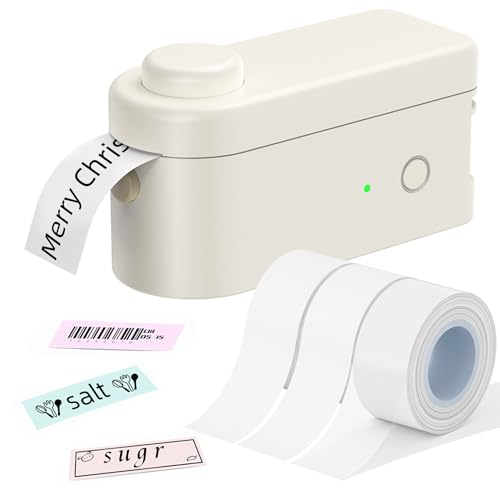
Aimed at working through a garage or playroom in one session, this thermal app driven labeler swaps rolls quickly. Adhesive holds well on plastic totes and storage bins. Print refinement gives way to speed and low per label cost.
Pros
- Fast roll swaps during long labeling sessions
- Sticks reliably to plastic storage bins
- Consumables cost less than rival systems
Cons
- App layout tools stay fairly basic
- Print quality trails the Brother models
How they stack up
| # | Model | Tape type | Best for | Score | Price |
|---|---|---|---|---|---|
| 1 | Brother P-touch PT-D210 Label Maker | Laminated TZe, 3.5mm to 12mm | Best overall | 9.4 | Check price |
| 2 | Brother P-touch Cube PT-P300BT Label Maker | Laminated TZe, up to 12mm | Best value | 9.2 | Check price |
| 3 | NIIMBOT D110 Label Maker | Direct thermal, no ink | Best budget | 9.0 | Check price |
| 4 | DYMO LabelManager 160 Label Maker | DYMO D1, 6mm to 12mm | Best simple handheld | 8.8 | Check price |
| 5 | Phomemo D30 Label Maker | Direct thermal | Best for small jars and spice racks | 8.6 | Check price |
| 6 | DYMO LetraTag LT-100H Label Maker | LetraTag paper and plastic, 12mm | Best for occasional use | 8.3 | Check price |
| 7 | MakeID L1 Label Maker | Direct thermal | Best for bulk bin labelling | 8.0 | Check price |
What matters most
Laminated tape or thermal labels: which lasts longer This single decision shapes everything else about a label maker. Laminated TZe tape seals print between plastic layers, surviving freezer condensation, bathroom steam and years of handling. Thermal labels carry no ink at all, keeping cost extremely low, but heat and sunlight grey them out over time. A practical setup often pairs one laminated machine for kitchen and bathroom jobs with one thermal machine for bulk bin work.
Keyboard or phone app: which is faster to use Power on and type wins for keyboard models on short, plain labels. App driven models pull ahead when a specific font, an icon or a two line label matters. Households with more than one label maker user tend to reach for the keyboard model more often, since it skips the app install step entirely.
What tape width actually suits home labels Jar lids, drawer fronts, shelf edges and cable ties make up most home labeling, and all of them suit tape between six and twelve millimetres. Wider tape looks impressive but wastes material on small containers and costs more per label. Check the widest tape a machine accepts, then confirm narrower cartridges exist before committing to a system.
Running costs and cartridge availability over time A label maker is a one time purchase, but the tape keeps costing money for years. Before buying, check how many cartridge types a system offers, whether generic compatible tape exists, and how much tape each cartridge holds. Large installed bases like Brother TZe and DYMO D1 offer the safest bet for finding replacements years down the line.
Good to know
What label maker works best for pantry jars?
Laminated tape models such as the Brother P-touch PT-D210 handle pantry duty safely, since those labels get handled, wiped and occasionally splashed. Print stays readable through all of that, while thermal labels can smudge or fade under the same conditions.
Are thermal label makers worth buying for home use?
Yes, as long as labels stay indoors and away from direct sun. Thermal models like the NIIMBOT D110 cost far less per label, which adds up fast when labeling forty storage bins. Freezer, bathroom or outdoor use calls for laminated tape instead.
Can label maker stickers be peeled off later?
Most standard tapes stay put by design and can leave residue when removed. Removable adhesive variants exist from both Brother and DYMO for anyone who expects to relabel often, and thermal labels lift more cleanly from smooth plastic surfaces.
Does a label maker need a built in keyboard?
Not strictly. Keyboard models print quick, plain labels without needing a phone nearby. App based models unlock better fonts and layouts instead. Households where several people label things tend to get more mileage from a keyboard model.
Will label maker tape hold up in a freezer?
Laminated tape generally does, and Brother sells strong adhesive and flexible ID tapes built for cold or curved surfaces. Paper based and thermal labels tend to lift once condensation forms, so save those for dry shelves instead.
How long do label maker batteries actually last?
Print volume drives battery life more than anything else. AAA powered handhelds can drain fast during a big organizing session, which is why owners report keeping a mains adapter on hand. Rechargeable thermal models sidestep the issue by charging over USB.
What tape width should a first time buyer choose?
Twelve millimetre tape covers the most ground for home organizing, fitting jar lids, drawer fronts and shelf edges without overwhelming them. Narrower tape can get added later for cables and small containers.
Can one label maker cover both home and office needs?
It can, though heavy office work benefits from wider tape and mains power. The Brother P-touch PT-D210 handles home labeling comfortably plus occasional folder and shelf jobs, while daily filing work favours a dedicated desktop model.
The bottom line
Laminated tape and a real keyboard remove nearly every reason to abandon a labeling project halfway, which keeps the Brother P-touch PT-D210 the most sensible home label maker. App designed labels on the same durable tape point toward the Brother P-touch Cube PT-P300BT, and labeling a lot of bins for as little as possible points toward the NIIMBOT D110.