Which Gaming Console Fits Your Setup Right Now?
The PlayStation 5 Slim leads for its exclusive lineup and DualSense controller. Anyone already paying for Game Pass gets more value from the Xbox Series X, while families and travelers do better with the Nintendo Switch OLED Model.
Buy the PlayStation 5 Slim for the deepest single library, the Xbox Series X if Game Pass already anchors your budget, and the Nintendo Switch OLED Model for portable or shared play.
Spec sheets across these systems look deceptively similar while libraries, services and daily use diverge sharply. We compared exclusive catalogues, subscription structures, resolution targets, storage expansion and backwards compatibility, then weighed owner reports about noise, drive space and how each system actually fits a household.
The top picks, ranked

Sony PlayStation 5 Slim
Sony shrank the case without cutting performance, and the exclusive lineup remains the deepest of any current console. Adaptive triggers and haptic feedback in the DualSense controller still do things no rival pad replicates. A disc drive option makes physical game trading realistic here, unlike on all digital systems.
Pros
- Strongest exclusive library
- Controller haptics are genuinely different
- Smaller than the launch model
Cons
- Subscription needed for online play
- Disc drive costs extra on digital models

Microsoft Xbox Series X
Raw power tops the mainstream home console field here, and pairing it with Game Pass changes how many games you actually need to buy outright. Quick Resume holds several suspended games at once for instant switching. Backwards compatibility across older Xbox generations beats every rival in this list.
Pros
- Excellent subscription value
- Deep backwards compatibility
- Quick Resume across multiple games
Cons
- Fewer system exclusives
- Expansion cards are pricey

Nintendo Switch OLED Model
Nintendo’s own library carries this console, and it exists nowhere else. A brighter OLED screen and sturdier kickstand separate this model from the base Switch without changing the game catalogue. Detachable Joy-Con controllers turn any room into a multiplayer setup in seconds, no extra hardware required.
Pros
- Excellent handheld screen
- Effortless local multiplayer
- Exclusive Nintendo franchises
Cons
- Weakest raw performance
- Joy-Con drift is a known issue
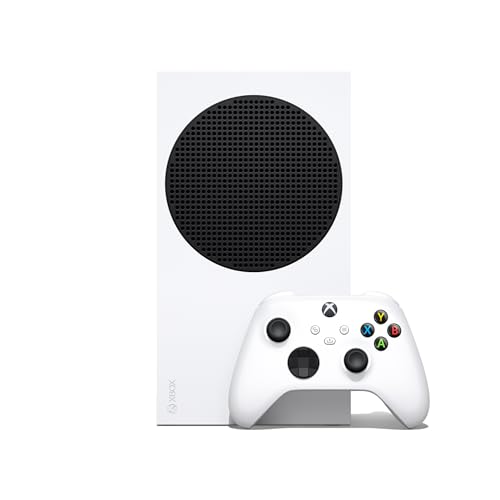
Microsoft Xbox Series S
Lower resolution output keeps this the cheapest entry into current generation gaming and full Game Pass access. Its small, quiet chassis fits a bedroom shelf or a travel bag without complaint. Internal storage fills quickly at this size, so plan for an expansion card or external drive from the start.
Pros
- Lowest cost entry point
- Very small and quiet
- Full Game Pass access
Cons
- No disc drive
- Storage fills fast

Valve Steam Deck OLED
An existing Steam library becomes portable here, backed by a sharp OLED screen and longer battery life than the original Deck. Full PC hardware sits underneath, which brings flexibility along with more setup work than any console. People who already own many PC games get the most value from this system.
Pros
- Plays an existing PC library
- Excellent OLED screen
- Highly customisable
Cons
- Not every game runs perfectly
- More setup than a console
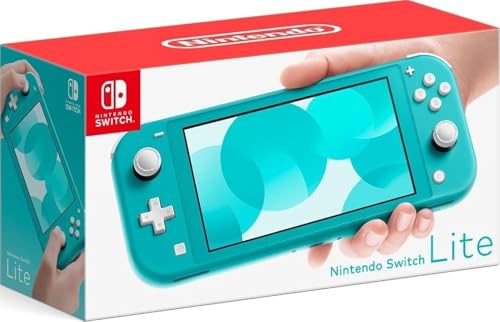
Nintendo Switch Lite
Removing the dock and detachable controllers shrinks this into a lighter, purely handheld system. As a second console for a child or a travel companion it works well, provided you accept it never connects to a television. Battery life holds up respectably given its compact size.
Pros
- Compact and light
- Lower cost than other Switch models
- Durable one piece design
Cons
- Cannot connect to a TV
- Some games need detached controllers

ASUS ROG Ally
Full Windows runs on this handheld, opening access to every PC storefront instead of a single ecosystem. Performance holds up well for its size, and the display stays bright and fast under load. Software feels fiddlier than a console, and battery life drops noticeably during demanding games.
Pros
- Access to every PC store
- Strong handheld performance
- Bright fast display
Cons
- Battery drains quickly under load
- Windows on a handheld is fiddly
How to choose
What to check before comparing specs at all Performance gaps between current home consoles matter less than which games you actually want to play. PlayStation and Nintendo both hold large exclusive libraries unavailable elsewhere, while Xbox increasingly publishes titles across platforms. List five games you genuinely want, check where each runs, and the decision often makes itself.
How subscriptions change the real cost Online multiplayer requires a paid subscription on every major platform, so that cost applies regardless of choice. Game Pass goes further with a large rotating catalogue, suited to players who like sampling many titles over owning a few. Replaying the same handful of games for years makes buying outright cheaper than any subscription.
Why storage fills faster than the number suggests Modern games routinely consume large chunks of a drive, so a 512GB or 1TB console holds fewer titles than expected. PlayStation accepts standard M.2 drives, Xbox relies on proprietary expansion cards, and Switch takes ordinary microSD cards. Budget for expansion up front, since reinstalling large games over a home connection gets old fast.
Matching the console to where and how you play A living room console shared by several people has different needs than one in a bedroom. Switch systems excel at handing over a controller for instant local multiplayer, while home consoles favor a single player facing a television. Handheld PCs like the Steam Deck and ROG Ally suit travel and existing PC libraries but demand more tinkering than any console here.
How they compare
| # | Model | Storage | Best for | Score | Price |
|---|---|---|---|---|---|
| 1 | Sony PlayStation 5 Slim | 1TB internal SSD | Best overall | 9.4 | Check price |
| 2 | Microsoft Xbox Series X | 1TB custom SSD | Best value | 9.2 | Check price |
| 3 | Nintendo Switch OLED Model | 7 inch OLED | Best for families | 9.0 | Check price |
| 4 | Microsoft Xbox Series S | 512GB or 1TB SSD | Best budget | 8.7 | Check price |
| 5 | Valve Steam Deck OLED | OLED handheld display | Best for PC libraries | 8.5 | Check price |
| 6 | Nintendo Switch Lite | Handheld only | Best for handheld only players | 8.3 | Check price |
| 7 | ASUS ROG Ally | Windows handheld | Best for Windows handheld gaming | 8.0 | Check price |
Good to know
Which console has the best exclusive games?
PlayStation and Nintendo both maintain strong exclusive libraries aimed at different audiences. Xbox exclusives increasingly land on other platforms too, which shifts its appeal toward the subscription instead.
Do I need a 4K television for a current console?
No. Home consoles output at lower resolutions without issue, and the Series S targets those resolutions by design. A 4K set with high refresh rate does let you see more benefit from the more powerful systems.
Is a digital only console a mistake?
That depends on whether you buy used games or trade titles in. Digital consoles cost less upfront but lock you into store pricing and remove any resale value.
Can I use my old controllers on a new console?
Generally not across generations for standard gameplay, though Xbox has the best track record for accessory compatibility. Check each accessory individually rather than assuming it works.
How much storage should I plan for on a new console?
Assume a modern console fills its internal drive within a handful of large games. Budgeting for an expansion drive or card at purchase time saves frustration later.
Is a handheld PC a real replacement for a console?
For PC gamers with an existing library, often yes. For someone who wants to switch on a system and play with zero configuration, a console stays the simpler option.
Do all consoles need internet access to work?
Setup and system updates require a connection, and digital purchases need one to download. After that, most single player games run fine offline.
Which console is best for young children?
The Switch family usually fits best, thanks to durable handheld options, straightforward parental controls and a library aimed squarely at younger players.
PS5 vs Xbox Series X: which one should I actually buy?
Choose PS5 for the stronger exclusive lineup and DualSense controller. Choose Series X if Game Pass already covers most of your gaming budget and backwards compatibility with older Xbox games matters to you.
Our take
The PlayStation 5 Slim earns the strongest single recommendation, pairing the deepest exclusive library with a controller that still feels ahead of its rivals. Build around Game Pass instead and the Xbox Series X makes more sense, while households that play together or travel often get more use from the Nintendo Switch OLED Model.
You might also need
Wired or Wireless Gaming Headset: Which Fits Your Setup?

Mirrorless Cameras Under 500 Worth Buying Right Now
