Pro Gaming Mice That Hold Up in Real Matches
The Logitech G Pro X Superlight 2 leads for professional play. Owners report it feels nearly weightless, and the HERO 2 sensor tracks flawlessly. Its main limitation is the lack of Bluetooth, which bothers some users.
Professional gaming demands precision and speed. A mouse that lags or feels heavy can cost you the match. We compared the most popular pro-grade mice used in esports.
Each mouse here has a proven track record. We looked at sensor specs, weight, build quality, and real user feedback. Our goal is to help you find the right tool for your play style.
Our top picks

Logitech G Pro X Superlight 2
The Superlight 2 is the go-to for many esports pros. It weighs just 60 grams and features the HERO 2 sensor with up to 32,000 DPI. The shape is symmetrical and suits most grip styles. Owners report a solid, responsive click.
Pros
- Extremely light
- Flawless wireless performance
- Long battery life
Cons
- No Bluetooth
- No RGB lighting

Razer DeathAdder V3 Pro
Razer’s DeathAdder V3 Pro is a favorite for its comfortable shape and light weight. It features the Focus Pro 30K optical sensor and optical switches. It is available in black or white. Users appreciate the smooth glide and precise tracking.
Pros
- Excellent ergonomics
- Very light
- Optical switches are fast
Cons
- Right-handed only
- No charging dock

Zowie EC2-CW
Zowie is known for shapes that pros love. The EC2-CW is a wireless version of the classic EC2. It has a 3360 sensor and a simple design. Players report it feels like a natural extension of the hand. The scroll wheel is stiff but precise.
Pros
- Iconic shape
- Plug and play, no software needed
- Durable build
Cons
- Lower DPI range
- No software customization
Razer Viper V2 Pro
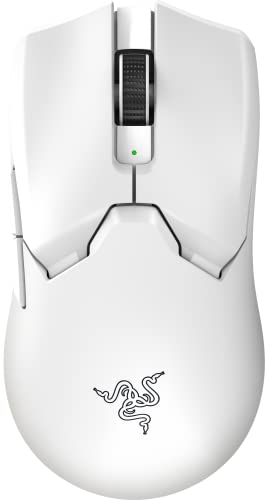
The Viper V2 Pro is a symmetrical mouse that works for lefties and righties. It weighs 58 grams and has Razer’s Focus Pro 30K sensor. It lacks RGB to save weight. Owners say the clicks are crisp and the feet are smooth.
Pros
- Ambidextrous shape
- Very light
- Great sensor
Cons
- No side buttons on right side
- No Bluetooth

Logitech G502 X Plus
The G502 X Plus is heavier but feature-rich. It has 13 programmable buttons and a hybrid optical-mechanical switch. It includes LIGHTSYNC RGB. It suits gamers who want lots of controls for MMOs or MOBAs.
Pros
- Many programmable buttons
- Dual connectivity
- Adjustable scroll wheel
Cons
- Heavy
- Pricey

SteelSeries Aerox 5 Wireless
The Aerox 5 Wireless is a holey mouse that is light and durable. It has 9 programmable buttons and a TrueMove Air sensor. It is IP54 water resistant. Users like the comfortable shape and the fast wireless.
Pros
- Lightweight
- Extra buttons
- Water resistant
Cons
- Holes can collect dust
- Software can be finicky

Glorious Model O 2 Pro
The Model O 2 Pro is a wired mouse that offers pro-level specs for less. It has a BAMF 2.0 sensor with 26,000 DPI and weighs 59 grams. It is ambidextrous and has a flexible cable. Gamers report it feels like a wireless mouse due to the cable.
Pros
- Low price
- Lightweight
- Flexible cable
Cons
- Wired only
- Software has limited options
Before you buy
Sensor and DPI The sensor determines tracking accuracy. Pro mice use optical sensors with high DPI, but most pros play at low DPI. Look for a sensor that performs well at your preferred settings. Brands like Logitech, Razer, and SteelSeries use top-tier sensors.
Weight and Shape Weight affects how quickly you can move the mouse. Most pros prefer under 80 grams. Shape is personal: ergonomic for palm grip, symmetrical for claw or fingertip. Consider your hand size and grip style.
Wireless vs Wired Wireless technology has improved greatly. Professional mice now use low-latency wireless that is as fast as wired. Wireless gives freedom of movement. But some players still prefer wired to avoid charging. Battery life is a factor.
Switch Durability Switches handle clicks. Optical switches use light and last longer, while mechanical switches give a tactile feel. Pros need consistent clicks over many hours. Look for switches rated for 70 million clicks or more.
How they compare
| # | Model | Weight | Best for | Score | Price |
|---|---|---|---|---|---|
| 1 | Logitech G Pro X Superlight 2 | 60 g | Ultra-light wireless performance | 9.6 | Check price |
| 2 | Razer DeathAdder V3 Pro | 63 g | Ergonomic comfort for palm grip | 9.4 | Check price |
| 3 | Zowie EC2-CW | 77 g | Competitive FPS with a proven shape | 9.2 | Check price |
| 4 | Razer Viper V2 Pro | 58 g | Ambidextrous users who want speed | 9.0 | Check price |
| 5 | Logitech G502 X Plus | 106 g | Versatile gaming with extra buttons | 8.8 | Check price |
| 6 | SteelSeries Aerox 5 Wireless | 74 g | Lightweight with extra buttons | 8.6 | Check price |
| 7 | Glorious Model O 2 Pro | 59 g | Budget-conscious wired perfomance | 8.3 | Check price |
Frequently asked questions
What is the best mouse for professional gaming?
The Logitech G Pro X Superlight 2 is widely used by pros for its light weight and reliable sensor. But the best mouse also depends on your grip and hand size.
Do pro gamers use wireless mice?
Yes, many pros use wireless mice because modern wireless tech is lag-free. The Superlight and Razer Viper V2 Pro are common in tournaments.
What DPI do pro gamers use?
Most pros use low DPI, often between 400 and 1600, to maintain precise aim. They adjust in-game sensitivity instead.
Is a lighter mouse better?
Lighter mice reduce fatigue and allow faster flicks. Many pros prefer under 70 grams, but some like a bit of weight for stability.
What is the difference between optical and mechanical switches?
Optical switches use light to register clicks, resulting in faster response and longer life. Mechanical switches use metal contacts and offer a tactile feel.
How important is the shape of a gaming mouse?
Shape is crucial for comfort during long sessions. A poor shape can cause hand cramps. It’s best to choose a shape that matches your grip style.
Can I use a gaming mouse for work?
Yes, many gaming mice have programmable buttons and adjustable DPI, making them versatile for productivity tasks.
How long do gaming mice last?
With proper care, a good gaming mouse can last several years. Switches are rated for tens of millions of clicks.
Do I need software to use these mice?
Most mice work plug and play, but software allows customization of DPI, buttons, and RGB. Some mice like Zowie have no software, which some users prefer.
Are expensive gaming mice worth it?
High-end mice offer better sensors, lower weight, and advanced features. For competitive play, they can make a difference, but mid-range options also perform well.
Final word
If you want the best overall for competitive play, get the Logitech G Pro X Superlight 2. Its light weight and flawless wireless make it a top choice. For ergonomic comfort, the Razer DeathAdder V3 Pro is excellent. If you are on a budget, the Glorious Model O 2 Pro gives you pro-level performance at a lower price.