Wireless Gaming Mice That Keep Up With Your Clicks
The Razer Viper V2 Pro leads our list, offering a featherlight 58g build with Razer’s Focus Pro 30K sensor for precise tracking across all surface types. Its main drawback is a higher price point and no Bluetooth support, but for competitive FPS players, the speed and accuracy justify the cost.
Wireless gaming mice have evolved from laggy alternatives to tournament-grade peripherals. Today’s models offer sub-millisecond response times, high-precision sensors, and battery life measured in days, not hours. But with so many options, finding the right one for your playstyle can be overwhelming.
We dug through specifications and user feedback to shortlist seven top contenders. Whether you prioritize ultra-lightweight design for flick shots, extra buttons for MMO macros, or a budget-friendly option that doesn’t skimp on performance, this guide cuts through the noise.
How to choose
The top picks, ranked

Razer Viper V2 Pro
The Razer Viper V2 Pro is a no-compromise esports mouse. Owners report a featherlight 58g frame that glides effortlessly, and the Focus Pro 30K sensor tracks perfectly on glass. Its symmetrical shape suits both claw and fingertip grips, but there’s no Bluetooth and the price is premium.
Pros
- Extremely light for fast flicks
- Top-tier sensor accuracy
- Durable optical switches rated for 90 million clicks
Cons
- No Bluetooth support
- High price compared to similar options

Logitech G502 X Plus
Logitech’s G502 X Plus combines a comfortable shape with 13 programmable buttons and LIGHTSPEED wireless. Its 25K HERO sensor ensures precise tracking, and the RGB lighting adds flair. At 106g, it’s heavier than ultralights, but the thumb rest and adjustable weight system appeal to those who prefer stability.
Pros
- Versatile button layout
- Dual connectivity with Bluetooth
- PowerPlay compatible for wireless charging
Cons
- Heavier than dedicated esports mice
- Slightly bulky for small hands

Logitech G305 LIGHTSPEED
The G305 delivers LIGHTSPEED wireless and a 12K HERO sensor at an affordable price. Users report a comfortable shape for claw and palm grips, and the single AA battery provides up to 250 hours of use. It lacks RGB and extra buttons, but for the price, it’s a steal.
Pros
- Excellent value for wireless performance
- Long battery life
- Simple and durable design
Cons
- No Bluetooth or RGB
- Weight distribution changes with battery type

Razer Basilisk V3 Pro
The Basilisk V3 Pro is a feature-packed mouse with 11 programmable buttons, a tilt wheel, and Razer’s Focus Pro 30K sensor. Its ergonomic shape suits palm grip, and the RGB underglow looks stunning. At 112g, it’s heavier, but the comfort and functionality justify it for long MMO sessions.
Pros
- Plenty of programmable buttons
- HyperScroll tilt wheel for free-scrolling
- Wireless charging dock optional
Cons
- Heavy for competitive shooters
- Pricey for its niche

Glorious Model O 2 Pro
Glorious offers a 59g wireless mouse with a honeycomb shell that reduces weight without sacrificing durability. Its BAMF 2.0 sensor tracks up to 26K DPI, and the flexible cable for charging is a plus. Owners report the shape is ideal for claw and fingertip grips, though the holes may collect dust.
Pros
- Featherlight with excellent glide
- High-performance sensor
- Swappable switches for customization
Cons
- Honeycomb shell may gather dust
- No Bluetooth

SteelSeries Aerox 9 Wireless
Aerox 9 Wireless packs 18 programmable buttons, including a 12-button side grid, into a 89g frame. Its TrueMove Air sensor offers 18K DPI, and the AquaBarrier protects against spills. The honeycomb design keeps it light, but some users find the side buttons too close together.
Pros
- Many buttons yet still light
- Dust and water resistance
- Dual wireless modes
Cons
- Side buttons can be accidentally pressed
- Software customization can be complex
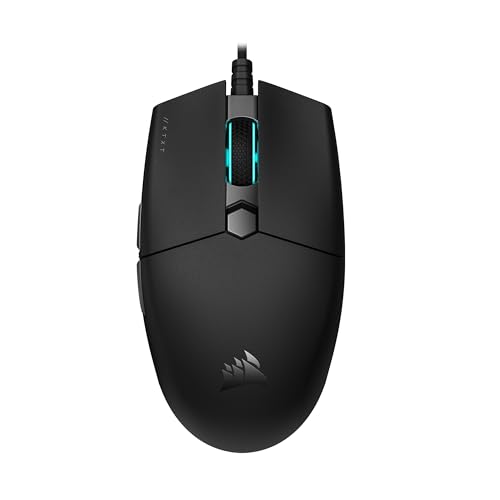
Corsair Katar Pro Wireless
Corsair’s Katar Pro Wireless is a no-frills option with a 10K DPI sensor and a compact symmetrical shape. It connects via 2.4GHz or Bluetooth, making it versatile for work and play. The 99g weight is average, and battery life reaches 135 hours on 2.4GHz. It lacks extra buttons, but for simple gaming, it suffices.
Pros
- Affordable dual connectivity
- Simple and portable
- Comfortable for small hands
Cons
- No programmable buttons
- Sensor specs lower than competitors
How they stack up
| # | Model | Weight | Best for | Score | Price |
|---|---|---|---|---|---|
| 1 | Razer Viper V2 Pro | 58g | Competitive FPS players who want the lightest pro-grade mouse | 9.4 | Check price |
| 2 | Logitech G502 X Plus | 106g | All-rounders who want wireless freedom with a feature-rich design | 9.1 | Check price |
| 3 | Logitech G305 LIGHTSPEED | 99g (with battery) | Gamers on a budget who need reliable wireless performance | 8.8 | Check price |
| 4 | Razer Basilisk V3 Pro | 112g | MMO and RPG players who want a customizable multi-button mouse | 9.2 | Check price |
| 5 | Glorious Model O 2 Pro | 59g | FPS gamers who love ultralight honeycomb designs | 9.0 | Check price |
| 6 | SteelSeries Aerox 9 Wireless | 89g | MMO players who want a lightweight mouse with a side grid | 8.7 | Check price |
| 7 | Corsair Katar Pro Wireless | 99g | Casual gamers who need a simple, comfortable wireless mouse | 8.2 | Check price |
Good to know
What is the best wireless gaming mouse for FPS games?
For FPS, the Razer Viper V2 Pro is the top choice due to its ultra-light 58g design and precise Focus Pro 30K sensor. The Logitech G502 X Plus is also excellent if you prefer more buttons and a heavier feel.
Are wireless gaming mice as good as wired ones?
Yes, modern wireless mice with 2.4GHz dongles have latency as low as 1ms, making them indistinguishable from wired in practice. Professional esports players use them widely.
How long do wireless gaming mice last on a single charge?
Battery life varies: from 40 hours on high-performance mice like the Viper V2 Pro to 250 hours on the Logitech G305. Some mice also support fast charging or wireless charging docks.
Can I use a wireless gaming mouse for office work?
Absolutely. Many gaming mice have Bluetooth, allowing you to connect to multiple devices. The Corsair Katar Pro Wireless is a good budget option for both gaming and work.
What is the difference between optical and mechanical switches?
Optical switches use light to register clicks, offering faster response and longer lifespan (up to 90 million clicks). Mechanical switches use physical contacts and provide a tactile feel. Both are reliable, but optical switches are more durable.
Do I need a mouse with a high DPI?
Most gamers use DPI between 400 and 1600. Higher DPI (over 10K) is not necessary for performance and can even be detrimental if set too high. Focus on sensor quality and lift-off distance instead.
What is the ideal weight for a gaming mouse?
It’s personal preference. Competitive FPS players often prefer under 80g for quick flicks. Heavier mice (over 90g) offer stability and are favored in MMOs. Try different weights to see what feels comfortable.
Can I customize the buttons on a wireless gaming mouse?
Yes, most gaming mice come with software like Razer Synapse or Logitech G Hub. You can remap buttons, create macros, and adjust RGB lighting. Some mice store these settings onboard, allowing you to use them on any PC without software.
How do I extend the battery life of my wireless mouse?
Lower the polling rate, disable RGB lighting, and use Bluetooth instead of 2.4GHz when possible. Also, turn off the mouse when not in use. Many mice have an automatic sleep mode.
Are there any wireless gaming mice with a charging dock?
Yes, the Razer Basilisk V3 Pro and Logitech G502 X Plus support optional wireless charging docks or PowerPlay mouse pads. This allows you to charge the mouse while in use.
The bottom line
For competitive FPS players who demand the lightest and most precise tool, the Razer Viper V2 Pro is the clear winner. If you want a versatile mouse that excels in both productivity and gaming, the Logitech G502 X Plus offers the best balance. Budget-conscious gamers can rely on the Logitech G305, while MMO enthusiasts will appreciate the button-packed Razer Basilisk V3 Pro or SteelSeries Aerox 9 Wireless.