Security Keys That Keep Your Accounts Safe
The YubiKey 5 NFC stands out as the top pick for most people, offering broad compatibility and phishing resistance. It works with USB-A and NFC, making it versatile for desktops and mobiles. However, it lacks USB-C natively, so you may need an adapter for newer laptops.
Passwords are no longer enough. Phishing attacks trick you into typing credentials on fake sites. Security keys eliminate that risk by requiring physical presence.
These small devices use FIDO2 or U2F protocols to verify your identity. They work with Google, Microsoft, Facebook, and many password managers. We compared the most popular models to help you choose.
Our top picks

YubiKey 5 NFC
The YubiKey 5 NFC is the gold standard for security keys. It supports FIDO2, U2F, and smart card protocols. Its durable design and wide platform support make it a favorite. Owners praise its reliability, though some note the lack of USB-C.
Pros
- Broad protocol support
- NFC for mobile use
- Works with many services
Cons
- No USB-C connector
- Can be expensive

YubiKey 5C NFC
Similar to the YubiKey 5 NFC but with a USB-C connector. It fits modern laptops and Android phones directly. The NFC capability adds convenience for mobile payments. Owners appreciate the future-proof design.
Pros
- Native USB-C
- NFC support
- Same robust features
Cons
- May be overkill for some
- Pricey
Google Titan Security Key
Google’s Titan key offers both USB-A and Bluetooth options. It integrates seamlessly with Google accounts and supports FIDO2. Owners report easy setup and reliable performance. However, Bluetooth pairing can be finicky on some devices.
Pros
- Works flawlessly with Google
- Bluetooth for mobile
- Tactile button
Cons
- Bluetooth battery needs charging
- Limited to FIDO protocols
Nitrokey FIDO2
Nitrokey offers an open source alternative with firmware that can be audited. It supports FIDO2 and U2F with a USB-A or USB-C option. Owners value the transparency and security. The build is sturdy, but the software is less polished.
Pros
- Open source firmware
- Secure element
- Affordable
Cons
- No NFC
- Less user friendly software
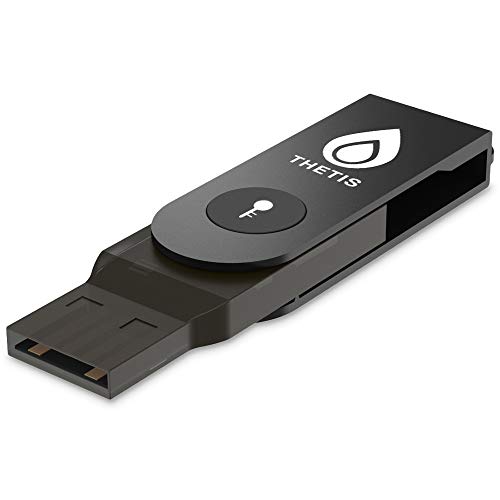
Thetis FIDO2 Security Key
Thetis offers an affordable FIDO2 key without breaking the bank. It provides basic phishing protection and works with major services. Owners find it reliable for the price, but it lacks advanced features like NFC.
Pros
- Very low cost
- Simple plug and play
- Supports FIDO2
Cons
- No NFC
- Plastic build

Kensington VeriMark Guard
Kensington’s key is designed for Windows Hello and FIDO2. It features a fingerprint reader for biometric authentication. Owners enjoy the convenience, but it requires a driver installation on some systems.
Pros
- Fingerprint sensor
- Fast authentication
- High build quality
Cons
- Windows only
- Driver needed

Feitian ePass FIDO2 USB-C
Feitian offers a slim USB-C key that works with Android and laptops. It supports FIDO2 and U2F. Owners appreciate its compact size and reliability. However, it may not fit all cases on phones.
Pros
- Compact and light
- Works well with Android
- Good value
Cons
- No NFC
- May be too short for some ports
How to pick the right one
Side by side
| # | Model | Connectivity | Best for | Score | Price |
|---|---|---|---|---|---|
| 1 | YubiKey 5 NFC | USB-A and NFC | Best overall for most users | 9.6 | Check price |
| 2 | YubiKey 5C NFC | USB-C and NFC | Best for USB-C laptops and phones | 9.5 | Check price |
| 3 | Google Titan Security Key | USB-A and Bluetooth Low Energy | Best for Google account users | 9.2 | Check price |
| 4 | Nitrokey FIDO2 | USB-A or USB-C (choose) | Best for open source enthusiasts | 9.0 | Check price |
| 5 | Thetis FIDO2 Security Key | USB-A | Best budget option | 8.5 | Check price |
| 6 | Kensington VeriMark Guard | USB-A | Best for Windows Hello | 8.8 | Check price |
| 7 | Feitian ePass FIDO2 USB-C | USB-C | Best for USB-C Android phones | 8.7 | Check price |
Good to know
What is a security key?
A security key is a physical device that authenticates your identity when logging in. It uses cryptographic protocols like FIDO2 to prove you are you, without entering a password. It protects against phishing and credential theft.
Do security keys work with my phone?
Many security keys support NFC or USB-C, allowing them to work with Android and iOS devices. For iPhones, you need a key with NFC or Lightning. Check the key’s specifications for compatibility.
Can I use one security key for multiple accounts?
Yes, a single security key can be registered with many services. You can use it for Google, Microsoft, Facebook, password managers, and more. Just register the key with each account.
What happens if I lose my security key?
If you lose your key, you could lose access to accounts. Therefore, always set up a backup method, such as a second key or recovery codes. Most services allow you to register multiple keys.
Are security keys better than authenticator apps?
Security keys are more secure because they are not susceptible to SIM swapping or malware. Authenticator apps are convenient, but they rely on the phone’s security. Keys provide hardware-level protection.
Do I need a security key if I use two-factor authentication?
Two-factor authentication (2FA) is good, but security keys offer the strongest form of 2FA. They are phishing resistant, unlike SMS codes. Replacing SMS with a security key significantly increases security.
Can security keys be used with password managers?
Yes, many password managers like 1Password and Bitwarden support security keys for two-factor authentication. You can also use security keys to unlock your password manager and autofill passwords.
How do I set up a security key?
Go to your account’s security settings and choose to add a security key. Insert the key and press the button or tap it. Follow the prompts. It usually takes less than a minute per service.
Are security keys expensive?
Prices range from around current price to current price depending on features. Budget keys like Thetis are affordable. Premium keys like YubiKey offer more durability and protocols. Consider the cost as an investment in your security.
Do security keys require batteries?
Most security keys are powered by the device you plug them into, so no batteries are needed. Bluetooth keys like the Google Titan have a battery that needs charging, but USB and NFC keys are powered by the host.
Final word
For most people, the YubiKey 5 NFC is the best choice because it balances compatibility, durability, and protocol support. If you have a USB-C laptop and an Android phone, the YubiKey 5C NFC is a better fit. Budget-conscious users can start with the Thetis FIDO2 key, but you lose NFC convenience. Regardless of your pick, using a security key is a significant upgrade over passwords alone.