7 Gaming Mice Worth Comparing Before You Buy
Logitech’s G Pro X Superlight 2 balances low weight with tracking accuracy for most players. Razer’s DeathAdder V3 offers similar comfort at a lower cost, and the Logitech G203 Lightsync covers tight budgets. Competitive shooter fans should check the Razer Viper V3 Pro for its lighter wireless build.
Logitech’s G Pro X Superlight 2 suits the widest mix of grips and genres among these seven mice. Razer’s DeathAdder V3 trails close behind on value alone. Weight and shape decide comfort more than DPI once a sensor clears 8000.
Sensor specs barely separate these mice at this price point, since every listed sensor tracks well past normal aim speed. Hand size, grip style, and whether extra buttons suit your genre matter more in practice. We compared weight, sensor specs, button counts, and owner feedback on shape durability to rank all seven models.
What to look for
What actually matters when choosing a gaming mouse DPI numbers stopped separating mice once every model passed 8000, since no player aims that fast. Weight, shape, and button placement decide comfort across long sessions instead. Flagship wireless mice now match wired latency, though cheaper wireless models still lag slightly. Grip style and hand size narrow the useful list faster than any spec sheet.
Which grip style needs which mouse shape Claw grip players do well with a lower, shorter shell like the DeathAdder V3. Palm grip favors taller shapes such as the Rival 600, which supports the whole hand. Fingertip grip works best with light, compact mice like the Viper V3 Pro. Less contact area needs less mass to move quickly across a pad.
Best gaming mouse by genre: FPS, MMO, and casual play Competitive shooters reward the lightest mouse a player can still control, favoring the Viper V3 Pro or Superlight 2. MMO and MOBA players benefit from extra programmable buttons, which makes the Naga V2 Pro worth its added weight. Casual or office gaming rarely needs either extreme. Everyday wireless mice like the Katar Pro Wireless balance simplicity with enough accuracy for typical play.
Is wired or wireless better for gaming in 2026 Flagship wireless mice like the Superlight 2 and Viper V3 Pro now match wired latency, based on published polling rates. Budget wireless models can still show minor input delay during fast flicks. Wired stays the safer, cheaper choice when latency worries outweigh cable drag. Battery life also factors in for players who game daily without a charging routine.
Our top picks

Logitech G Pro X Superlight 2
Esports feedback shaped this shell, trimming weight while keeping a symmetrical body for claw and fingertip grips. HERO 2 tracks up to 32000 DPI, far beyond what human aim requires. Lightspeed wireless holds input lag close to a wired connection during fast flicks.
Pros
- Low 60 gram weight eases wrist strain in long sessions
- Wireless latency matches wired mice in owner reports
- Battery runs roughly 95 hours per charge
Cons
- Costs more than most wired rivals
- Side buttons sit close together for smaller hands

Razer DeathAdder V3
This shape has anchored Razer’s palm grip lineup for over a decade. Focus Pro 30K optical sensor tracks accurately at any DPI setting. A braided Speedflex cable cuts drag during quick swipes.
Pros
- Ergonomic curve favors palm and claw grips alike
- Lighter than earlier DeathAdder generations
- Costs less than flagship wireless models
Cons
- Wired only, with no wireless variant at this price
- Right handed shape excludes left handed players

Razer Viper V3 Pro
Razer built this for competitive shooters, pairing a symmetrical shape with one of the lightest wireless frames sold today. Focus Pro 35K sensor tracks extreme speeds without smoothing artifacts. HyperSpeed wireless keeps polling steady through rapid flick shots.
Pros
- Weighs just 54 grams, among the lightest wireless mice sold
- Symmetrical shape works for left and right hand use
- Sensor holds accuracy at high sensitivity without jitter
Cons
- Fewer side buttons than MMO focused mice
- Battery life runs shorter than heavier wireless rivals

Razer Naga V2 Pro
Naga V2 Pro ships with three swappable side plates offering 2, 6, or 12 buttons. One mouse then covers MMO raids, MOBA lanes, or general use. Focus Pro 30K sensor matches the accuracy of Razer’s FPS lineup, and plate swaps take seconds without tools.
Pros
- Swappable plates adapt one mouse to different games
- Twelve button plate maps entire ability bars
- Palm rest stays comfortable through extended raid sessions
Cons
- Heaviest plate configuration feels bulky for fast FPS play
- Extra plates and charging dock add setup complexity

SteelSeries Rival 600
SteelSeries built a taller, wider shell here for palm grips and larger hands. TrueMove3+ combines optical tracking with a depth sensor for lift off detection. Internal weight ports let owners add up to eight grams in four gram increments.
Pros
- Adjustable internal weights let owners fine tune feel
- Tall shell supports a full palm grip comfortably
- Dual sensor improves lift off accuracy
Cons
- Bulkier shape does not suit claw or fingertip grips
- Wired only, with no wireless version at this spec

Logitech G203 Lightsync
G203 covers casual and entry level gaming without a premium price tag. Mercury sensor handles up to 8000 DPI, more than most monitor resolutions need. Six programmable buttons remap through Logitech’s G Hub software.
Pros
- Low entry price for a name brand gaming mouse
- RGB lighting customizes through G Hub software
- Long term owners report reliable click durability
Cons
- Heavier than premium lightweight models
- No wireless connectivity at this price
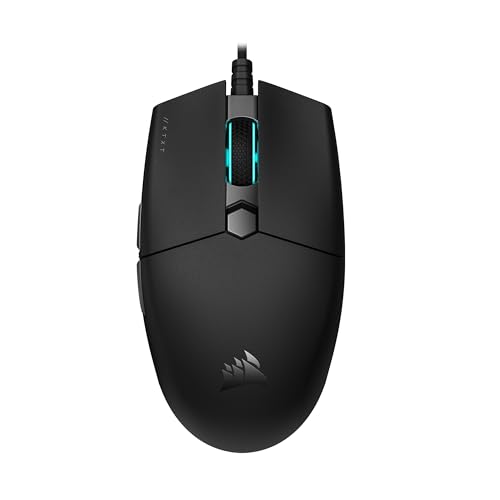
Corsair Katar Pro Wireless
Katar Pro Wireless targets office and casual play rather than esports. A PixArt sensor covers up to 10000 DPI, plenty for typical monitor setups. Slipstream wireless connects through a USB dongle or Bluetooth.
Pros
- Dual connectivity works with a PC and a laptop alike
- Lightweight shell suits all day desk use
- Costs less than flagship wireless competitors
Cons
- Sensor specs trail dedicated FPS mice
- Fewer programmable buttons than MMO options
Compared at a glance
| # | Model | Sensor | Best for | Score | Price |
|---|---|---|---|---|---|
| 1 | Logitech G Pro X Superlight 2 | HERO 2 | Best overall | 9.4 | Check price |
| 2 | Razer DeathAdder V3 | Focus Pro 30K Optical | Best value | 9.1 | Check price |
| 3 | Razer Viper V3 Pro | Focus Pro 35K Optical | Best for competitive FPS | 8.9 | Check price |
| 4 | Razer Naga V2 Pro | Focus Pro 30K Optical | Best for MMO players | 8.7 | Check price |
| 5 | SteelSeries Rival 600 | TrueMove3+ dual sensor | Best for large hands | 8.5 | Check price |
| 6 | Logitech G203 Lightsync | Mercury | Best budget | 8.3 | Check price |
| 7 | Corsair Katar Pro Wireless | PixArt PAW3311 | Best for everyday wireless use | 8.1 | Check price |
Questions worth asking
What is the best gaming mouse for small hands?
Lighter, shorter shells like the Razer Viper V3 Pro or Logitech G203 fit smaller hands better than tall ergonomic designs like the Rival 600.
Is a wireless gaming mouse worth it over wired?
Flagship wireless models now match wired latency based on published polling rates, though budget wireless mice can still lag slightly behind a wired connection.
How much DPI do I actually need for gaming?
Most players stay between 3000 and 6000 DPI in practice, even though modern sensors reach 30000 or higher. Extra range mostly future proofs the mouse.
Claw grip vs palm grip, which mouse fits each?
Claw grip suits shorter shells like the DeathAdder V3, while palm grip favors taller, wider shapes like the Rival 600.
Are MMO mice with extra buttons worth it for FPS games?
Not usually. Extra side buttons add weight and bulk that competitive shooter players tend to avoid in favor of lighter, simpler shells.
Do gaming mice work fine for regular office use?
Yes. Most gaming mice function as standard USB or Bluetooth mice, though RGB lighting and extra buttons go unused in office settings.
How long do gaming mouse batteries last?
Flagship wireless mice like the Superlight 2 report roughly 95 hours per charge. Lighter competitive mice often run shorter due to smaller batteries.
Can left handed players use these mice?
Symmetrical shapes like the Viper V3 Pro and Naga V2 Pro work for either hand, while ergonomic shapes like the DeathAdder V3 and Rival 600 fit right handed use.
What is the best gaming mouse for large hands?
The SteelSeries Rival 600 suits large hands with its taller shell and adjustable internal weights for a fuller palm grip.
Which gaming mouse is best for MOBA or MMO play?
The Razer Naga V2 Pro suits MOBA and MMO play with swappable side plates offering up to twelve programmable buttons.
Our take
Grip style and genre decide the right pick more than any spec sheet. Logitech’s G Pro X Superlight 2 suits the widest range of players. Dedicated FPS or MMO fans should lean toward the Viper V3 Pro or Naga V2 Pro instead.


