Podcast Cameras Worth Pairing With Your Mic Setup
Sony ZV-E10 II stands out as the strongest podcast camera overall, offering clean HDMI, USB webcam mode and a flip out screen. Fujifilm X-S20 suits longer sessions with fewer overheating worries, while Canon EOS R50 is the cheapest way to add a clean second angle to a multi camera setup.
Most podcasters should build around the Sony ZV-E10 II. The Fujifilm X-S20 takes over once sessions run long, and the Canon EOS R50 adds a clean second angle for less. Seven current bodies are compared below on the specs that actually matter for talking head video.
Podcast video is tricky because the specs cameras advertise are not the ones that matter. A genuinely clean HDMI feed, a USB webcam mode, recording that does not cut off after thirty minutes and autofocus that holds a face while it turns away all count more than resolution. HDMI behavior, webcam support, record limits and self recording autofocus were compared across seven current bodies to build this list.
What matters most
Clean HDMI is the feature that matters most A podcast rig usually runs each camera into a capture card or a switcher, and that only works if the feed has no icons, focus boxes or exposure readouts overlaid. Not every camera manages this, and some only do it at a reduced resolution. Confirm clean HDMI output before anything else, since a body without it cannot join a live multi camera setup no matter how good its picture looks.
Webcam mode saves a whole layer of gear Most current cameras can act as a USB webcam, sending video straight into recording software without a capture card at all. For a solo host that removes a box, a cable and a point of failure. Support varies, so check whether the camera does it natively or needs the maker’s utility installed, and whether full resolution survives over USB.
Recording limits decide how long form episodes go Older mirrorless cameras cut recording at around half an hour, and heat can stop a take even sooner. A two hour conversation needs a body with no arbitrary limit or heat management good enough to reach the end. External power over USB and a spare battery routine matter here too, since a dead camera mid episode means re recording the segment.
Autofocus and framing for talking to a lens Filming yourself means nobody stands behind the camera to adjust focus, so reliable face and eye tracking becomes essential, especially while leaning back or bringing in a second person. A fully articulating screen that faces forward lets a host check framing while recording. Together these two features separate a camera built for creators from a general purpose one.
What we recommend

Sony ZV-E10 II
Sony built this body for people talking directly to a lens, which makes it a natural podcast anchor. A clean HDMI signal feeds straight into a capture card, and the same body doubles as a plug and play USB webcam. Face and eye tracking hold focus even while a host glances at notes or a co host.
Pros
- Clean HDMI feed for capture cards
- Reliable USB webcam mode
- Fully articulating screen for framing
Cons
- No viewfinder for stills
- No in body stabilization

Fujifilm X-S20
Long form podcasts punish cameras that overheat, and this body keeps rolling far longer than most rivals in its class. Clean HDMI output pairs with USB webcam support, and a larger battery becomes a real advantage across a two hour recording. A deeper grip and dedicated dials make it comfortable to operate between takes.
Pros
- Long recording before heat becomes an issue
- Big battery for full episodes
- Clean HDMI and webcam support
Cons
- Heavier than the vlog focused bodies
- Menu takes time to learn

Canon EOS R50
Adding a clean second or third camera without spending much becomes simple with this body. Clean HDMI output pairs with webcam functionality, and Canon’s subject tracking keeps a wide shot sharp with no operator watching it. Sharing the RF mount means a lens bought for it carries over if the main body gets upgraded later.
Pros
- Inexpensive way to add an angle
- Reliable subject tracking with no operator
- Shares the RF mount with pro bodies
Cons
- No in body stabilization
- Small grip suits smaller hands

Panasonic Lumix G100D
Panasonic aimed this body at talking head video, and its built in directional microphone array tracks whoever is speaking. That genuinely helps a solo host recording without a dedicated audio operator. Video specs sit below the larger sensor rivals here, but the audio focus is exactly what a podcast setup wants.
Pros
- Clever built in directional microphone
- Light and easy to position
- Fully articulating screen
Cons
- Smaller sensor limits low light
- 4K is capped at 30 frames

Sony ZV-1 II
A single host who wants to skip lens shopping gets a fixed lens compact that just works. Its wide zoom suits small rooms, and a clean output feed doubles as a high quality webcam. A background defocus button and product showcase mode make it forgiving for anyone new to filming themselves.
Pros
- Wide lens works in small rooms
- Very light and pocketable
- Clean output and webcam support
Cons
- Small sensor for dim studios
- Fixed lens limits framing

Nikon Z30
Dropping the viewfinder keeps the price down, which costs nothing on a podcast where framing happens on the rear screen anyway. Clean HDMI output pairs with a webcam mode through Nikon’s software, and a large recording indicator shows when the camera is live. A comfortable grip makes repositioning mid session easy.
Pros
- Affordable clean HDMI camera
- Front tally light for recording
- Comfortable grip for repositioning
Cons
- No viewfinder
- Webcam mode needs Nikon software
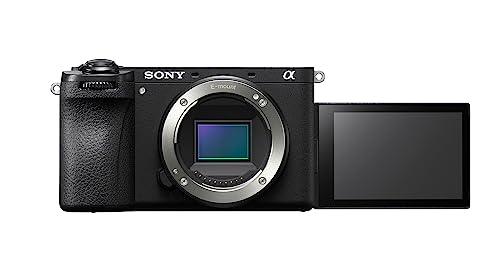
Sony Alpha a6700
A podcast heading toward a polished multi camera studio benefits from centring the rig on this body. In body stabilization, sharper autofocus processing and 4K up to 120 for cutaways sit on top of the clean HDMI and webcam features the whole range shares. It costs more, but it will not be the part of the rig that gets outgrown.
Pros
- In body stabilization for handheld cutaways
- High frame rates for polished edits
- Advanced subject tracking
Cons
- More expensive than the rest here
- More features than a simple setup needs
Compared at a glance
| # | Model | Sensor | Best for | Score | Price |
|---|---|---|---|---|---|
| 1 | Sony ZV-E10 II | 26 megapixel APS-C | Best overall | 9.4 | Check price |
| 2 | Fujifilm X-S20 | 26 megapixel APS-C | Best for long sessions | 9.2 | Check price |
| 3 | Canon EOS R50 | 24 megapixel APS-C | Best for a second angle | 9.0 | Check price |
| 4 | Panasonic Lumix G100D | 20 megapixel Micro Four Thirds | Best for audio | 8.7 | Check price |
| 5 | Sony ZV-1 II | 20 megapixel one inch type | Best value | 8.5 | Check price |
| 6 | Nikon Z30 | 21 megapixel APS-C | Best budget | 8.2 | Check price |
| 7 | Sony Alpha a6700 | 26 megapixel APS-C | Best for a growing setup | 9.1 | Check price |
Questions worth asking
What makes a camera good for a podcast rather than photos?
Clean HDMI output, a USB webcam mode, long recording times and forward facing autofocus. Those matter far more for talking head video than resolution or megapixels do.
Do I need clean HDMI if I use a webcam mode?
Only if a capture card or hardware switcher is part of the setup. A pure USB webcam workflow can skip HDMI entirely, but clean HDMI gives more flexibility as the setup grows.
How many cameras do I need for a video podcast?
One is enough to start. A second angle adds cutaways and a wide shot, and a third covers a guest. The cameras do not need to match, so a cheaper body works fine for extra angles.
Will these cameras overheat during a long episode?
The vlog focused compacts can, while bodies like the Fujifilm X-S20 run longer before heat becomes an issue. For two hour sessions, favor a camera known for good heat management and keep it powered over USB.
Can I power these continuously from the wall?
Most accept USB power delivery, which runs the camera and trickle charges it at the same time. That is the reliable way to avoid a battery dying mid recording.
Do I still need a separate microphone?
Yes for serious audio. Even a camera with good built in mics loses to a dedicated USB or XLR microphone, and most podcasts record audio on a separate device anyway.
Is a viewfinder worth having for podcasting?
Rarely. Framing happens on the rear screen when talking to a camera, so a body without a viewfinder loses nothing here and often costs less.
Can I use one of these as a plain webcam for calls?
Yes. Any of these in webcam mode will outclass a built in laptop camera on video calls, a useful bonus outside recording sessions.
Which camera works best for a solo host on a budget?
The Sony ZV-1 II or Nikon Z30 keep costs down while still offering clean HDMI and webcam support, making either a sensible starting point.
Podcast camera vs vlogging camera, what is the difference?
Overlap is heavy, since both need clean output and forward facing autofocus. Podcast use leans harder on long, uninterrupted recording and multi camera compatibility.
Our take
The Sony ZV-E10 II earns the top spot for most shows, combining clean HDMI, a proper webcam mode and creator friendly autofocus in a light body. Step up to the Fujifilm X-S20 when episodes run long and heat becomes a worry, or the Sony a6700 once the studio grows toward polished multi camera edits. For extra angles on a tight budget, the Canon EOS R50 delivers a clean feed for very little.


