Gaming TVs With Low Input Lag and 120Hz HDMI 2.1
The LG C4 OLED is the best all round gaming television for response, contrast and full HDMI 2.1 support on every port. The Samsung QN90D Neo QLED is the pick for bright rooms, and the Hisense U6N covers the essentials for anyone who wants low lag without a flagship outlay.
If you want a television that keeps up with a current console or a gaming PC, the LG C4 OLED, Samsung QN90D Neo QLED and Hisense U6N cover the realistic range from flagship to sensible. Each handles the same specifications very differently in practice.
This category is confusing because marketing terms like game mode and gaming hub appear on sets that cannot actually accept a 120Hz signal. What matters is the panel refresh rate, whether the HDMI ports are full bandwidth 2.1, which variable refresh rate standards are supported and how low the input lag drops in game mode. We compared published specifications, port counts and what owners report about brightness and reflections in real rooms.
The top picks, ranked

LG C4 OLED
Four full bandwidth HDMI 2.1 ports mean two consoles and a PC can all run at high refresh without swapping cables. OLED response time effectively removes motion blur, and per pixel contrast makes dark game scenes readable. Owners report input lag low enough that competitive players stop thinking about it.
Pros
- All four ports are full bandwidth
- Effectively instant pixel response
- Perfect blacks for dark games
Cons
- Dimmer than Mini LED in bright rooms
- Static HUD elements need burn in care

Samsung S90D OLED
A QD-OLED panel that keeps OLED contrast while pushing noticeably higher colour brightness than conventional white OLED. Four HDMI 2.1 ports and a very fast game mode make it a strong console partner. Owners report it copes better than most OLEDs with a room that has daytime light.
Pros
- Brighter, more saturated colour than standard OLED
- Four high bandwidth ports
- Useful on screen game settings overlay
Cons
- No Dolby Vision support
- Raised blacks in very bright rooms

LG G4 OLED
The brightness focused version of LG’s OLED line, using a micro lens array to push highlights harder than the C series. Gaming features are identical, so the difference is purely picture headroom. Based on specifications it is the OLED to choose for a room with real daylight.
Pros
- Highest brightness in LG’s OLED range
- Same full gaming feature set as the C4
- Designed for flush wall mounting
Cons
- Significant step up in outlay over the C4
- Wall mount design means no stand in some sizes

Samsung QN90D Neo QLED
Mini LED backlighting with an anti glare coating that handles windows and lamps far better than any OLED here. Four HDMI 2.1 ports and 144Hz support cover every current console and PC scenario. Owners report it is the set to choose for a living room that cannot be darkened.
Pros
- Very high peak brightness
- Excellent glare rejection
- No burn in concern with static HUDs
Cons
- Blooming around bright objects on dark scenes
- Contrast narrows at off centre seats
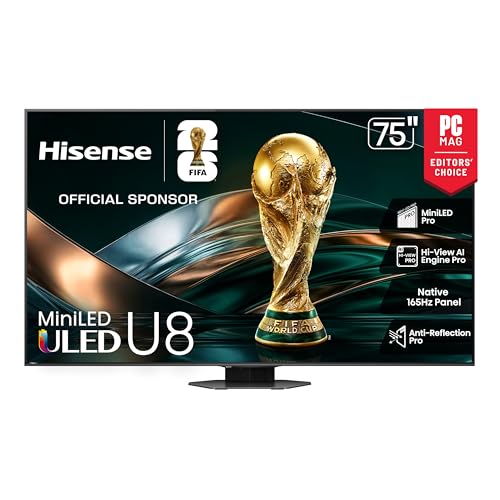
Hisense U8N
Mini LED brightness and 144Hz support at a level well below the big brand flagships, with two full bandwidth HDMI 2.1 ports. Game mode lag is low and VRR support is broad. Owners report the local dimming is aggressive, which suits games more than film.
Pros
- Flagship brightness for far less
- 144Hz with wide VRR support
- Strong HDR highlight punch
Cons
- Only two full bandwidth ports
- Local dimming can be heavy handed

TCL QM8 QM851G
TCL’s Mini LED flagship goes very large and very bright, which is the combination that makes a big room work. Game Accelerator supports high refresh at reduced resolution for competitive titles. Based on specifications it delivers more screen per outlay than any other set here.
Pros
- Very large sizes available
- High brightness for the outlay
- High refresh modes for competitive play
Cons
- Two full bandwidth ports only
- Viewing angles narrow off centre

Hisense U6N
A Mini LED set that keeps decent brightness and low input lag while stopping short of 120Hz on most sizes. For single player console gaming at 60 frames per second it covers the essentials. Owners report it is a clear step up from basic LED sets without flagship spending.
Pros
- Good brightness at entry level
- Low lag in game mode
- Wide HDR format support
Cons
- No 120Hz support on most sizes
- Limited benefit for high frame rate PC gaming
How to pick the right one
Check port counts, not just port versions Manufacturers often advertise HDMI 2.1 when only one or two of the ports actually run at full bandwidth, and one of those may be the eARC port your soundbar needs. If you own two consoles and a PC, a set with four full bandwidth ports removes a permanent annoyance. Read the specification carefully, because 2.1 labelled ports limited to lower bandwidth cannot carry 4K at 120Hz with full colour.
Refresh rate only helps if your source can feed it A 144Hz panel is wasted on a console locked to 120 frames per second, and completely wasted on games that target 60. Current consoles benefit from 120Hz support in specific titles; PC gaming is where the higher numbers pay off. Set a realistic expectation from your hardware first, then buy the panel that matches, rather than paying for headroom you cannot use.
Understand what VRR actually fixes Variable refresh rate matches the display to the frame rate the game is producing, which removes tearing and the stutter that comes from uneven frame pacing. Different sets support different standards, so check that yours covers whichever your hardware uses. Many sets also show more visible brightness flicker in dark scenes when VRR is active, which is worth knowing before you assume something is faulty.
Match panel technology to your room, not to a spec sheet OLED gives per pixel contrast and instant response, which is superb in a dim room and less impressive facing a window. Mini LED gets far brighter and rejects glare better, at the cost of some blooming around bright objects in dark scenes. If you play mostly in the evening with the lights down, OLED wins. If your gaming happens in a sunny living room, brightness matters more than contrast ratio.
Compared at a glance
| # | Model | Panel | Best for | Score | Price |
|---|---|---|---|---|---|
| 1 | LG C4 OLED | OLED evo | Best overall | 9.4 | Check price |
| 2 | Samsung S90D OLED | QD-OLED | Best for bright OLED performance | 9.2 | Check price |
| 3 | LG G4 OLED | OLED evo with brightness booster | Best premium pick | 9.0 | Check price |
| 4 | Samsung QN90D Neo QLED | Mini LED with quantum dots | Best for bright rooms | 8.8 | Check price |
| 5 | Hisense U8N | Mini LED | Best value flagship | 8.6 | Check price |
| 6 | TCL QM8 QM851G | Mini LED | Best for large screens | 8.3 | Check price |
| 7 | Hisense U6N | Mini LED | Best budget | 8.0 | Check price |
Frequently asked questions
Do I need 120Hz for console gaming?
Only for the subset of titles that support it. Many console games target 60 frames per second, where a good 60Hz panel with low lag is fine. If you play competitive shooters that offer a performance mode, 120Hz support is worth having.
What input lag figure should I look for?
Anything under about 15 milliseconds in game mode feels immediate for the vast majority of players. Competitive players tend to look for single digit figures, which most current OLED and Mini LED sets achieve at high refresh.
Is OLED burn in still a concern for gaming?
Modern panels include pixel shifting and refresh routines, and normal varied use is low risk. The risk rises with many hours of the same static HUD at high brightness. Varying content and avoiding maximum brightness for static interfaces mitigates it.
What is ALLM and do I need it?
Auto Low Latency Mode lets the console tell the television to switch into game mode automatically. It saves you doing it manually and prevents the common mistake of gaming in a picture mode with heavy processing and high lag.
Does a gaming monitor beat a gaming TV?
For a desk at close range and very high refresh rates, monitors still lead. For couch gaming at a distance, large high refresh televisions now match monitors on lag while offering far more screen area.
Will a 4K 120Hz signal work over any HDMI cable?
No. It needs an ultra high speed certified cable rated for 48Gbps. Older cables often work at 4K and 60Hz then fail intermittently at 120Hz, which shows up as a black screen or dropped signal.
Does VRR cause flickering?
On some sets, dark scenes with rapidly changing frame rates can show brightness flicker while VRR is active. It is a known behaviour rather than a fault, and turning VRR off in problem titles resolves it.
What screen size suits a gaming setup?
For couch gaming at around eight to ten feet, sizes from 55 to 65 inches suit most rooms. Sitting closer than that with a very large screen makes you turn your head to track the edges of the image.
The verdict
The LG C4 OLED is the best gaming television for most people because it combines near instant response, perfect blacks and four full bandwidth ports so nothing needs unplugging. In a bright living room the Samsung QN90D Neo QLED is the more sensible choice, since brightness and glare rejection matter more than absolute contrast. The Hisense U6N delivers low lag console gaming for anyone who does not need 120Hz.

