GaN Chargers Compared: Speed, Size and Ports
Anker 737 Charger (GaNPrime 120W) leads for households charging a laptop and two phones from one outlet. UGREEN Nexode 100W 4-Port Charger delivers the strongest value with four ports. Anker Nano II 65W stays the easiest single-laptop charger to pocket.
Anker 737 Charger (GaNPrime 120W) handles a laptop, phone, and earbuds together more comfortably than any other charger here. UGREEN Nexode 100W 4-Port Charger comes close for less money and one extra port. Anker Nano II 65W wins for travel, small enough to forget in a jacket pocket.
Headline wattage rarely reaches a single device once two or three things share one charger. Manufacturers publish power sharing tables, and those tables matter more than the number printed on the box. We compared specification sheets, port layouts, folding plug designs, and owner reports on heat and coil whine to rank the seven chargers below.
Our top picks

Anker 737 Charger (GaNPrime 120W)
Three ports share a 120W budget, enough for a laptop, phone, and tablet running at the same time. Anker’s power sharing logic reallocates wattage the moment a device connects or disconnects, so a laptop never sits at a trickle. Owners report it runs warm under a full three device load but never hot.
Pros
- Runs a laptop plus two mobile devices without a big drop
- Reallocates power automatically as devices connect
- Foldable plug survives being tossed in a bag
Cons
- Bulkier than single port travel chargers
- Only one USB-A port for older cables

UGREEN Nexode 100W 4-Port USB C Charger
Four ports split 100W across a whole desk or a pair of travelers sharing one outlet. Three of those ports are USB-C, so a legacy USB-A cable never becomes the bottleneck. Based on specifications, the single port peak covers most 13 and 14 inch laptops with room to spare.
Pros
- Four ports cover a couple traveling together
- Three USB-C ports instead of just one
- Compact body for its port count
Cons
- Split wattage drops sharply with all four ports busy
- No cable included in most listings
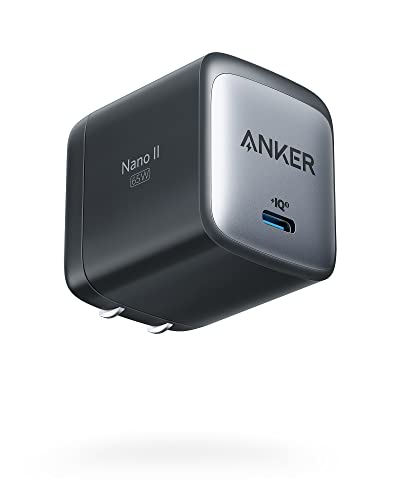
Anker Nano II 65W
A single USB-C port and a folding plug fit into a body roughly the size of a golf ball. Swapping out an original laptop brick is the entire point here. No port juggling and no power sharing calculations, since only one device connects at a time.
Pros
- Genuinely pocketable size
- Enough output for most thin and light laptops
- Simple single port behavior with no wattage splitting
Cons
- Charges only one device at a time
- Gets noticeably warm at sustained full output

Belkin BoostCharge Pro 4-Port GaN Charger 108W
Belkin splits 108W across four ports built for households running Apple and Android hardware side by side. Its published sharing table spells out exactly what each combination delivers, which simplifies planning. Owners report steady output when a laptop and phone charge together.
Pros
- Clear published power sharing figures
- Long standing warranty support from Belkin
- Balanced size relative to its port count
Cons
- Prongs do not fold flat
- Heavier than similar wattage rivals

Baseus GaN5 Pro 65W Charger
A slim three port unit still folds down small enough for a carry-on pocket. Its 65W ceiling covers a mainstream laptop alone, or a phone and tablet together on a hotel nightstand. Baseus publishes a detailed split table, and owners report fast phone charging even with a second device attached.
Pros
- Slim profile suits crowded outlet strips
- Three ports in a compact size
- Folding plug packs easily for luggage
Cons
- 65W total feels tight for larger laptops
- Wattage drops quickly once three devices connect
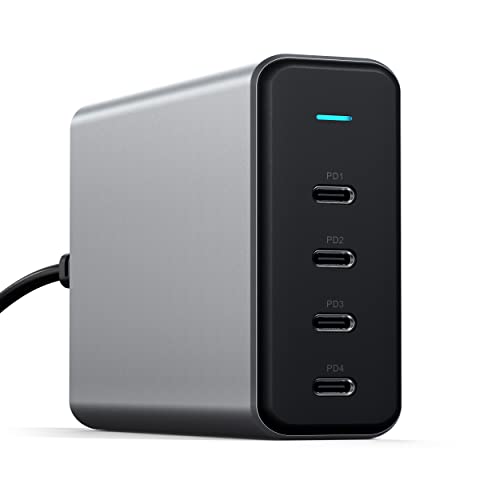
Satechi 165W USB-C 4-Port GaN Charger
This one stays on a desk rather than in a bag, and its 165W ceiling reflects that. It feeds a 16 inch laptop and still leaves real power for a tablet and two phones. A detachable power cable replaces wall prongs, so placement stays flexible behind a monitor.
Pros
- Highest total output in this roundup
- All USB-C ports match a modern cable set
- Sits neatly behind a monitor
Cons
- Not built for travel by any measure
- No USB-A port for older accessories

Spigen ArcStation Pro GaN 65W Charger
Two ports and a folding plug keep this charger’s profile low enough to clear a neighboring outlet. Tablet owners, not workstation laptop users, are the target here. Based on specifications, the USB-C port alone covers fast charging on current phones without fuss.
Pros
- Low profile does not block the adjacent outlet
- Folding plug keeps it light for a bag
- Straightforward two port layout
Cons
- Only two ports total
- Combined output drops well below 65W with both ports busy
The lineup, side by side
| # | Model | Total output | Best for | Score | Price |
|---|---|---|---|---|---|
| 1 | Anker 737 Charger (GaNPrime 120W) | 120W | Best overall | 9.4 | Check price |
| 2 | UGREEN Nexode 100W 4-Port USB C Charger | 100W | Best value | 9.2 | Check price |
| 3 | Anker Nano II 65W | 65W | Best budget | 9.0 | Check price |
| 4 | Belkin BoostCharge Pro 4-Port GaN Charger 108W | 108W | Best for mixed device homes | 8.8 | Check price |
| 5 | Baseus GaN5 Pro 65W Charger | 65W | Best for travel | 8.6 | Check price |
| 6 | Satechi 165W USB-C 4-Port GaN Charger | 165W | Best for a permanent desk setup | 8.3 | Check price |
| 7 | Spigen ArcStation Pro GaN 65W Charger | 65W | Best for phones and tablets | 8.0 | Check price |
How to choose
Total wattage is not per port wattage The number printed on a GaN charger is a shared budget, not a guarantee per port. A 100W charger with four ports might send 65W to a laptop and split the rest three ways once everything connects. Check the published power sharing table before buying, since it shows what your exact device combination receives. A 60W laptop plus a tablet needs a charger rated near 90W total to avoid a slowdown.
Why GaN runs cooler and smaller Gallium nitride switches faster and wastes less energy as heat than the silicon inside older bricks. That efficiency lets makers shrink the housing without raising temperatures. A 65W GaN charger can be a fraction of the size of the laptop adapter it replaces. Warm to the touch under full load is normal; uncomfortably hot is not.
Match ports to the cables you already own USB-C to USB-C covers laptops, current phones, and tablets at full speed. USB-A now mostly serves older earbuds, e-readers, and accessories. Counting cables first prevents buying a four port charger where only two ports fit existing gear. Many chargers ship without a cable, so budget for one rated to the wattage needed, since an underrated cable quietly caps charging speed.
Plug style, size, and where the charger will live A folding plug matters more than it sounds once a charger starts traveling, since fixed prongs snag fabric and tear bag linings. A detachable AC cable suits a desk charger better, letting the unit sit behind a monitor instead of hanging off the wall. Check body width against a power strip too, since wide chargers often block the next outlet over.
Frequently asked questions
Are GaN chargers safe for a laptop?
Yes, as long as the charger supports the USB Power Delivery profile the laptop expects. Power Delivery negotiates voltage and current, so the laptop only draws what it requests. Sticking to established brands with published certifications is the simplest safeguard.
How much wattage does a laptop actually need?
Thin and light laptops usually charge fully between 45W and 65W. Larger 15 and 16 inch machines and gaming laptops often want 90W to 140W. Phones rarely benefit from anything above 30W. Add up devices charged at the same time and pick a total that comfortably exceeds that sum.
Will a lower wattage charger still work?
Generally yes, just slower. A 65W charger on a laptop expecting 100W may only maintain the battery under heavy use instead of charging it. Some laptops also show a warning or throttle performance when they detect an undersized adapter.
Do GaN chargers need a special cable?
Anything above 60W needs a cable rated to 100W or 240W, often marked 5A or EPR. Ordinary cables cap at 3A and limit charging speed no matter how capable the charger is. Cables bundled with phones are frequently the weak link.
Can one charger run a laptop and a phone at full speed?
Only with enough headroom in total wattage. Owners report the smoothest results when total output sits at least 30W above the laptop’s requirement, which is why 100W and above units feel better than 65W ones once a second device joins.
Why does a GaN charger get warm?
Converting mains power always produces some heat, and a compact body has less surface area to shed it. Warm to the touch during heavy charging is expected. Persistent heat with nothing plugged in, or any burning smell, means the unit should come off the outlet.
Do GaN chargers work while traveling internationally?
Most accept 100V to 240V input, so they work worldwide with a simple plug adapter instead of a voltage converter. Check the input range printed on the housing before a trip to confirm.
Is a four port charger better than two smaller ones?
For travel, one multi port charger saves space and outlet hunting. For a fixed desk where devices charge overnight, two separate chargers skip wattage splitting entirely and often cost less combined. Portability versus guaranteed per device speed decides which wins.
Our take
Anker 737 Charger (GaNPrime 120W) suits the widest range of setups, since its output leaves headroom for a laptop and two mobile devices without a noticeable slowdown. UGREEN Nexode 100W 4-Port Charger covers similar ground for less money, with one extra USB-C port. For pure travel, Anker Nano II 65W beats everything else here on size.



