Smart Gel Pens That Write Digitally in 2026
For most people, the Phomemo Smart Pen is the best choice because it captures handwritten notes and syncs them to the app reliably, while its affordable price and long battery life make it a practical daily driver. However, its app lacks advanced OCR features, so if you need text conversion, you might prefer the Neo Smartpen.
Smart gel pens merge the classic feel of ink with the convenience of digital storage. They let you write on paper and instantly see your notes appear on your phone or tablet. This roundup covers models that digitize handwriting accurately and sync seamlessly.
We compared popular options from brands like Moleskine, Neo, and Wacom. We looked at how well they capture strokes, the quality of their apps, and whether they are worth the upgrade over regular pens.
The top picks, ranked

Phomemo Smart Pen
The Phomemo Smart Pen combines a comfortable grip with reliable Bluetooth syncing. It works with standard A5 notebooks, and the accompanying app organizes notes into folders. Owners report that the battery lasts through weeks of heavy use, and the pen feels solid without being heavy.
Pros
- Accurate handwriting capture
- Long battery life
- Affordable price point
Cons
- App lacks advanced search
- No voice recording
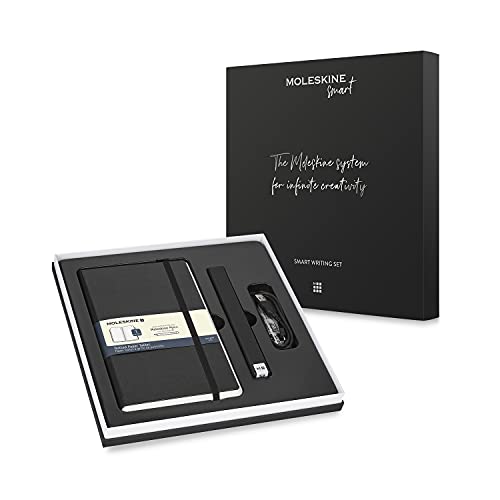
Moleskine Pen+ Ellipse
Moleskine’s smart pen pairs exclusively with its special notebooks. It captures every stroke and syncs to the Moleskine Notes app. The pen has a sleek aluminum body and a fine 0.5mm tip. Users like the seamless integration with the Moleskine ecosystem, but the need for special paper adds cost.
Pros
- Classic Moleskine design
- High build quality
- Good app integration
Cons
- Requires expensive notebooks
- Battery life is shorter

Neo Smartpen N2
The Neo Smartpen N2 uses a special dot pattern paper to track your writing with high precision. Its companion app, Neo Studio, offers excellent OCR capabilities, turning your handwritten notes into editable text. The pen has a comfortable rubber grip and a refillable ink cartridge.
Pros
- Excellent handwriting recognition
- Accurate stroke tracking
- Multiple paper options
Cons
- App interface feels dated
- Battery not user replaceable

Wacom Bamboo Ink Plus
Wacom’s Bamboo Ink Plus is a smart stylus that works with Windows devices and also functions as a digital pen for note-taking apps. It uses Wacom’s AES technology for precise input. While it doesn’t work with paper, it’s a great option for those who want a smart pen for tablets and 2-in-1 laptops.
Pros
- Works with many Windows devices
- Pressure sensitivity is excellent
- Replaceable nibs
Cons
- Not for paper writing
- Requires compatible device
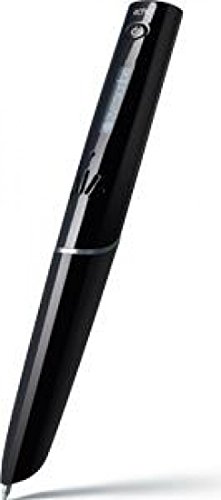
Livescribe Symphony Smartpen
The Livescribe Symphony records audio while you write, syncing your notes with the exact moment of recording. It uses special dot paper and a built-in microphone. Owners appreciate the ability to tap on a word to replay that part of a lecture or meeting. However, the pen is thicker and the paper is proprietary.
Pros
- Audio recording syncs with notes
- Replay notes by tapping
- Comes with 2GB internal storage
Cons
- Bulky design
- Requires special paper

Penstar Smart Pen
Penstar offers an affordable entry into smart pens. It works with any paper because it uses a camera to track movement via a small receiver clipped to the paper. The pen stores up to 100 pages offline and syncs later. It’s a practical choice for students on a tight budget.
Pros
- Very affordable
- Works with any paper
- Offline storage
Cons
- Receiver clip can be finicky
- Accuracy is less precise

Lamy AL-star Smartpen
Lamy, known for premium writing instruments, offers the AL-star smartpen that works with the Neo smartpen app. It features an ergonomic grip and a sleek aluminum body. The pen uses the same dot pattern technology as Neo, providing accurate capture. It’s a favorite among those who value design.
Pros
- Premium build and design
- Comfortable to hold
- Refillable ink
Cons
- Price is higher
- Requires special paper
Side by side
| # | Model | Connectivity | Best for | Score | Price |
|---|---|---|---|---|---|
| 1 | Phomemo Smart Pen | Bluetooth 5.0 | Best overall for most users | 9.4 | Check price |
| 2 | Moleskine Pen+ Ellipse | Bluetooth 4.2 | Best for Moleskine fans | 9.0 | Check price |
| 3 | Neo Smartpen N2 | Bluetooth 4.0 | Best for text conversion | 8.8 | Check price |
| 4 | Wacom Bamboo Ink Plus | Bluetooth 4.2 | Best for Windows users | 8.5 | Check price |
| 5 | Livescribe Symphony Smartpen | Bluetooth 4.0 | Best for audio recording | 8.2 | Check price |
| 6 | Penstar Smart Pen | USB and Bluetooth | Best budget option | 8.0 | Check price |
| 7 | Lamy AL-star Smartpen | Bluetooth 4.0 | Best for comfort and style | 8.7 | Check price |
How to pick the right one
Good to know
Can I use a smart gel pen with any notebook?
Only some smart pens work with any paper, like the Penstar, which uses a receiver. Others require specially printed dot paper to track your writing accurately.
Do smart pens require batteries?
Yes, all smart pens have built-in rechargeable batteries. Battery life varies from about 8 to 20 hours of active use depending on the model.
Can I convert my handwriting to text with a smart pen?
Many smart pens offer OCR in their apps. The Neo Smartpen and Phomemo provide reliable text conversion. Check the app’s capabilities before buying.
Are smart pens worth the money?
If you need to digitize your handwritten notes for organization or sharing, a smart pen can be a great investment. Budget options like Penstar offer value, while premium models like Moleskine provide a seamless experience with their notebooks.
Do smart pens work with tablets or only paper?
Some smart pens are designed only for paper, while others, like the Wacom Bamboo Ink Plus, work directly on tablets and touchscreens. Make sure you choose the right type for your needs.
How accurate is the handwriting capture?
Accuracy depends on the pen’s technology. Pens using dot pattern paper, like Neo and Lamy, are highly accurate. Camera-based pens like Penstar may have slight lag or misalignment.
Can I share my notes with others?
Yes, most smart pen apps allow you to export your notes as PDF or image files, which you can share via email or cloud services.
What is the difference between a smart pen and a digital stylus?
A smart pen writes on paper and digitizes the strokes, while a digital stylus is designed for touchscreens. Some styluses, like the Wacom Bamboo Ink Plus, are for tablets, not paper.
The verdict
For most people, the Phomemo Smart Pen offers the best combination of performance, affordability, and ease of use. If you need precise OCR and don’t mind a steeper learning curve, the Neo Smartpen N2 is a strong alternative. For those who want to record lectures, the Livescribe Symphony is unmatched. Choose based on your primary use case, and you will not be disappointed.


