Top Handheld Consoles for Every Type of Gamer
For most gamers, the Nintendo Switch OLED is the top pick because it offers an unbeatable library of exclusive games, a hybrid design that works as both a home console and portable, and a polished user experience, though its hardware is less powerful than premium competitors. If you prioritize raw performance and PC game compatibility, the Steam Deck OLED is a strong alternative, but it is bulkier and has shorter battery life under heavy loads.
Handheld gaming has evolved far beyond simple puzzle games. Modern handheld consoles offer console-quality graphics, vast game libraries, and even PC gaming on the go. Choosing the right one can be overwhelming with so many options available.
In this guide, we break down the top handheld consoles on the market. We compare their strengths and weaknesses, so you can find the device that best matches your gaming preferences and lifestyle.
What we recommend

Nintendo Switch OLED Model
The Nintendo Switch OLED is the definitive version of Nintendo’s popular hybrid console. It features a vibrant 7-inch OLED screen, improved speakers, and a wider adjustable stand. Owners report that the screen makes a significant difference in handheld mode, with deeper blacks and vivid colors. The game library is unmatched, with exclusive franchises like Zelda, Mario, and Pokemon. It plays smoothly on the TV or on the go. However, its internal hardware is dated, and some third-party ports run at lower resolutions and frame rates.
Pros
- Huge library of exclusive games
- Versatile hybrid design
- Excellent OLED display
Cons
- Underpowered compared to modern handhelds
- Joy-Con drift issues reported

Steam Deck OLED
The Steam Deck OLED is a powerful handheld PC that runs a vast library of Steam games. It features a 7.4-inch OLED screen with a 90Hz refresh rate, delivering smooth visuals. The device is comfortable to hold, with full-size analog sticks and trackpads. Owners appreciate the seamless integration with Steam, including cloud saves and remote play. The battery life is improved over the original LCD model, lasting about 3 to 12 hours depending on the game. The main drawbacks are its size and weight, making it less portable than the Switch, and some games may require tweaking settings for optimal performance.
Pros
- Access to huge PC game library
- High refresh rate OLED screen
- Customizable controls
Cons
- Heavy and bulky
- Battery drains quickly on intense games

ASUS ROG Ally
The ASUS ROG Ally is a Windows-based handheld console that offers impressive performance. It is powered by an AMD Ryzen Z1 Extreme processor and features a 7-inch 1080p display with a 120Hz refresh rate. This device can run AAA games at high settings with smooth frame rates. It also functions as a full Windows tablet, allowing access to multiple game stores like Xbox Game Pass and Epic Games. However, the battery life is short, often lasting only 1.5 to 3 hours in demanding games. The software experience can be clunky due to Windows not being optimized for handhelds.
Pros
- Powerful performance
- 120Hz display for smooth gameplay
- Runs Windows, so many game stores
Cons
- Short battery life
- Windows interface is not optimized for handhelds
Nintendo Switch Lite
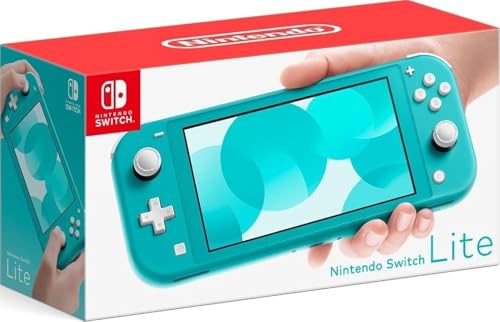
The Nintendo Switch Lite is a dedicated handheld version of the Switch, designed for portable play only. It is smaller, lighter, and more affordable than the standard Switch. It has a 5.5-inch touchscreen and built-in controls, so it cannot connect to a TV. Owners love its compactness and portability, perfect for commutes and travel. It plays the entire Switch library, though games that require motion controls or tabletop mode may be less ideal. The battery life is decent, lasting about 3 to 7 hours. The main limitation is that you cannot dock it to play on a bigger screen.
Pros
- Lightweight and portable
- Lower price point
- Access to all Switch games
Cons
- No TV output
- No detachable Joy-Cons
PlayStation Portal
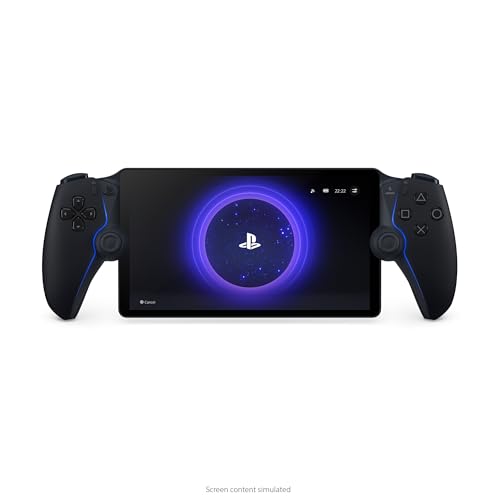
PlayStation Portal is a dedicated remote player for the PlayStation 5. It streams games directly from your PS5 over Wi-Fi, offering a console-quality experience on an 8-inch LCD screen. It features the same adaptive triggers and haptic feedback as the DualSense controller. Owners report that it works best when the PS5 is connected via Ethernet and the network is strong. The device is not a standalone console; it requires a PS5 to function. The screen is bright and clear, and the ergonomics are comfortable. However, it is useless without a PS5 and internet connection, and there can be input lag in some network conditions.
Pros
- Excellent for PS5 remote play
- DualSense features integrated
- Large, sharp screen
Cons
- Requires PS5 and strong Wi-Fi
- No Bluetooth audio

Nintendo Switch (OLED) with Neon Red and Blue Joy-Con
This is the standard Nintendo Switch OLED model bundled with the iconic Neon Red and Blue Joy-Con controllers. It offers the same features as the regular OLED model but with the colorful Joy-Cons that kids and adults love. It includes the dock, so you can easily switch between handheld and TV mode. The console supports multiplayer out of the box, making it great for family game nights. Owners note that the Joy-Cons are comfortable for small hands, but may require a grip for larger hands. The game library includes many family-friendly titles. Like all Switch models, it is not as powerful as other handhelds, but the fun factor outweighs that for many.
Pros
- Great for multiplayer and family
- Vibrant Joy-Con colors
- Hybrid play options
Cons
- Joy-Con drift issues
- No 4K output when docked

Logitech G Cloud
The Logitech G Cloud is a handheld designed specifically for cloud gaming services like Xbox Cloud Gaming and NVIDIA GeForce NOW. It runs Android, so you can also install apps from the Google Play Store. The device features a 7-inch 1080p IPS display with a 60Hz refresh rate, and it is lightweight at just 0.94 pounds. Owners appreciate its long battery life, often lasting up to 12 hours, which is excellent for cloud gaming. The controls are comfortable, and the build quality is solid. However, it is not a standalone console; it relies entirely on a stable internet connection and subscriptions to cloud services. It cannot play local games natively unless they are Android games.
Pros
- Long battery life
- Lightweight and portable
- Works with multiple cloud services
Cons
- Requires internet for most games
- No high refresh rate display
What matters most
How they compare
| # | Model | Screen | Best for | Score | Price |
|---|---|---|---|---|---|
| 1 | Nintendo Switch OLED Model | 7-inch OLED | Best overall for most gamers | 9.4 | Check price |
| 2 | Steam Deck OLED | 7.4-inch OLED | Best for PC gamers | 9.2 | Check price |
| 3 | ASUS ROG Ally | 7-inch 1080p LCD | Best for high-performance gaming | 8.8 | Check price |
| 4 | Nintendo Switch Lite | 5.5-inch LCD | Best budget option | 8.5 | Check price |
| 5 | PlayStation Portal | 8-inch LCD | Best for PS5 remote play | 8.2 | Check price |
| 6 | Nintendo Switch (OLED) with Neon Red and Blue Joy-Con | 7-inch OLED | Best for families | 8.0 | Check price |
| 7 | Logitech G Cloud | 7-inch 1080p IPS | Best for cloud gaming | 7.8 | Check price |
Good to know
Can I play Nintendo Switch games on other handheld consoles?
No, Nintendo Switch games are exclusive to Switch hardware. Other handhelds like the Steam Deck or ASUS ROG Ally cannot play Switch cartridges or digital Switch games.
Do I need a PC to use the Steam Deck?
No, the Steam Deck is a standalone device. It runs SteamOS and can download and play games directly from Steam. You do not need a separate PC.
Is the ASUS ROG Ally good for playing PC games without a PC?
Yes, the ROG Ally is a full Windows device, so it can run PC games from various stores. It functions as a portable PC, but you can also use it without a separate PC.
What is cloud gaming and how does it work?
Cloud gaming streams games from remote servers over the internet. You need a stable and fast internet connection. The game runs on the server, and the video is streamed to your device, so you don’t need powerful hardware.
Can I connect the PlayStation Portal to my PS5 wirelessly?
Yes, the Portal connects to your PS5 via Wi-Fi. For best performance, your PS5 should be connected to the network with an Ethernet cable, and you should have a strong Wi-Fi signal for the Portal.
Are there any handheld consoles that support Xbox Game Pass?
Yes, the ASUS ROG Ally and Logitech G Cloud support Xbox Game Pass, as well as other cloud gaming services. The Steam Deck can also access Game Pass via cloud, but not natively for local play.
How important is an OLED screen for a handheld console?
OLED screens offer better contrast, deeper blacks, and more vibrant colors compared to LCD screens. This can enhance the visual experience, especially in dark scenes. However, some people may not notice a huge difference, and LCD screens are still perfectly usable.
What is the best handheld console for kids?
The Nintendo Switch Lite is often recommended for kids because it is durable, affordable, and has a large library of family-friendly games. The regular Switch with detachable Joy-Cons is also great for multiplayer, but it is more expensive.
Our take
If you want the best all-around handheld with a rich exclusive game library and the flexibility to play on TV or on the go, choose the Nintendo Switch OLED. It is our top pick. For PC gamers who want to play their Steam library anywhere, the Steam Deck OLED is the clear winner. It offers superior performance and versatility, but you must be comfortable with its size and shorter battery life. If you are a PS5 owner looking to extend your gaming sessions beyond the living room, the PlayStation Portal is the ideal companion, provided you have a stable network. For those on a tight budget, the Switch Lite offers great value, but remember it cannot connect to a TV. Ultimately, the best choice aligns with your existing game library and how you plan to play.