Headset Stands That Keep Your Desk Tidy and Gear Safe
The Razer Base Station V2 Chroma is the top pick for most gamers because it combines a weighted metal base with customizable RGB lighting and a built-in USB passthrough. Its main limitation is the higher price compared to basic stands.
A good headset stand does more than hold your headphones. It keeps your desk organized and prevents damage to your headband and ear cushions. With so many options, finding the right one can be tricky.
We looked at stands from Razer, Corsair, and other trusted brands. We considered materials, weight, cable management, and extra features like RGB lighting or USB ports. Here are the best headset stands for every type of user.
What we recommend

Razer Base Station V2 Chroma
The Razer Base Station V2 Chroma is a sturdy aluminum stand with a weighted base. It features customizable Chroma RGB lighting and two USB 3.0 passthrough ports for easy access. The base includes a non-slip rubber pad to keep it stable during intense gaming sessions.
Pros
- Weighted base prevents tipping
- Built-in USB ports are convenient
- Customizable RGB lighting
Cons
- Expensive compared to basic stands
- Requires external power for USB ports

Corsair ST100 RGB
The Corsair ST100 RGB is a premium stand with a solid metal construction. It features a built-in 7.1 surround sound DAC and audio controls for volume and mute. The stand also has two USB 3.1 Gen-1 ports and dynamic RGB lighting, making it ideal for streamers who want quick access to audio settings.
Pros
- Built-in DAC enhances audio quality
- Dedicated volume and mute controls
- Stable and sturdy build
Cons
- Large footprint on desk
- Requires USB connection for audio
NZXT Puck
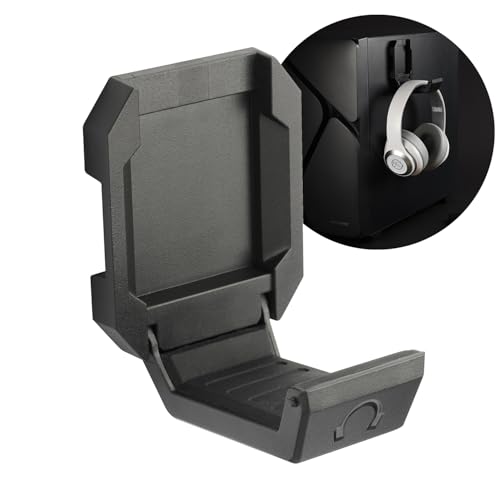
The NZXT Puck is a small adhesive mount that attaches to the side of your desk or PC case. It holds your headset securely with a magnetic hook and also includes a cable management tie. It is perfect for those who want a simple, unobtrusive solution without taking up desk space.
Pros
- Very affordable
- Saves desk space
- Easy to install
Cons
- Not portable once mounted
- May not stick to textured surfaces

Elgato Wave Mic Arm LP
The Elgato Wave Mic Arm LP is a low-profile microphone arm that also includes a headset hook. It is designed to be mounted under a desk to keep your setup clean. The arm provides flexible positioning and includes cable management channels. The headset hook clips onto the arm, offering a convenient spot for your headphones.
Pros
- Keeps desk surface clear
- High-quality construction
- Smooth articulation
Cons
- Requires clamping to desk
- Not a dedicated headset stand

SteelSeries Arena 3
The SteelSeries Arena 3 is a heavy-duty stand designed to hold large headsets. It features a wide base and a robust hook that can support heavy gaming headsets without bending. The stand has a sleek design with a subtle logo and a non-slip bottom.
Pros
- Stable for heavy headsets
- Simple and durable design
- Affordable price
Cons
- No extra features
- Plastic parts may feel less premium
Lamicall Headset Stand
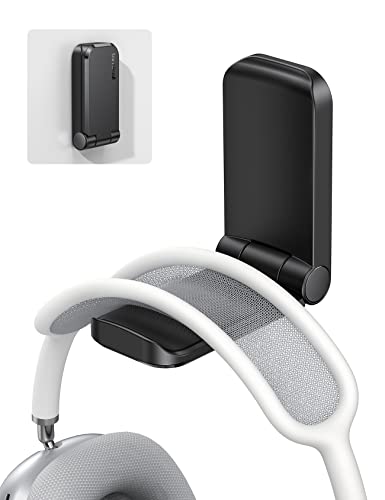
The Lamicall Headset Stand is a budget-friendly option that offers a sturdy metal base and a comfortable silicone pad to protect your headband. It has a minimalist design that fits well in any office or home setup. The stand also features a built-in cable holder to keep your desk tidy.
Pros
- Very affordable
- Silicone pad prevents scratches
- Compact footprint
Cons
- Not as heavy-duty as premium stands
- No RGB or USB ports

Orico Headset Stand with USB Hub
The Orico Headset Stand combines a headset holder with a 4-port USB 3.0 hub. It provides easy access to additional USB ports for your desk setup. The stand has a sturdy construction with a non-slip base and a thoughtful cable management design.
Pros
- Adds USB ports to your desk
- Stable and well-built
- Reasonable price
Cons
- Requires power for full speed
- Not the most stylish design
How to pick the right one
Compared at a glance
| # | Model | Material | Best for | Score | Price |
|---|---|---|---|---|---|
| 1 | Razer Base Station V2 Chroma | Aluminum with rubber base | Gamers who want RGB and USB ports | 9.4 | Check price |
| 2 | Corsair ST100 RGB | Aluminum | Streamers who need audio controls | 9.1 | Check price |
| 3 | NZXT Puck | Adhesive (3M tape) | Minimalists with limited desk space | 8.5 | Check price |
| 4 | Elgato Wave Mic Arm LP | Under-desk clamp | Content creators with low-profile setups | 8.8 | Check price |
| 5 | SteelSeries Arena 3 | Steel with plastic coating | Gamers with heavy headsets | 8.4 | Check price |
| 6 | Lamicall Headset Stand | Metal and silicone | Office workers and casual users | 8.2 | Check price |
| 7 | Orico Headset Stand with USB Hub | 4 x USB 3.0 | Users who need extra USB ports | 8.0 | Check price |
Good to know
Are headset stands universal?
Most headset stands are universal and can hold various headset sizes. However, some heavy or oversized headsets may not fit properly on small stands. Always check the dimensions and weight capacity.
Do headset stands damage headphones?
No, a good headset stand should not damage your headphones. Look for stands with soft padding on the hook to avoid crushing the headband. Avoid stands with sharp edges.
Can I use a headset stand for other items?
Yes, many people use headset stands to hold VR headsets, watches, or even small controllers. Just ensure the stand is sturdy enough for the weight.
How do I install a clamp-on headset stand?
Clamp-on stands attach to the edge of your desk. Simply loosen the clamp, place it on the desk, and tighten. Make sure the desk is thick enough to support the clamp.
What is the benefit of a headset stand with USB ports?
USB ports on a headset stand provide convenient access for charging devices or connecting peripherals. It reduces the need to reach behind your computer.
Are RGB headset stands worth it?
RGB stands add aesthetic appeal to your setup. They are worth it if you enjoy customization and have a themed battlestation. They often cost more than non-RGB stands.
How much weight can a headset stand hold?
Most stands can hold up to 1-2 kg, which is sufficient for typical gaming headsets. Heavy-duty stands can support more. Check the product specifications for weight limits.
Can I mount a headset stand on the wall?
Yes, there are wall-mounted headset hooks available. They save desk space but require drilling or adhesive. Adhesive mounts may not hold heavy headsets.
What is the best material for a headset stand?
Aluminum and steel are durable and look premium. Plastic stands are lighter but may be less stable. Rubber or silicone pads help prevent slipping.
Do headset stands come with warranties?
Most reputable brands offer a limited warranty, usually one to two years. Check the product listing for warranty details.
Final word
For most gamers, the Razer Base Station V2 Chroma is the best overall headset stand. It offers a perfect balance of stability, style, and functionality with its USB ports and RGB lighting. If you are on a tight budget, the NZXT Puck is a clever and practical choice for saving space. For streamers who want integrated audio controls, the Corsair ST100 RGB is worth the investment. Whichever you choose, a good headset stand will keep your desk organized and your gear safe.