Home Server Options for Backups, Media and Files
The Synology DiskStation DS224+ is our top pick because the software is the most approachable and it handles Plex, backups and photo sync without fuss. The UGREEN NASync DXP4800 Plus offers more raw hardware, and the TerraMaster F4-424 is the value four bay choice.
For most households the Synology DiskStation DS224+ is the home server we would start with, because DSM software handles backups, photo libraries and media serving with the least friction. If you want more processor and network headroom, the UGREEN NASync DXP4800 Plus is the hardware pick, while the TerraMaster F4-424 covers four bays for a smaller outlay.
The confusing part is that home server means two very different things: a purpose built NAS with polished software, or a mini PC you configure yourself and can push much further. We compared bay counts, processors and their hardware transcoding support, maximum RAM, network interfaces and published noise figures across current models, and weighed those against what owners report about setup time, app ecosystems and how each behaves under sustained load.
What matters most
Appliance NAS or mini PC, and who each suits A NAS gives you a supported operating system, an app store and a setup wizard, which means a working photo backup in an evening. A mini PC gives you far more processing power for the same outlay and complete freedom, but you own every decision from filesystem to update policy. If the phrase container stack sounds like work rather than fun, buy the appliance.
Bays, redundancy and the capacity you will actually reach Two bays in a mirror protect against a single drive failure but halve usable capacity. Four bays with parity give better efficiency and room to grow. Whatever you plan, add more than you think: media libraries and phone photo backups expand relentlessly. Note that redundancy is not a backup, since it protects against drive failure but not deletion, corruption or theft.
Transcoding is the specification that decides your Plex experience If you stream media to devices that cannot play the source format directly, the server has to transcode it in real time. Processors with integrated graphics and hardware acceleration handle several streams comfortably, while models without integrated graphics fall back on the processor and struggle. Check for integrated graphics specifically if media serving is the main reason you are buying.
Noise, power and where the box will live A home server runs continuously, so idle power draw and fan noise matter more than peak performance. Two bay units are generally quieter than four bay ones, and drive choice affects noise as much as the chassis does, with solid state storage silent and larger mechanical drives audibly seeking. If the server lives in a bedroom or living room, prioritise a quiet chassis and consider a cupboard with ventilation.
The shortlist, ranked

Synology DiskStation DS224+ 2-Bay NAS
DSM remains the most approachable server operating system, with genuinely good apps for photo backup, file sync and surveillance that work without command line time. Two bays in a mirror give you redundancy for family photos, and the Celeron processor handles hardware transcoding for most media. Owners report it running quietly enough to sit in a living room.
Pros
- Software is the most beginner friendly here
- Hardware transcoding covers common media
- Quiet enough for a living space
Cons
- Only two bays limits future expansion
- Base memory needs upgrading for heavy app use

UGREEN NASync DXP4800 Plus 4-Bay NAS
Considerably more hardware than legacy brands offer at similar positioning, with an Intel Core processor, room for substantial memory, NVMe cache slots and 10 gigabit networking. The software is younger and less polished than DSM, which is the honest tradeoff. For anyone comfortable installing their own container stack, the hardware value is compelling.
Pros
- Far more processing power than typical NAS units
- 10 gigabit networking built in
- NVMe slots for caching or fast storage
Cons
- Software ecosystem is less mature
- Fans ramp audibly under sustained load

Synology DiskStation DS923+ 4-Bay NAS
Four bays, an AMD Ryzen processor, ECC memory support and an expansion unit option make this the Synology to buy if the library only ever grows. It lacks integrated graphics, so hardware transcoding is not its strength, and it suits file serving, backups and virtualisation better than heavy Plex duty. Build quality and DSM are the usual high standard.
Pros
- Expansion unit support for long term growth
- ECC memory suits critical data
- Excellent virtualisation and backup handling
Cons
- No integrated graphics for transcoding
- Higher outlay than two bay alternatives

QNAP TS-464 4-Bay NAS
The Celeron N5105 with integrated graphics handles hardware transcoding well, and QNAP includes HDMI output plus a PCIe slot for future upgrades. QTS software is more feature dense than DSM, which some owners find powerful and others find cluttered. Dual 2.5 gigabit ports give useful throughput headroom.
Pros
- Strong hardware transcoding for media libraries
- PCIe slot allows later upgrades
- 2.5 gigabit networking as standard
Cons
- QTS interface is dense for newcomers
- Bundled apps can feel like clutter

TerraMaster F4-424 4-Bay NAS
Four bays, an N95 processor and dual 2.5 gigabit ports at a noticeably lower outlay than the established brands. TOS software has improved considerably but still sits behind DSM for polish. Many owners buy this specifically to run TrueNAS or Unraid instead, treating it as inexpensive four bay hardware, which it does well.
Pros
- Four bays for a modest outlay
- Runs third party operating systems well
- Dual 2.5 gigabit networking
Cons
- Stock software lags the leading platforms
- Chassis fan is more noticeable than rivals
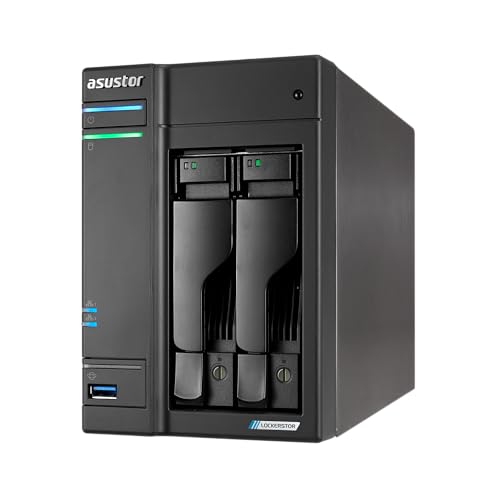
Asustor Lockerstor 2 Gen 2 AS6702T NAS
Two bays plus dual M.2 NVMe slots and two 2.5 gigabit ports make this quick for its size, particularly with SSD caching enabled. ADM software is clean and the app selection covers the common needs. The compact chassis suits a desk or shelf rather than a rack.
Pros
- NVMe caching improves responsiveness noticeably
- Clean software without excessive clutter
- Compact enough for a desk
Cons
- Two bays limit total capacity
- Smaller app ecosystem than Synology

Beelink SER5 Max Mini PC
Not a NAS at all, but a compact Ryzen mini PC that many people use as a home server running Proxmox, Docker or a full Linux install with external storage. It is far more flexible than any appliance and considerably faster, at the cost of doing everything yourself. Internal storage is limited to M.2 and a single drive bay.
Pros
- Much faster than typical NAS processors
- Complete freedom over the software stack
- Very small footprint and low power draw
Cons
- No drive bays for a proper storage array
- Everything must be configured manually
Compared at a glance
| # | Model | Bays | Best for | Score | Price |
|---|---|---|---|---|---|
| 1 | Synology DiskStation DS224+ 2-Bay NAS | 2, hot swappable | Best overall | 9.4 | Check price |
| 2 | UGREEN NASync DXP4800 Plus 4-Bay NAS | 4 plus dual NVMe slots | Best hardware for the outlay | 9.2 | Check price |
| 3 | Synology DiskStation DS923+ 4-Bay NAS | 4, expandable via expansion unit | Best for growing storage | 9.0 | Check price |
| 4 | QNAP TS-464 4-Bay NAS | 4 plus dual M.2 slots | Best for media transcoding | 8.8 | Check price |
| 5 | TerraMaster F4-424 4-Bay NAS | 4 | Best value four bay | 8.6 | Check price |
| 6 | Asustor Lockerstor 2 Gen 2 AS6702T NAS | 2 plus dual M.2 NVMe | Best for fast networking | 8.3 | Check price |
| 7 | Beelink SER5 Max Mini PC | AMD Ryzen 7 | Best DIY server | 8.0 | Check price |
Good to know
Do I need a NAS or is an external drive enough?
An external drive is fine for backing up one computer. A NAS makes sense once several devices need access, you want automatic phone photo backup, or you want media available to the whole household without a computer being switched on.
Are drives included with a NAS?
Almost never. NAS units are usually sold as diskless enclosures, so budget separately for drives rated for continuous operation, which are built for the vibration and duty cycle of an always on array.
Is RAID a backup?
No. RAID protects against a drive failing, not against accidental deletion, ransomware or a house fire. A proper setup keeps at least one copy of important data somewhere else, ideally offsite or in cloud storage.
How much memory does a home server need?
Four to eight gigabytes covers file sharing, backups and a media server. Push to sixteen or more if you run several containers, virtual machines or memory hungry filesystems such as ZFS.
Can a home server replace cloud storage?
For file sync and photo libraries, largely yes, and most NAS platforms include apps that mirror the experience. What you take on is the responsibility for backups, updates and remote access security.
How much electricity does a home server use?
Two bay NAS units typically draw a modest amount at idle, which is a small ongoing cost. Mini PCs are similar. Multi bay units with several mechanical drives spinning constantly draw noticeably more.
Is it safe to access a home server from outside the house?
It can be, but exposing a server directly to the internet is risky. Use the manufacturer’s relay service or a VPN back into your home network rather than opening ports, and keep the system updated and two factor authentication enabled.
Can I use regular desktop drives in a NAS?
They will work, but drives rated for NAS use are built for continuous duty and multi drive vibration, and they handle error recovery in a way that suits arrays. In an always on system the difference in longevity is worth the small extra outlay.
Our take
The Synology DiskStation DS224+ is the home server that will frustrate the fewest people, because the software does the hard parts and it runs quietly enough to live anywhere. Choose the UGREEN NASync DXP4800 Plus if you want serious hardware and do not mind younger software, or the Beelink SER5 Max if configuring everything yourself is the appeal rather than the obstacle.


