Label Makers for Home Organising and Office Files
The Brother P-touch PTD210 is our overall pick, combining laminated tape durability with a keyboard that is faster than app based rivals. For design flexibility the P-touch Cube Plus PT-P710BT wins, while the DYMO LabelWriter 550 is the desktop choice for shipping and address volume.
The Brother P-touch PTD210 is the label maker most households and offices should start with, with the P-touch Cube Plus PT-P710BT better when you want fonts and symbols from your phone and the DYMO LabelWriter 550 built for address and shipping volume.
Label makers look simple but split into three categories that suit completely different jobs, and the running cost of the tape matters far more than the machine price. Laminated tape survives dishwashers and freezers where thermal paper fades in months, while desktop label printers use continuous rolls that make sense only at volume. We compared tape formats and cost per label, print widths, connectivity and power arrangements, then weighed those against what owners report about tape jams, battery drain and labels that peel off curved containers.
The top picks, ranked

Brother P-touch PTD210 Label Maker
The PTD210 uses Brother’s laminated TZe tape, which is the reason its labels survive kitchens, garages and freezers where paper labels curl away. The QWERTY keyboard and graphical display make short labels much faster to produce than fiddling with a phone app. It runs on AA batteries or an optional adapter, and the batteries are the main ongoing annoyance.
Pros
- Laminated tape resists water, heat and scuffing
- Keyboard is faster than app based entry for short labels
- Wide range of tape colours and widths available
Cons
- Mains adapter sold separately
- Eats AA batteries if left switched on

Brother P-touch Cube Plus PT-P710BT Label Maker
The Cube Plus drops the keyboard and drives everything from a phone or computer app, which unlocks far more fonts, symbols and layout options than any handheld display can offer. It takes tape up to 24mm wide, so it handles shelf and bin labels that narrow machines cannot. It also has a rechargeable battery rather than a pile of AAs.
Pros
- Full font and layout control through the app
- Prints wide 24mm tape for bins and shelves
- Rechargeable rather than battery hungry
Cons
- Useless without a paired phone or computer
- Slower than a keyboard for one quick label

DYMO LabelWriter 550 Label Printer
This is a desktop thermal printer rather than a handheld, designed for churning out address, shipping and barcode labels from a computer at speed. Automatic label recognition means it knows which roll is loaded and sets up accordingly. The 550 generation only accepts genuine DYMO rolls, which is a real consideration for running costs.
Pros
- Very fast for batches of address labels
- No ink or toner required
- Automatic recognition of loaded label rolls
Cons
- Locked to genuine DYMO label rolls
- Thermal labels fade with heat and sunlight

DYMO LabelManager 160 Handheld Label Maker
The LabelManager 160 covers the basics well, with a QWERTY keyboard, a clear display and one touch buttons for common formatting. DYMO D1 tape is widely stocked and cheaper than laminated alternatives, at the cost of some durability. A sensible pick for filing, shelves and pantry jars that stay indoors.
Pros
- Straightforward to use with no setup
- D1 tape is widely available and affordable
- Light enough to hold comfortably
Cons
- Labels are less durable than laminated tape
- No mains power option included

NIIMBOT D110 Label Maker
The D110 is a pocket thermal printer that pairs with a phone app full of templates, which makes it popular for pantry jars, storage boxes and craft supplies. It uses inexpensive thermal label rolls with a peel and stick backing rather than tape cartridges. Being thermal, the labels are not suited to sunlight, heat or dishwashers.
Pros
- Very low cost per label
- App includes ready made organising templates
- Small enough to keep in a drawer
Cons
- Thermal labels fade in sun or heat
- Print width is limited to narrow labels

Phomemo M110 Label Maker
Phomemo’s M110 prints barcodes, QR codes and product labels from a phone, which suits market sellers and small online shops that need presentable packaging labels without a desktop setup. It handles a range of roll widths and shapes including round stickers. Print resolution is adequate for text and codes but not for detailed artwork.
Pros
- Prints scannable barcodes and QR codes
- Wide choice of label shapes and sizes
- Portable enough for market stalls
Cons
- Resolution too low for detailed graphics
- Thermal labels are not weatherproof
DYMO LetraTag LT-100H Handheld Label Maker
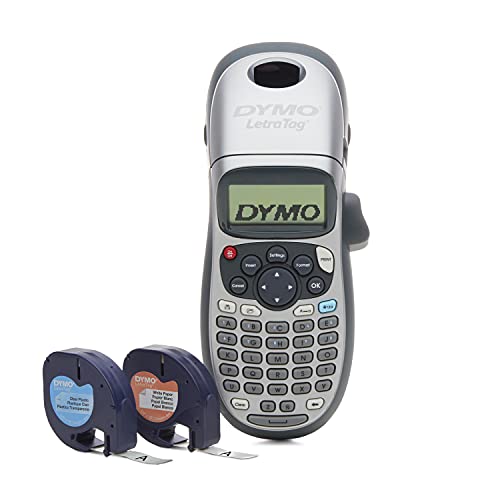
The LetraTag is the entry point, a light handheld with an ABC keyboard and a two line display that does exactly what a label maker needs to do and nothing more. LetraTag tape includes paper, plastic and metallic finishes at low cost. The ABC keyboard layout slows down anyone used to typing on QWERTY.
Pros
- Lowest outlay for a keyboard label maker
- Tape available in several finishes
- Light and simple for occasional use
Cons
- ABC keyboard is slow to type on
- Paper tape does not survive damp areas
What matters most
Tape type decides where the label survives Brother’s laminated TZe tape sandwiches the print between layers of plastic, which is why those labels stay legible in freezers, on drink bottles and in garages. Direct thermal labels, used by the NIIMBOT and Phomemo machines, print with heat onto sensitive paper and fade if left in sunlight or near a heat source. Paper tape is fine for filing and useless in a kitchen.
Work out the running cost before the machine cost A cheap label maker with expensive proprietary cartridges costs far more over a year than a pricier machine on widely stocked tape. Divide the cartridge price by the number of labels you expect from it, and check whether third party tape is available. Owners report that machines locked to a single brand of media are the ones that end up in a drawer once the included roll runs out.
Keyboard or phone app Handheld machines with a keyboard get you from idea to stuck down label in under a minute, which matters when you are labelling a shelf mid tidy. App driven printers give you far more fonts, symbols and layout freedom and are the better choice for anything decorative or repeated. If you will label in bursts of thirty, the app wins. If you label one thing at a time, the keyboard wins.
Match the width to the job Most handhelds top out at 12mm, which is right for file spines, cable tags and jar lids. Shelf edges, storage bins and door signs want 18mm or 24mm to be readable across a room, which narrows your options to machines like the P-touch Cube Plus. Desktop printers like the LabelWriter 550 use a different format entirely, sized around address and shipping labels.
Side by side
| # | Model | Tape | Best for | Score | Price |
|---|---|---|---|---|---|
| 1 | Brother P-touch PTD210 Label Maker | Brother TZe laminated, up to 12mm | Best overall | 9.4 | Check price |
| 2 | Brother P-touch Cube Plus PT-P710BT Label Maker | TZe laminated, up to 24mm | Best for design flexibility | 9.2 | Check price |
| 3 | DYMO LabelWriter 550 Label Printer | Desktop direct thermal printer | Best for shipping labels | 9.0 | Check price |
| 4 | DYMO LabelManager 160 Handheld Label Maker | DYMO D1, up to 12mm | Best value | 8.8 | Check price |
| 5 | NIIMBOT D110 Label Maker | Portable thermal label printer | Best for home organising | 8.6 | Check price |
| 6 | Phomemo M110 Label Maker | Portable thermal label printer | Best for small business | 8.3 | Check price |
| 7 | DYMO LetraTag LT-100H Handheld Label Maker | LetraTag paper and plastic, 12mm | Best budget pick | 8.0 | Check price |
Frequently asked questions
What is the difference between tape and thermal label makers?
Tape machines such as the Brother P-touch range print onto laminated plastic cartridges that resist water and heat. Thermal printers like the NIIMBOT D110 print onto heat sensitive paper rolls, which cost far less per label but fade in sunlight.
Which label maker is best for kitchen and freezer use?
One using laminated tape, such as the Brother P-touch PTD210. Laminated labels stay stuck and legible through condensation, freezing and repeated wiping, where thermal and paper labels lift or fade.
Do I need a label maker that connects to my phone?
Only if you want font choice, symbols or repeated designs. For quick one off labels a keyboard machine is faster, since there is no app to open or device to pair.
How much do label maker refills cost?
It varies enormously by format, which is why running cost matters more than machine cost. Thermal rolls are the cheapest per label, laminated tape cartridges the most expensive, with plain plastic tape in between.
Can label makers print barcodes?
Some can. The Phomemo M110 and DYMO LabelWriter 550 both produce scannable barcodes and QR codes. Most basic handhelds print text and symbols only.
Will labels stick to curved bottles and jars?
Narrow labels do best on curves. Wide labels on small round containers lift at the edges. Clean and dry the surface first, since dust and residue are what owners report as the main cause of peeling.
Are desktop label printers worth it for home use?
Rarely, unless you post a lot of parcels. Machines like the LabelWriter 550 shine at address and shipping volume, but they need a computer and take permanent desk space.
Can I use third party tape cartridges?
Often yes with Brother TZe compatible machines, though quality varies. The DYMO LabelWriter 550 generation specifically rejects non genuine rolls, so factor that into the running cost.
Our pick
The Brother P-touch PTD210 is the label maker we would recommend to most people, because laminated tape means the label is still there and still readable a year later. Move to the P-touch Cube Plus PT-P710BT if you want wider tape and full design control from a phone, and only consider the DYMO LabelWriter 550 if you are printing addresses in batches. Compare tape cost per label before the machine price.