Keyboard Trays That Fix Desk Height and Wrist Angle
The VIVO MOUNT-KB05E is our top pick for its long steel track, generous negative tilt and clamp mount that spares your desktop. The 3M AKT150LE offers the smoothest gliding action and best wrist support, while the HUANUO Under Desk Keyboard Tray is the value choice for standard rectangular desks.
If you want one under-desk keyboard tray that suits most setups, the VIVO MOUNT-KB05E is the safest choice, with the 3M AKT150LE ahead on ergonomic adjustment and the HUANUO tray covering the basics for less outlay.
Keyboard trays are trickier to buy than they look, because the mount has to match your desk before the ergonomics matter at all. Screw-in tracks need a solid wood underside with clearance, clamp models need a flat overhanging lip, and a tray that is 2 inches too narrow makes your mouse hang off the edge. We compared published track lengths, tilt ranges, platform dimensions and mounting hardware, then weighed those against what owners report about sag, wobble and knee clearance over months of use.
Our top picks

VIVO MOUNT-KB05E Clamp-on Computer Keyboard Tray
VIVO clamps to the front edge of the desk rather than screwing into the underside, which makes it the one tray most people can actually install on the desk they already own. The platform holds a full size keyboard and mouse side by side, and the arm tilts down for a negative typing angle. Owners report the clamps hold firmly on desktops within the stated thickness range, though very thick or bullnose edges are a problem.
Pros
- Installs without drilling into the desktop
- Wide platform fits keyboard and mouse together
- Height and tilt both adjust after mounting
Cons
- Clamps will not fit thick or rounded desk edges
- Less fore and aft travel than a full track system
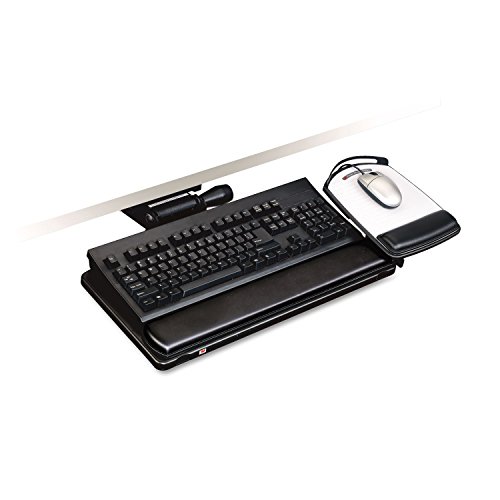
3M AKT150LE Easy Adjust Keyboard Tray
The 3M tray uses a lever under the platform to change height and tilt without tools, so you can move between sitting positions through the day. The gel wrist rest and swiveling mouse platform are the parts owners single out most often. It needs a screw-in installation on a solid desk underside, which rules out some hollow core and glass tops.
Pros
- Tool free height and tilt changes
- Mouse platform swings to either side
- Gel rest included rather than sold separately
Cons
- Requires drilling into the desk underside
- Platform is narrower than clamp-on rivals

Fellowes Office Suites Underdesk Keyboard Drawer 8035101
This is a straightforward sliding drawer rather than an articulating ergonomic arm, and that is exactly why it suits shared desks and small rooms. The keyboard tucks out of sight when you are done, freeing the desktop for paperwork. It is fixed height, so it solves clutter rather than posture.
Pros
- Hides the keyboard completely when closed
- Simple mechanism with little to fail
- Small compartments for pens and clips
Cons
- No height or tilt adjustment at all
- Not deep enough for oversized mouse pads

HUANUO Under Desk Keyboard Tray
HUANUO covers the same clamp-on ground as the VIVO for noticeably less, with a wide platform and a retractable slide. Build quality is a step down, mainly in the plastic used around the tilt mechanism, but owners report it holds a standard keyboard and mouse without sagging. A sensible pick if you are unsure whether a tray suits your workflow.
Pros
- Low cost route into an adjustable tray
- Wide enough for full size keyboards
- Quick clamp installation
Cons
- Plastic parts feel less durable than steel rivals
- Tilt range is narrower than premium trays
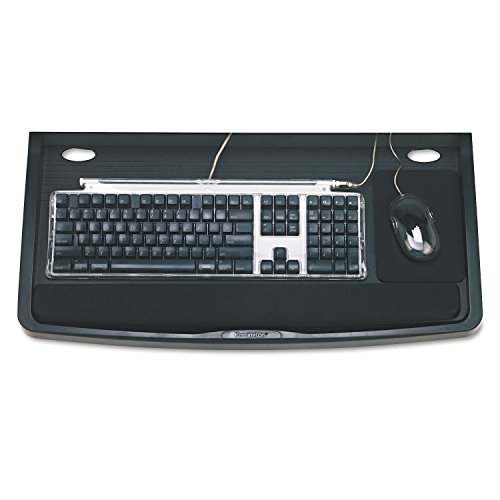
Kensington SmartFit Under-Desk Comfort Keyboard Drawer K60004US
Kensington keeps the depth short so the drawer works under desks that do not have much clearance behind the front edge. The SmartFit colour coded sizing helps you set a height matched to your body rather than guessing. It is a modest tray rather than a full articulating arm, and the platform suits compact keyboards best.
Pros
- Fits desks with limited under-surface depth
- Sizing guide takes the guesswork out of height
- Non slip surface keeps the keyboard put
Cons
- Tight for full size keyboards with number pads
- Screw mounting only

Mount-It! MI-7137 Under Desk Keyboard Tray
Mount-It! builds this one around a long steel track with a stated capacity that comfortably covers heavy mechanical boards. The tilt lever sits under the platform where it is easy to reach, and the tray retracts most of the way under the desk. Installation is screw-in only, so check your desk material first.
Pros
- Steel track resists sagging over time
- Long travel tucks the tray well out of the way
- Handles weighty mechanical keyboards
Cons
- Drilling required, not clamp compatible
- Assembly instructions are sparse

Eureka Ergonomic Under Desk Keyboard Tray
Eureka keeps the mechanism thin so the tray does not eat into leg clearance on a height adjustable frame. It attaches with a clamp on most models and holds a keyboard plus a small mouse area. Because it is slim, there is less tilt range than dedicated ergonomic arms offer.
Pros
- Thin design keeps knee clearance intact
- Suits height adjustable desk frames
- Straightforward clamp fitting
Cons
- Limited tilt compared with articulating arms
- Mouse area is narrow for larger hands
How they compare
| # | Model | Mounting | Best for | Score | Price |
|---|---|---|---|---|---|
| 1 | VIVO MOUNT-KB05E Clamp-on Computer Keyboard Tray | C-clamp, no drilling | Best overall | 9.4 | Check price |
| 2 | 3M AKT150LE Easy Adjust Keyboard Tray | Screw-in track | Best for ergonomics | 9.2 | Check price |
| 3 | Fellowes Office Suites Underdesk Keyboard Drawer 8035101 | Screw-in under desk | Best for tidy storage | 9.0 | Check price |
| 4 | HUANUO Under Desk Keyboard Tray | Clamp on, no drilling | Best value | 8.8 | Check price |
| 5 | Kensington SmartFit Under-Desk Comfort Keyboard Drawer K60004US | Screw-in under desk | Best for shallow desks | 8.6 | Check price |
| 6 | Mount-It! MI-7137 Under Desk Keyboard Tray | Screw-in steel track | Best for heavy keyboards | 8.3 | Check price |
| 7 | Eureka Ergonomic Under Desk Keyboard Tray | Clamp style attachment | Best for standing desks | 8.0 | Check price |
How to pick the right one
Check your desk before you check the tray The single most common return reason is a mount that does not fit. Clamp trays need a flat overhang, usually within a stated thickness range, and they will not grip a bullnose or rounded edge. Screw-in tracks need solid material at least three quarters of an inch thick with no drawer or crossbar in the way. Measure the underside clearance and the desktop thickness before you compare anything else.
Negative tilt matters more than height Most people already sit too low relative to their keyboard, so the value of a tray comes from angling the far edge slightly upward. That negative tilt keeps wrists flat instead of extended. Trays that only slide in and out solve clutter but do nothing for posture, so if wrist comfort is the goal, prioritise the tilt range in the specifications.
Platform width decides whether your mouse fits A 21 inch platform will hold a full size keyboard and almost nothing else. If you use a mouse at the same height, look for platforms around 26 inches wide, or a model with a separate swiveling mouse pad. Owners report that mousing on the desktop while typing on a lower tray reintroduces the shoulder strain the tray was meant to fix.
Weight capacity and long term sag Heavy mechanical keyboards with aluminium cases put real load on the arm. Steel tracks hold their position far better over a year of daily use than plastic rails, which tend to develop a droop at full extension. Based on specifications, look for a stated capacity well above your actual keyboard weight rather than right at it.
Common questions
Will a keyboard tray fit my desk?
Only if the mount matches. Clamp models need a flat front edge within the stated thickness range, and screw-in models need solid material underneath with enough clearance. Glass desks and thin hollow core tops rule out most screw mounted trays.
Do I need to drill holes in my desk?
Not with clamp-on trays like the VIVO MOUNT-KB05E or HUANUO. Track based trays such as the 3M AKT150LE and Mount-It! MI-7137 do require screws into the underside of the desktop.
What is negative tilt and why does it matter?
Negative tilt angles the far edge of the keyboard slightly upward so your wrists stay neutral rather than bent back. It is the main ergonomic benefit of a tray, and simple sliding drawers do not provide it.
How wide should the platform be?
About 26 inches if you want keyboard and mouse on the same surface. Around 21 inches is enough for a keyboard alone, or for a compact board plus a small mouse area.
Can a tray hold a heavy mechanical keyboard?
Steel track models are rated for it. Check the stated capacity and leave margin, because plastic rails at full extension are where owners report sag developing over time.
Will a tray reduce my leg room?
Slightly, yes. Every tray adds a mechanism under the desk. Slim profile models such as the Eureka Ergonomic tray minimise the loss, which matters most on standing desk frames where you raise and lower often.
Are keyboard trays worth it for laptop users?
Only if you use an external keyboard. A laptop on a tray puts the screen far too low. The usual setup is laptop or monitor raised on the desktop with a separate keyboard on the tray.
Do trays work with under-desk cable trays and drawers?
Often they conflict. Existing drawers, crossbars and cable management channels take up the same space the track needs, so check the clear run under your desk before ordering.
The verdict
For most desks the VIVO MOUNT-KB05E is the sensible default, because the clamp mount fits without drilling and the platform is wide enough for keyboard and mouse together. Spend more on the 3M AKT150LE if wrist comfort is the whole reason you are buying, or save with the HUANUO tray if you want to try the idea first. Whatever you pick, measure your desk edge and underside clearance before ordering.