Top USB C Keyboards: Wired, Wireless, and Mechanical Picks
For most people, the Keychron K8 Pro is the best USB C keyboard because it offers hot-swappable switches, Bluetooth and wired dual mode, and a compact tenkeyless layout. Its main advantage is versatility for both Mac and Windows users. The main limitation is that it lacks a wrist rest and dedicated media keys, so some users add their own.
USB C has become the standard for modern devices, and keyboards are catching up. A USB C keyboard means faster charging, reversible plugs, and often better power delivery for wireless models.
We looked at wired and wireless options with USB C connections. We considered typing comfort, switch types, battery life, and whether they work across multiple operating systems.
The shortlist, ranked

Keychron K8 Pro
A tenkeyless mechanical keyboard with hot-swappable switches. It connects via Bluetooth or USB C cable and works with up to 3 devices. Owners appreciate the solid build and smooth typing feel.
Pros
- Hot-swappable switches allow customization
- Long battery life with backlight off
- Works with Mac, Windows, and Linux
Cons
- No wrist rest included
- Keycaps are ABS not PBT

Logitech MX Keys S
A full-size wireless keyboard with low-profile keys and smart backlighting. It pairs via Bluetooth or Logi Bolt USB receiver. Owners report comfortable typing for long sessions.
Pros
- Backlit keys with automatic illumination
- Switch between 3 devices with one key
- Comfortable concave keycaps
Cons
- Not mechanical
- Requires Logitech software for full features

Corsair K65 Plus Wireless
A 75% mechanical gaming keyboard with a USB C connection. It features Corsair’s rapidfire switches and a detachable USB C cable. Gamers like the responsive keys and low latency wireless.
Pros
- Optical switches for fast response
- Three connection modes
- Premium aluminum top plate
Cons
- No dedicated media keys
- Software required for macro programming

Razer BlackWidow V4 75%
A compact 75% wired keyboard with Razer’s new tactile mechanical switches. It has a gasket-mounted design for softer bottoming out. Users find it great for both typing and gaming.
Pros
- Gasket mount for flexible feel
- Hot-swappable switches
- High-quality PBT keycaps
Cons
- Wired only, no wireless
- Expensive for a 75% board
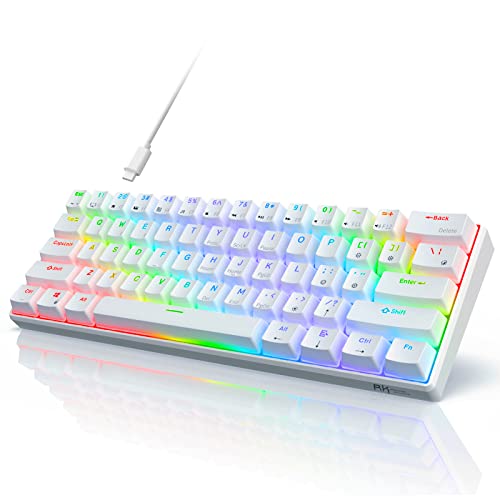
Royal Kludge RK61
A 60% mechanical keyboard that is wireless and USB C. It offers Bluetooth 5.1 and a USB C port for charging and wired use. Budget buyers like the low price and multiple switch options.
Pros
- Very affordable
- Three connection modes on some models
- Compact and portable
Cons
- No arrow keys (requires function layer)
- Build quality is okay but not premium

Logitech K380
A compact multi-device keyboard with a USB C charging port. It pairs with up to 3 Bluetooth devices and has a familiar laptop-like layout. Travelers appreciate its light weight and long battery.
Pros
- Ultra portable and lightweight
- Long battery life
- Easy switching between devices
Cons
- Not mechanical
- No backlight

Apple Magic Keyboard with Touch ID
Apple’s full-size keyboard with Touch ID for Mac computers. It connects via Bluetooth and charges through a USB C port. Mac users love the seamless integration and the convenience of Touch ID.
Pros
- Works flawlessly with Mac and iPad
- Touch ID for secure login and payments
- Sleek aluminum design
Cons
- Only works well with Apple devices
- Expensive compared to similar keyboards
Compared at a glance
| # | Model | Connectivity | Best for | Score | Price |
|---|---|---|---|---|---|
| 1 | Keychron K8 Pro | Bluetooth 5.1 and USB C wired | Best overall for Mac and Windows users | 9.4 | Check price |
| 2 | Logitech MX Keys S | Bluetooth and Logi Bolt USB C receiver | Best for productivity and multi-device | 9.2 | Check price |
| 3 | Corsair K65 Plus Wireless | 2.4GHz Slipstream, Bluetooth, USB C wired | Best for gaming and low latency | 9.0 | Check price |
| 4 | Razer BlackWidow V4 75% | USB C wired only | Best for tactile typing and gaming | 8.8 | Check price |
| 5 | Royal Kludge RK61 | Bluetooth 5.1, USB C, 2.4GHz (some versions) | Best budget compact | 8.5 | Check price |
| 6 | Logitech K380 | Bluetooth only (USB C for charging) | Best for travel and tablets | 8.3 | Check price |
| 7 | Apple Magic Keyboard with Touch ID | Bluetooth (USB C to charge) | Best for Apple ecosystem | 8.1 | Check price |
Before you buy
Common questions
Can I use any USB C keyboard with my Mac?
Most USB C keyboards work with Mac, but some features may need software. Keyboards like the Keychron K8 Pro have a Mac/Windows toggle. Apple’s Magic Keyboard is optimized for Mac and offers Touch ID, but it is not compatible with Windows PCs.
Do all USB C keyboards support fast charging?
No. Fast charging depends on the keyboard’s battery and charging circuit. Most wireless keyboards charge via USB C at standard rates. Wired keyboards do not have batteries, so they do not need charging.
What is the difference between a 60% and a 75% keyboard?
A 60% keyboard has no function row, arrow keys, or navigation cluster. A 75% keyboard retains the function row and arrow keys but is more compact than a tenkeyless. The 75% layout is popular for gaming and productivity.
Do USB C keyboards work with PS5 or Xbox?
For gaming consoles, you need a keyboard that supports USB HID. Many wired and wireless keyboards with a dongle work with PS5 and Xbox for text input. However, not all features like macros or RGB may be supported.
Are mechanical keyboards louder than membrane keyboards?
Mechanical keyboards can be louder, especially with clicky switches. Tactile switches are quieter, and linear switches are the quietest. Membrane keyboards are generally quiet. If noise is a concern, choose a keyboard with red or brown switches.
How long does the battery last on a wireless USB C keyboard?
Battery life varies widely. Keyboards like the Logitech MX Keys S last up to 10 months on a full charge. Gaming keyboards with RGB backlighting may need charging every few weeks. The Keychron K8 Pro can last months with backlight off.
Can I use a USB C keyboard while it is charging?
Yes, most wireless keyboards can be used while charging via USB C. For Bluetooth keyboards, you can plug in the cable and continue typing. Some keyboards also support wired mode when connected.
What are hot-swappable switches?
Hot-swappable switches allow you to replace the switches without soldering. This means you can customize the feel of your keyboard by swapping in different switch types. Keyboards like the Keychron K8 Pro and Razer BlackWidow V4 75% offer this feature.
Do I need software to use a USB C keyboard?
Basic typing works without software on most keyboards. However, to program macros, customize RGB lighting, or adjust settings, you may need manufacturer software. Some keyboards have on-board controls for basic adjustments.
Is USB C keyboard better than USB A?
USB C is better because the connector is reversible and can carry more power. Many modern laptops only have USB C ports, so a USB C keyboard avoids needing an adapter. USB A is still common, but USB C is becoming the standard.
Final word
If you want a versatile keyboard that works with both Mac and PC, go with the Keychron K8 Pro. For a premium typing experience in an office, choose the Logitech MX Keys S. Gamers should pick the Corsair K65 Plus Wireless. Budget shoppers will be happy with the Royal Kludge RK61. Apple users should get the Apple Magic Keyboard with Touch ID.