Label Dispensers That Speed Up Shipping and Office Work
Brother P-touch PTD610BT wins overall for laminated labels that survive handling and moisture. DYMO LabelWriter 550 dispenses shipping and filing volume fastest of the group. NIIMBOT B1 stays the simplest pocket sized pick for quick home labelling jobs around the house.
Choose Brother P-touch PTD610BT for most homes and small offices, since laminated tape survives washing, rubbing and cold storage. Reach for DYMO LabelWriter 550 instead if you are dispensing dozens of shipping or filing labels at once.
Label dispensers split into two families that behave nothing alike: cassette machines that laminate durable tape, and thermal roll printers that spit out paper labels fast and cheap. We compared print resolution, dispense speed, consumable format and durability claims, then weighed owner reports about proprietary consumable lock in and labels that fade within months.
How to choose
Laminated tape or thermal rolls: which comes first? Laminated cassette tape protects print between plastic layers, so labels survive dishwashers, freezers and years of handling. Thermal paper costs far less per label but darkens in heat and fades in sunlight. Choosing wrong means overpaying for pantry labels or watching shipping labels blur.
Are the consumables locked to one brand? Some dispensers only recognise authentic rolls or cassettes, fixing your ongoing cost for the life of the machine. Others accept generic stock at a fraction of the price. Owners report this single factor dominates total cost, since consumables overtake the machine price within the first year.
Which input method suits where you label? A built in keyboard works anywhere with no phone, which suits workshops and stockrooms. App driven units speed up complex layouts and symbols but stall if a battery dies or an update breaks. Prioritise standalone operation if you label in bursts away from a desk.
How much label volume should shape your choice? Handhelds handle a dozen labels comfortably and struggle past a hundred. Desktop thermal printers work the opposite way. Based on specifications, the dispense speed gap between the two categories is wide enough that volume, not features, should pick the category before you compare individual models.
The shortlist, ranked

Brother P-touch PTD610BT
Laminated TZe tape seals print between plastic layers, so it survives moisture, scuffing and freezer storage that would ruin a thermal label. A colour screen and full keyboard let you compose labels without a phone, while Bluetooth adds app design when wanted. Cassette tape costs more per label than thermal rolls.
Pros
- Laminated labels survive moisture and abrasion
- Usable standalone without a phone or computer
- Wide range of tape widths and colours
Cons
- Cassette tape costs more per label than rolls
- Slower than a dedicated thermal roll printer

DYMO LabelWriter 550
This desktop thermal printer dispenses a continuous stream of labels for shipping, filing and barcoding, far faster than any handheld unit. No ink or toner is needed, only label rolls. Automatic roll recognition on the 550 generation rules out third party consumables.
Pros
- Very fast for batches of shipping or file labels
- No ink or toner to replace
- Software handles address books and barcodes
Cons
- Locked to authentic DYMO rolls
- Thermal paper fades in sunlight and heat

Brother PT-P710BT Cube Plus
This keyboardless cube designs everything through a phone or tablet app, which makes complex layouts and symbols easier than thumbing a tiny keypad. It takes the same laminated TZe cassettes as the P-touch range, matching that durability. A rechargeable battery lets it dispense away from a socket.
Pros
- App design is far quicker than a keypad
- Uses durable laminated tape
- Rechargeable and genuinely portable
Cons
- Unusable without a paired device
- Cassette cost per label remains high

DYMO LabelManager 280
A rechargeable handheld with a proper keyboard, built for people who label as they work rather than at a desk. DYMO D1 tape prints durable enough for shelves, cables and storage boxes. Based on specifications, the rechargeable battery removes the constant battery changes older handhelds require.
Pros
- Works anywhere with no phone needed
- Rechargeable rather than battery hungry
- D1 tape is widely stocked
Cons
- Small screen limits layout preview
- Fewer formatting options than app driven models
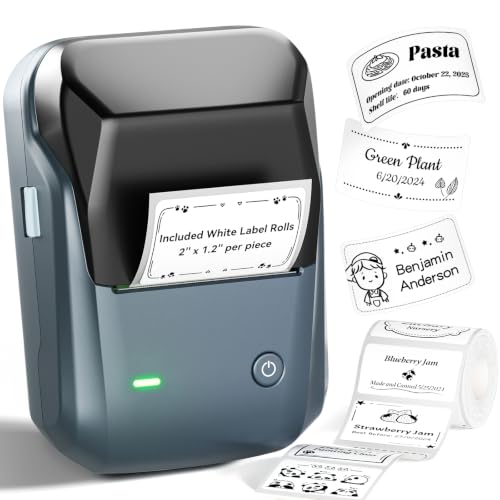
NIIMBOT B1
This compact thermal dispenser pairs to a phone app with a large template library, making it quick for pantry jars, kids items and general home organising. Label rolls cost less than laminated cassettes. Direct sun fades thermal labels, so indoor use suits it best.
Pros
- Low cost per label on thermal rolls
- Template library speeds up home labelling
- Small enough to keep in a drawer
Cons
- Thermal labels fade in sunlight
- Requires the app for every label

Phomemo M110
Small sellers favour this model because it dispenses die cut sticker labels for packaging, pricing and barcodes without a computer. Its app supports imported images and barcode generation. Broad roll compatibility keeps consumable costs sensible compared with locked systems.
Pros
- Handles product stickers and barcodes
- Third party rolls keep costs down
- Runs entirely from a phone
Cons
- Print resolution limits very small text
- Thermal labels are not moisture proof

MUNBYN ITPP941 Thermal Label Printer
This desktop thermal unit targets four by six shipping labels, dispensing them fast from fanfold stacks or rolls. Standard label stock works here instead of proprietary cartridges, keeping running costs low for frequent parcel shipping. Small organisational labels are not its focus.
Pros
- Very low cost per shipping label
- Accepts standard third party stock
- Fast dispensing for parcel batches
Cons
- Only suited to large shipping labels
- No standalone operation without a computer
How they compare
| # | Model | Label type | Best for | Score | Price |
|---|---|---|---|---|---|
| 1 | Brother P-touch PTD610BT | Laminated TZe cassette tape | Best overall | 9.4 | Check price |
| 2 | DYMO LabelWriter 550 | Direct thermal rolls | Best for volume | 9.2 | Check price |
| 3 | Brother PT-P710BT Cube Plus | Laminated TZe cassette tape | Best app driven design | 9.0 | Check price |
| 4 | DYMO LabelManager 280 | DYMO D1 cassette tape | Best handheld | 8.8 | Check price |
| 5 | NIIMBOT B1 | Direct thermal rolls | Best portable value | 8.6 | Check price |
| 6 | Phomemo M110 | Die cut thermal rolls | Best for small business | 8.3 | Check price |
| 7 | MUNBYN ITPP941 Thermal Label Printer | Four by six thermal shipping labels | Best budget desktop | 8.0 | Check price |
Questions worth asking
What is the difference between a label dispenser and a label maker?
The terms overlap in practice. Manual dispensers peel pre printed labels from a roll, while label makers print and dispense on demand. Most shoppers searching for a dispenser actually want a machine that prints and feeds a ready to peel label.
Do thermal labels fade over time?
Yes. Direct thermal print darkens with heat and fades with sunlight and age. Kept indoors and out of direct light, labels last a year or more, but they are not suited to outdoor or long term archival use.
Which labels survive the dishwasher or freezer?
Laminated cassette tape handles both far better than thermal paper, since the print sits sealed between plastic layers. Look specifically for laminated tape rather than plain tape if labels will get wet or cold.
Are third party tapes and rolls safe to use?
Generally yes in machines that allow them, though adhesive and print quality vary. Machines with consumable recognition will reject or warn about non authentic stock, so check that first if running cost matters.
Can a label dispenser print barcodes?
Most app and software driven models generate common barcode formats. Verify the exact symbology you need, and check print resolution, since dense barcodes need enough dots per inch to scan reliably.
Do label dispensers need a computer to work?
Handheld keyboard models and app based units work without one. Desktop thermal printers generally need a computer or phone app connection to send jobs.
How wide can label dispenser output be?
Cassette machines usually top out around one inch of tape width, while desktop thermal units handle four inch shipping labels. Large labels rule out cassette machines regardless of other features.
Which label dispenser is cheapest to run long term?
Thermal roll printers that accept standard stock cost the least per label by a wide margin. Laminated cassette tape costs considerably more but buys durability, so the honest answer depends on whether the label needs to last.
Label dispenser vs label maker: which should small businesses buy?
Small businesses shipping often benefit from a desktop thermal dispenser like the DYMO LabelWriter 550 for speed. Those labelling products or stock in smaller batches usually do better with a handheld or app driven label maker instead.
The bottom line
Brother P-touch PTD610BT stands as the best all round label dispenser, since laminated tape keeps labels readable for years and it works without a phone. Pick DYMO LabelWriter 550 for desk bound volume dispensing, and NIIMBOT B1 for cheap, quick labels around the house.