Laptop Power Banks That Keep You Working Anywhere
The Anker 737 Power Bank is the best all-round choice, pushing enough wattage to charge most laptops while staying pocketable. The INIU 100W bank is the best value for its large capacity, and the Anker Prime 200W model is the top pick for charging a laptop and phone together at full speed.
The Anker 737 Power Bank is the best pick for most people because it delivers enough USB-C wattage to run mainstream laptops while staying easy to carry, while the INIU 100W bank is the value champion for its large capacity and the Anker Prime 200W model is the one to get if you need to fast-charge a laptop and phone at once. Charging a laptop needs far more power than topping up a phone.
Laptop power banks are trickier to shop for than phone chargers because a laptop demands high wattage over USB-C Power Delivery, and a bank with big capacity but weak output will charge slowly or not at all. We compared them on peak wattage, real usable capacity, number and type of ports, recharge speed and how portable each stays, using published specifications and what owners report in daily carry.
The best picks, ranked

Anker 737 Power Bank (PowerCore 24K)
The 737 balances a strong USB-C output with a genuinely useful capacity and a smart display that shows watts in and out. It charges most ultrabooks at near full speed and refills itself quickly over USB-C. Owners praise the readout and the pocketable size for the power on offer.
Pros
- High wattage suits most laptops
- Live display shows real draw
- Fast to recharge over USB-C
Cons
- Heavier than phone-only banks
- Premium price for the class
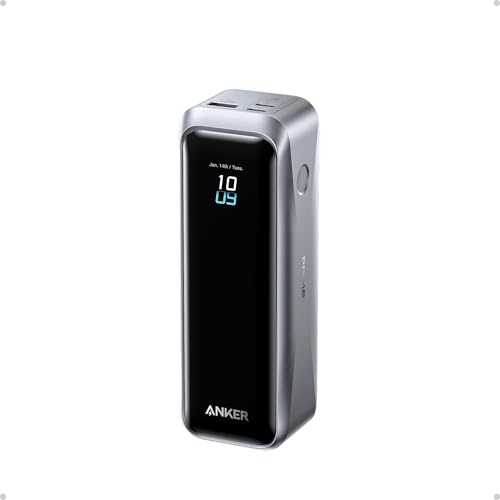
Anker Prime Power Bank 20000mAh (200W)
The Prime pushes very high combined output across multiple ports, so it can fast-charge a laptop and a phone at the same time without throttling. A crisp display reports every figure, and an optional base makes recharging effortless. Owners report it keeps demanding laptops running under load.
Pros
- Charges laptop and phone at full speed
- Very high combined wattage
- Informative status display
Cons
- Among the priciest here
- Dense and heavy for its size

UGREEN 145W Power Bank 25000mAh
With high total output and a healthy capacity, the UGREEN keeps a laptop, tablet and phone topped up on a long day out. A small display tracks charge level and wattage, and it recharges quickly over USB-C. Owners like the port spread for keeping a full kit alive.
Pros
- Runs several devices at once
- Large capacity for the size
- Quick USB-C recharge
Cons
- Bulkier than slim banks
- Full output needs the right cable

INIU 100W Laptop Power Bank 27000mAh
The INIU packs a big capacity and enough USB-C wattage to charge most laptops for a price well below the premium names. A small display shows remaining charge, and multiple ports cover a phone alongside the laptop. Owners report solid, dependable performance for the money.
Pros
- Large capacity at a low price
- Enough wattage for most laptops
- Handy percentage display
Cons
- Recharges slower than premium banks
- Fairly heavy to carry

Baseus Blade 100W Laptop Power Bank
The Blade’s flat, laptop-shaped body slides into a bag sleeve alongside your notebook and still delivers 100W over USB-C. Its thin profile makes it one of the most travel-friendly high-output banks. Owners like how easily it disappears into a work bag while charging full-size laptops.
Pros
- Very thin and bag-friendly
- Strong 100W laptop output
- Good spread of ports
Cons
- Lower capacity than chunkier banks
- No detailed watt display

Zendure SuperTank Pro 26800mAh
Built like a small brick with four USB-C ports and a bright display, the SuperTank Pro is aimed at travelers charging a laptop plus several accessories. Its capacity sits at the airline carry-on limit, and owners value the port count for powering a full mobile office on the go.
Pros
- Four USB-C ports for full kits
- Clear OLED status screen
- Capacity near carry-on limit
Cons
- Chunky and heavy to pocket
- Premium price
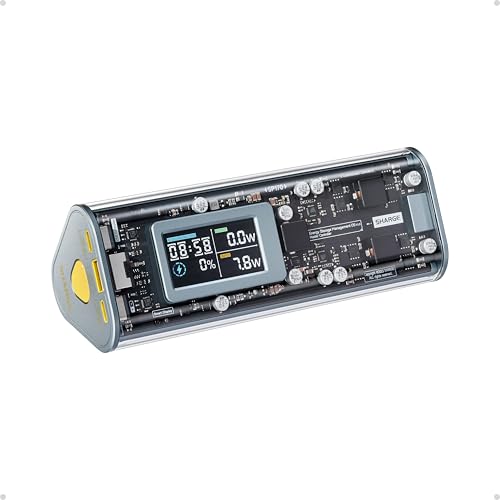
Shargeek Storm 2 Power Bank 25600mAh
The Storm 2 wraps a 100W bank in a transparent shell with a detailed color screen that reports voltage, current and remaining charge. Beyond the looks, it handles laptop charging and multiple devices. Owners buy it for the see-through design and the unusually rich readouts.
Pros
- Transparent shell stands out
- Detailed color status screen
- Enough output for laptops
Cons
- Large and heavy
- Costs more than plainer banks
What to look for
Why wattage matters more than capacity The most common mistake is buying on capacity alone. A laptop charges over USB-C Power Delivery and needs high wattage, often 65W to 100W or more, so a bank with a huge cell but only 30W of output will charge slowly or refuse to power a laptop under load. Check the maximum USB-C output first, then match it to your laptop’s charger rating, and only then look at capacity.
Reading real usable capacity The milliamp-hour number on the label is the raw cell capacity, not what actually reaches your laptop. Voltage conversion and heat lose some energy, so a 20000mAh bank delivers meaningfully less to a device. As a rough guide, expect a large bank to add most of a single laptop charge plus a phone top-up, rather than several full laptop charges.
Ports, cables and charging several devices If you carry a phone, tablet and laptop, look at how output is split across ports, since combined wattage often drops when several ports are in use. You also need a cable rated for the wattage you want, as a weak USB-C cable can quietly cap charging speed. Banks with two or more USB-C ports give the most flexibility for a full kit.
Portability and travel rules High-output banks are heavier and denser than phone chargers, so decide how much weight you will actually carry daily. Slim, laptop-shaped bodies slide into a bag sleeve, while brick-style banks trade pocketability for capacity and ports. For flights, remember most airlines cap carry-on power banks around the 100Wh mark, which is why many top out near 27000mAh.
Side by side
| # | Model | Capacity | Best for | Score | Price |
|---|---|---|---|---|---|
| 1 | Anker 737 Power Bank (PowerCore 24K) | 24000mAh | Best overall | 9.4 | Check price |
| 2 | Anker Prime Power Bank 20000mAh (200W) | 20000mAh | Best premium | 9.2 | Check price |
| 3 | UGREEN 145W Power Bank 25000mAh | 25000mAh | Best for multiple devices | 9.0 | Check price |
| 4 | INIU 100W Laptop Power Bank 27000mAh | 27000mAh | Best value | 8.8 | Check price |
| 5 | Baseus Blade 100W Laptop Power Bank | 20000mAh | Best slim design | 8.5 | Check price |
| 6 | Zendure SuperTank Pro 26800mAh | 26800mAh | Best for travel | 8.3 | Check price |
| 7 | Shargeek Storm 2 Power Bank 25600mAh | 25600mAh | Best design | 8.1 | Check price |
Questions worth asking
Can a power bank actually charge a laptop?
Yes, as long as it supports USB-C Power Delivery at enough wattage for your laptop, typically 65W or more for full-size models. Lower-output banks may charge a laptop very slowly or only maintain it, so always match the bank’s USB-C output to your laptop’s charger.
How many watts do I need for my laptop?
Check the wattage printed on your laptop’s original charger. Lightweight ultrabooks often need 45W to 65W, while larger or performance laptops want 100W or more. Pick a bank whose USB-C output meets or exceeds that figure to charge at full speed.
Why is the usable capacity lower than the label?
The milliamp-hour rating measures the internal cells, but converting that to the voltage your laptop needs loses energy as heat. Real delivered capacity is typically well below the label, so a 20000mAh bank provides roughly most of one laptop charge rather than several.
Can these power banks charge my phone too?
Yes, all of these include ports that fast-charge phones, and many can power a laptop and phone at the same time. Note that combined output is often shared, so total wattage may drop when several devices are connected at once.
Are laptop power banks allowed on airplanes?
Most airlines permit power banks in carry-on bags up to about 100Wh, which is why many high-capacity models stop near 27000mAh. Always check your airline’s current rules, keep the bank in your carry-on rather than checked luggage, and confirm the printed watt-hour rating.
How long do they take to recharge?
Banks that support high-wattage USB-C input recharge much faster, often refilling in a couple of hours, while models limited to lower input can take far longer. If quick turnaround matters, look for a high input wattage and use a compatible charger and cable.
Do I need a special cable?
Yes, to reach full wattage you need a USB-C cable rated for it; a low-rated cable can cap charging speed even on a capable bank. Many high-output banks include a suitable cable, and using it or an equivalent rated one is important for laptop charging.
Will a power bank harm my laptop battery?
No, a reputable USB-C Power Delivery bank charges your laptop the same way its wall charger does, with the same safety negotiation. Sticking to well-known brands with proper protections helps ensure safe, stable charging for your device.
Final word
For most people the Anker 737 Power Bank hits the best balance of laptop-grade wattage, capacity and portability, and its live display takes the guesswork out of charging. Choose the INIU 100W bank if you want the most capacity for the money, step up to the Anker Prime 200W if you need to fast-charge a laptop and phone together, and pick the slim Baseus Blade when carry weight is your main concern.