Top Gaming Laptops Compared for Every Type of Gamer
For most gamers, the ASUS ROG Zephyrus G14 stands out as the top pick because it balances portability with powerful AMD Ryzen 9 performance, ideal for those who game on the go and need a laptop for work or school. Its main limitation is the lack of a webcam, which can be a drawback for streamers or frequent video callers.
Finding the right gaming laptop is a balancing act between power, price, and portability. We compared current models from top brands to help you choose.
Whether you prioritize raw frame rates, a vibrant display, or a slim design, there is a laptop here for you. Our picks are based on specifications, user reviews, and expert consensus.
The top picks, ranked
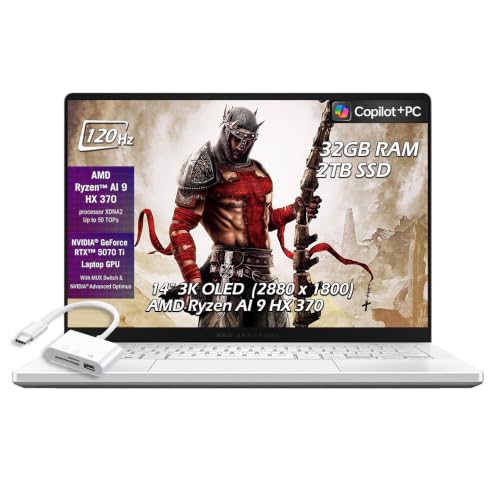
ASUS ROG Zephyrus G14
A 14-inch powerhouse that fits in a backpack, yet delivers desktop-class gaming with AMD’s latest Ryzen 9 and RTX 4060. Its exceptional battery life and crisp QHD display make it perfect for gamers who are also students or professionals.
Pros
- Compact and light at 3.64 pounds
- Excellent battery life for a gaming laptop
- High-quality aluminum build
Cons
- No built-in webcam
- Ports are limited

MSI Titan 18 HX
A massive 18-inch desktop replacement with an overclockable Intel Core i9-14900HX and RTX 4090, delivering unrivaled frame rates. The mechanical keyboard and 4K Mini LED display are top of the line, but the size and weight are not for everyone.
Pros
- Blazing fast performance
- Stunning Mini LED display
- Mechanical keyboard with per-key RGB
Cons
- Very heavy at 7.93 pounds
- Extremely expensive

Alienware m16 R2
Alienware’s m16 R2 offers a gorgeous 16-inch QHD+ 240Hz display with excellent color accuracy, making it a favorite for both gaming and content creation. With the RTX 4070 and Intel Core Ultra 7, it handles modern titles effortlessly.
Pros
- Vibrant and fast display
- Solid build with premium materials
- Good thermal management
Cons
- Battery life is average
- Fans can be loud under load

Lenovo Legion Pro 7i
The Legion Pro 7i packs a punch with an Intel Core i9-14900HX and RTX 4080, offering near-top-tier performance at a more accessible price point. Its 16-inch 2.5K 240Hz display and robust cooling make it a gamer’s delight.
Pros
- Strong performance for the price
- High refresh rate display
- Good keyboard and build
Cons
- Heavier than some competitors
- Software bloatware

Razer Blade 16
Razer’s Blade 16 is a masterpiece of aluminum construction, with a dual-mode Mini LED display that switches between 4K 120Hz and FHD 240Hz. It offers top-tier components like the RTX 4090, but the price is steep.
Pros
- Exceptional build quality
- Innovative dual-mode display
- Thin and relatively light
Cons
- Very expensive
- Runs hot under sustained load

Acer Predator Helios 16
The Predator Helios 16 delivers strong 1440p gaming with a 13th Gen Intel Core i7 and RTX 4060 at a price that is easier on the wallet. Its 165Hz display and per-key RGB keyboard add value without breaking the bank.
Pros
- Great price-to-performance ratio
- Solid 165Hz display
- Good selection of ports
Cons
- Plastic build feels less premium
- Battery life is short

Gigabyte Aorus 17X
With a blazing 17.3-inch 360Hz panel and RTX 4070, the Aorus 17X is designed for competitive gamers who need the smoothest visuals. Its mechanical keyboard and solid performance make it a niche pick for esports titles.
Pros
- Extremely high refresh rate
- Mechanical keyboard included
- Strong multi-core performance
Cons
- Bulky design
- Fans can be noisy
What to look for
Compared at a glance
| # | Model | CPU | Best for | Score | Price |
|---|---|---|---|---|---|
| 1 | ASUS ROG Zephyrus G14 | AMD Ryzen 9 7940HS | Best Overall for Portability and Performance | 9.4 | Check price |
| 2 | MSI Titan 18 HX | Intel Core i9-14900HX | Best for Extreme Performance | 9.2 | Check price |
| 3 | Alienware m16 R2 | Intel Core Ultra 7 155H | Best for Immersive Display | 9.0 | Check price |
| 4 | Lenovo Legion Pro 7i | Intel Core i9-14900HX | Best for Value with High-End Specs | 8.9 | Check price |
| 5 | Razer Blade 16 | Intel Core i9-14900HX | Best for Premium Design and Build | 8.8 | Check price |
| 6 | Acer Predator Helios 16 | Intel Core i7-13700HX | Best for Budget-Minded Enthusiasts | 8.6 | Check price |
| 7 | Gigabyte Aorus 17X | Intel Core i9-13980HX | Best for Esports and Competitive Gaming | 8.4 | Check price |
Frequently asked questions
What is the best budget gaming laptop?
The Acer Predator Helios 16 offers excellent value for around current price with an RTX 4060 and 165Hz display, making it a great entry point for 1440p gaming.
How much RAM do I need for gaming?
16GB is the minimum for current games, but 32GB is recommended for future-proofing and multitasking. Most laptops in this list come with 16GB or 32GB.
Is a gaming laptop good for everyday use?
Yes, many gaming laptops are suitable for work or school, but they are heavier and have shorter battery life compared to ultrabooks. Consider the ASUS ROG Zephyrus G14 for a balance.
What is the difference between RTX 4060 and RTX 4090?
The RTX 4090 is significantly faster, offering about 50-70% more performance, but it also costs much more and requires more power. For most gamers, the RTX 4060 or 4070 is sufficient.
Can I upgrade the RAM and storage on these laptops?
Most gaming laptops allow access to RAM and storage slots, but some like the Razer Blade 16 have soldered RAM. Check specifications before purchase.
Do gaming laptops have good displays for content creation?
Many modern gaming laptops feature high color accuracy, such as the Alienware m16 R2, which is suitable for photo and video editing. Look for 100% DCI-P3 coverage.
Are 4K displays worth it on gaming laptops?
4K displays are demanding on the GPU and may lower frame rates. Unless you need 4K for creative work, a 1440p or 1080p high refresh display is better for gaming.
What is the best gaming laptop for battery life?
The ASUS ROG Zephyrus G14 is known for its exceptional battery life, lasting up to 10 hours on light tasks. Other models like the Lenovo Legion Pro 7i offer around 5-6 hours.
Do I need a cooling pad for my gaming laptop?
A cooling pad can help reduce temperatures and noise, especially during long sessions. However, most laptops have adequate cooling systems; it is not necessary but can improve comfort.
Which brand has the best gaming laptops?
It depends on your needs. ASUS and MSI are known for performance, Razer for premium build, and Acer for budget options. Read reviews and consider your priorities.
The verdict
For the vast majority of gamers, the ASUS ROG Zephyrus G14 is the best choice because it offers excellent performance in a portable and affordable package. If you demand the absolute highest frame rates and have a large budget, the MSI Titan 18 HX is the ultimate machine, but it is heavy and expensive. For a balance of price and performance, the Lenovo Legion Pro 7i is a smart buy.


