Top Home Laptops for Work, Study, and Play
For most households, the Apple MacBook Air M2 stands out as the top pick, delivering exceptional battery life and a silent, fanless design ideal for everyday tasks. Its main limitation is the higher price for upgraded storage, but the base model offers ample performance for web browsing, streaming, and document work.
Choosing the right laptop for your home can be overwhelming with countless options. Whether you need a device for remote work, online classes, or family entertainment, the key is balancing performance, durability, and price.
We analyzed top-selling models from Apple, Dell, HP, Lenovo, and Asus, focusing on real-world usability. Our comparisons highlight each laptop’s strengths and trade-offs, helping you make an informed choice without marketing hype.
The shortlist, ranked
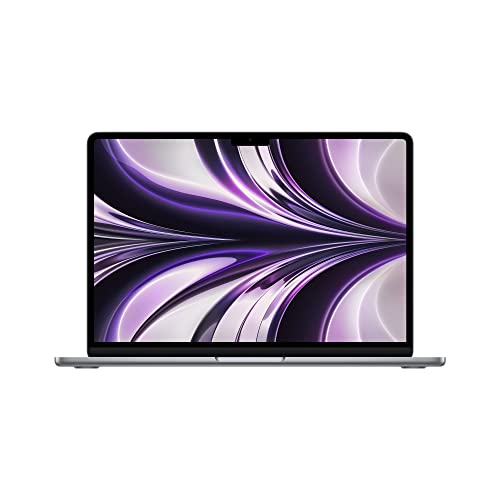
Apple MacBook Air M2
The MacBook Air M2 combines Apple’s efficient M2 chip with a stunning Liquid Retina display. Its fanless design ensures silent operation, and the 18-hour battery life easily lasts all day. Owners praise its build quality and webcam, but note the base storage is 256GB, which may fill quickly for media hoarders.
Pros
- Exceptional battery life
- Silent, fanless operation
- Premium build and display
Cons
- Limited ports (2 Thunderbolt)
- Base storage may be insufficient

Dell XPS 13 Plus
The Dell XPS 13 Plus features a futuristic design with a zero-lattice keyboard and haptic touchpad. Its 13.4-inch OLED display offers vibrant colors, and the 12th Gen Intel Core i7 processor delivers top-tier performance. Users love the sleek look, but some find the capacitive function row takes getting used to.
Pros
- Stunning OLED display
- Powerful performance
- Compact and premium design
Cons
- Limited port selection
- Capacitive function row is unconventional

HP Pavilion 15
The HP Pavilion 15 offers solid performance for everyday computing at an accessible price. With an AMD Ryzen 5 processor and 8GB RAM, it handles web browsing, streaming, and office applications smoothly. Its micro-edge display maximizes screen space, and the battery lasts around 8 hours. Owners appreciate the low cost but note the plastic build feels less premium.
Pros
- Affordable price
- Good performance for the cost
- Large display with thin bezels
Cons
- Plastic chassis
- Battery life is average
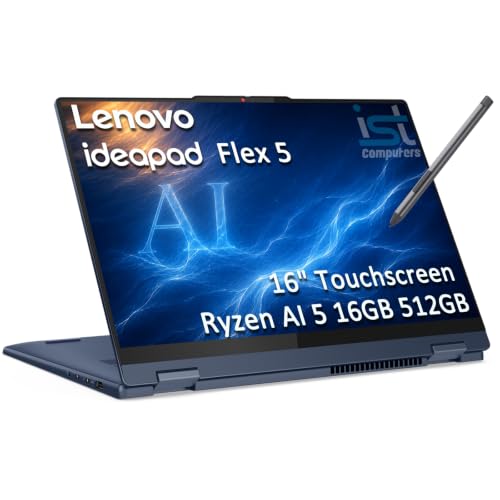
Lenovo IdeaPad Flex 5
The Lenovo IdeaPad Flex 5 is a versatile 2-in-1 that flips into tablet mode, perfect for watching movies or taking notes. It features a 14-inch touchscreen with 300 nits brightness, an AMD Ryzen 7 processor, and 16GB RAM for smooth multitasking. The included active pen is a bonus. Users love its flexibility but find the speakers only average.
Pros
- Flexible 2-in-1 design
- Strong performance
- Includes active pen
Cons
- Average battery life
- Speakers lack bass

Asus VivoBook 15
The Asus VivoBook 15 is a lightweight and affordable laptop that covers the basics well. It comes with an Intel Core i5 processor, 8GB RAM, and a 512GB SSD, providing ample storage for documents and projects. The full HD display is sharp, and the ErgoLift hinge improves typing comfort. Owners appreciate the value but note the display color accuracy is not for professional work.
Pros
- Lightweight and portable
- Good storage capacity
- Comfortable keyboard
Cons
- Average display color accuracy
- Battery life around 6 hours

Microsoft Surface Laptop 4
The Microsoft Surface Laptop 4 is a sleek ultraportable with a 13.5-inch PixelSense touchscreen that is ideal for productivity. Powered by an AMD Ryzen 5 processor and 16GB RAM, it handles daily tasks with ease. Its keyboard is comfortable, and the battery lasts up to 19 hours. However, it has few ports and is pricier than similar Windows laptops.
Pros
- Exceptional battery life
- Premium build and display
- Great keyboard and trackpad
Cons
- Limited ports (1 USB-A, 1 USB-C)
- Expensive for the specs

Acer Aspire 5
The Acer Aspire 5 is a dependable budget laptop that gets the job done for web browsing, email, and video streaming. It features an Intel Core i3 processor, 8GB RAM, and a 128GB SSD, which is small but fast. The 15.6-inch display is adequate, and the battery lasts around 7 hours. Owners say it is a great first laptop but not for heavy multitasking.
Pros
- Very affordable
- Fast SSD for boot times
- Good keyboard
Cons
- Limited storage
- Processor is entry-level
Before you buy
How they stack up
| # | Model | Processor | Best for | Score | Price |
|---|---|---|---|---|---|
| 1 | Apple MacBook Air M2 | Apple M2 | Best overall for most home users | 9.4 | Check price |
| 2 | Dell XPS 13 Plus | Intel Core i7-1260P | Best Windows laptop for premium experience | 9.2 | Check price |
| 3 | HP Pavilion 15 | AMD Ryzen 5 5500U | Best budget-friendly for daily tasks | 8.6 | Check price |
| 4 | Lenovo IdeaPad Flex 5 | AMD Ryzen 7 5700U | Best 2-in-1 convertible | 8.8 | Check price |
| 5 | Asus VivoBook 15 | Intel Core i5-1135G7 | Best for college students on a budget | 8.4 | Check price |
| 6 | Microsoft Surface Laptop 4 | AMD Ryzen 5 4680U | Best for portability and style | 8.9 | Check price |
| 7 | Acer Aspire 5 | Intel Core i3-1115G4 | Best under current price for basic home use | 8.2 | Check price |
Good to know
What is the best laptop for home use?
For most people, the Apple MacBook Air M2 is the best all-around choice due to its performance, battery life, and build quality. If you prefer Windows, the Dell XPS 13 Plus is excellent.
How much RAM do I need for a home laptop?
For basic tasks, 8GB is enough. If you multitask heavily or run virtual machines, 16GB is recommended to ensure smooth performance.
Is a touchscreen necessary on a laptop?
No, but it is convenient for navigation and is essential if you want a 2-in-1 convertible. It adds cost and reduces battery life slightly.
What is the ideal screen size for a home laptop?
13 to 14 inches is a good balance between portability and usability. 15.6 inches offers more screen space but is heavier. Larger screens are better for stationary use.
How long should a laptop battery last?
For home use, aim for at least 8 hours on a single charge. Premium laptops like the MacBook Air and Surface Laptop offer 15+ hours.
Do I need a dedicated graphics card?
Only if you plan to game or do video editing. Integrated graphics are fine for everyday tasks and streaming.
Are Chromebooks good for home use?
Chromebooks are suitable if your work is cloud-based and you rely on Google apps. They are affordable and secure but have limited offline capabilities.
What is the best budget laptop for home?
The Acer Aspire 5 offers the best value under current price handling basic tasks well. For a bit more, the HP Pavilion 15 provides better performance.
How important is storage type?
SSDs are significantly faster than HDDs, improving boot times and app loading. Always choose an SSD; 256GB is a good starting capacity.
Can I upgrade components later?
Some Windows laptops allow RAM and storage upgrades. MacBooks and many ultrabooks have soldered components, so choose your configuration carefully.
Our pick
If you want a laptop that excels in every area, choose the Apple MacBook Air M2. For Windows users seeking a premium experience, the Dell XPS 13 Plus is a top contender. Budget-conscious buyers will find the HP Pavilion 15 a reliable workhorse.


