Top Kids Learning Tablets for Fun and Education
The Amazon Fire HD 10 Kids Pro stands out as the best overall pick for most families, offering a vibrant 10.1 inch display, robust parental controls, and a two year worry free guarantee. Its main limitation is the Amazon app store, which has fewer educational apps than the Apple App Store or Google Play.
Choosing a learning tablet for your child can be overwhelming with so many options. You want something that is both educational and entertaining, but also durable and safe. We have compared the most popular models to help you decide.
From budget friendly options to premium devices, each tablet has its strengths. Some focus on preloaded educational content, while others offer full access to app stores with robust parental controls. Consider your child’s age and your own tech preferences when making a choice.
The top picks, ranked

Amazon Fire HD 10 Kids Pro
The Fire HD 10 Kids Pro is a top tier kids tablet with a 10.1 inch 1080p display, 3GB RAM, and 32GB storage. It includes a kid proof case, a two year worry free guarantee, and a one year subscription to Amazon Kids+, which offers thousands of ad free books, videos, and apps. Parents appreciate the easy to use parental controls and the ability to set educational goals.
Pros
- Large, high resolution display
- Excellent parental controls
- Two year worry free guarantee
Cons
- Limited app store compared to iPad
- Amazon Kids+ subscription required after first year

LeapFrog LeapPad Academy
The LeapPad Academy is a dedicated kids tablet from LeapFrog, a trusted name in educational toys. It comes preloaded with 20 educational apps, including LeapFrog Academy, which provides a curriculum based learning experience. The tablet features a 7 inch screen, a shatter safe design, and a built in bumper case. Parents like the focus on early reading, math, and creativity without exposure to the open internet.
Pros
- Preloaded educational content
- Durable and kid friendly design
- No internet browsing or social media
Cons
- Smaller screen and lower resolution
- Limited app ecosystem

Apple iPad (9th Generation)
The iPad 9th generation is a powerful tablet that can serve as an excellent learning device, especially with the Apple Pencil (first generation) support and access to the App Store’s vast educational library. It offers a 10.2 inch Retina display, A13 Bionic chip, and excellent battery life. With parental controls via Screen Time, parents can manage content and usage. It lacks a dedicated kid proof case, so you may need to buy one separately.
Pros
- Access to Apple App Store
- High performance and longevity
- Great for educational apps and creativity
Cons
- Higher price
- No included kid case or warranty
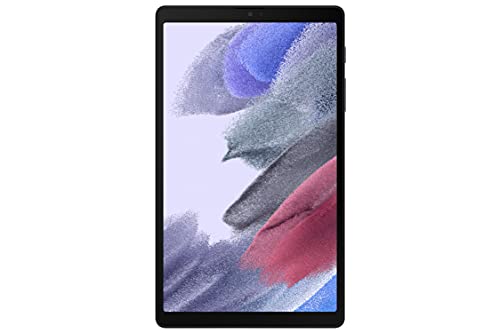
Samsung Galaxy Tab A7 Lite
The Samsung Galaxy Tab A7 Lite is an affordable Android tablet that offers a compact 8.7 inch display and decent performance for its price. It runs Google Play, giving access to a wide range of educational apps. With Samsung Kids, parents can set up a safe environment with age appropriate content. The metal body is sturdy, and it has expandable storage. However, the screen resolution is not as sharp as higher end models, and the battery life is moderate.
Pros
- Affordable price
- Google Play access
- Samsung Kids parental controls
Cons
- Lower resolution screen
- Not as durable as dedicated kids tablets
LeapFrog Epic Learning Tablet
The LeapFrog Epic Learning Tablet is designed for kids who want a tablet that can grow with them. It has a 7 inch screen, a kid safe browser, and access to the LeapFrog App Center which offers a variety of educational apps. The tablet supports multiple user profiles, so siblings can have their own settings. It also includes a built in camera for creative projects. Parents report that the battery life is good, but the app selection is less extensive than that of general purpose tablets.
Pros
- Multiple user profiles
- Kid safe browser
- Built for ages 4 to 9
Cons
- Smaller screen
- Limited app store

Contixo Kids Tablet 7 inch
The Contixo Kids Tablet is one of the most affordable options, offering a 7 inch HD display, a shockproof bumper case, and parental controls. It comes with access to the Google Play Store, so parents can download educational apps. The tablet has a kid friendly launcher that restricts access to settings and purchases. Battery life is about 4 to 5 hours, which is shorter than premium models. It is a good entry level device for very young children.
Pros
- Very affordable
- Google Play access
- Included protective case
Cons
- Shorter battery life
- Lower build quality

Amazon Fire 7 Kids Tablet
The Fire 7 Kids Tablet is a smaller and more budget friendly version of the Fire HD 10 Kids Pro. It has a 7 inch display, a durable kid proof case, and the same two year worry free guarantee. It includes a one year subscription to Amazon Kids+ with age appropriate content. The parent dashboard allows you to set time limits and educational goals. The main drawback is the lower resolution screen and slower processor compared to the HD 10.
Pros
- Compact and easy for small hands
- Robust parental controls
- Excellent value
Cons
- Lower resolution
- Slower performance
How they compare
| # | Model | Display | Best for | Score | Price |
|---|---|---|---|---|---|
| 1 | Amazon Fire HD 10 Kids Pro | 10.1 inch 1080p Full HD | Overall best for older kids and tweens | 9.4 | Check price |
| 2 | LeapFrog LeapPad Academy | 7 inch LCD | Best for preschoolers (ages 3 to 5) | 8.7 | Check price |
| 3 | Apple iPad (9th Generation) | 10.2 inch Retina | Best for families invested in Apple ecosystem | 9.0 | Check price |
| 4 | Samsung Galaxy Tab A7 Lite | 8.7 inch TFT | Best budget Android option | 8.4 | Check price |
| 5 | LeapFrog Epic Learning Tablet | 7 inch Capacitive Touch | Best for growing kids (ages 4 to 9) | 8.2 | Check price |
| 6 | Contixo Kids Tablet 7 inch | 7 inch IPS HD | Best on a tight budget | 8.0 | Check price |
| 7 | Amazon Fire 7 Kids Tablet | 7 inch IPS | Best for toddlers and young kids (ages 3 to 7) | 8.6 | Check price |
How to choose
Age Appropriateness Consider the age range for each tablet. Dedicated kids tablets like LeapFrog are designed for preschoolers, while general purpose tablets like the iPad can be tailored for older kids with parental controls. Amazon’s Kids tablets offer profiles for different age groups.
Educational Content Look at the preloaded apps and available content. Amazon Kids+ and LeapFrog Academy offer structured learning. General tablets give access to app stores with thousands of educational apps, but you may need to curate them yourself.
Parental Controls Robust parental controls are essential. Features to look for include time limits, content filtering, and the ability to block purchases. Amazon’s FreeTime and Apple’s Screen Time are examples of comprehensive systems.
Durability and Warranty Kids can be rough with devices. A sturdy case is a must. Some tablets, like the Fire Kids editions, include a kid proof case and a two year replacement guarantee, which adds peace of mind.
Good to know
What is the best age for a child to start using a learning tablet?
Most experts suggest waiting until age 2 or 3. For toddlers, choose tablets with simple, interactive apps and no internet access. For preschoolers, there are many educational apps that teach letters and numbers.
Are kids tablets worth the extra cost compared to regular tablets?
Dedicated kids tablets cost less than high end tablets and often include a protective case and warranty. They also come with preloaded content and parental controls, which can save time and give parents peace of mind.
Can I install apps from the Google Play Store on Amazon Fire tablets?
Amazon Fire tablets run on Fire OS, which does not have the Google Play Store by default. However, you can sideload Google Play apps, but it is not officially supported and may cause issues.
How do I set up parental controls on an Android tablet?
You can use the built in Kids Mode or download a parental control app. Samsung tablets have Samsung Kids, and Google Family Link works on most Android devices to manage apps and screen time.
Is the iPad too expensive for a child?
The iPad is more expensive than many kids tablets, but it offers a better screen, performance, and access to a vast app library. It can also last longer, making it a good investment if you plan to use it for years.
What is Amazon Kids+ and is it worth subscribing to?
Amazon Kids+ is a subscription service that provides thousands of kid friendly books, videos, games, and apps. It is included for one year with Fire Kids tablets. After that, it costs a monthly fee. Many parents find it valuable because it ensures all content is age appropriate.
Can kids tablets access the internet?
Most kids tablets allow some form of internet access. Dedicated kids tablets often have a kid safe browser with whitelisted sites. General tablets can be restricted with parental controls, but they may still allow access to the full internet if the controls are not set up properly.
What is the best way to clean a kids tablet?
Use a soft, dry cloth to wipe the screen and case. Avoid using harsh chemicals. Some cases are removable and can be washed with mild soap and water. Always check the manufacturer’s instructions.
Our pick
For most families, the Amazon Fire HD 10 Kids Pro is the best choice due to its excellent balance of price, durability, and parental controls. If you have a preschooler, the LeapFrog LeapPad Academy is a great dedicated learning device. For those wanting a tablet that grows with the child and offers access to a larger app ecosystem, the Apple iPad is a worthy investment.